How to deploy schema changes without scheduled downtime
In the first draft of this series, this post didn’t exist. I wanted to show a really simple example of a column switch and include it in the Blue-Green (Details) post. I planned for something simple. But I ran into some hiccups that I though were pretty instructive, so I turned it into the post you see here.
The Plan
For this demo, I wanted to use the WideWorldImporters database. In table Warehouse.ColdRoomTemperatures I wanted to change the column
ColdRoomSensorNumber INT NOT NULL,
into
ColdRoomSensorLabel NVARCHAR(100) NOT NULL,
because maybe we want to track sensors via some serial number or other code.
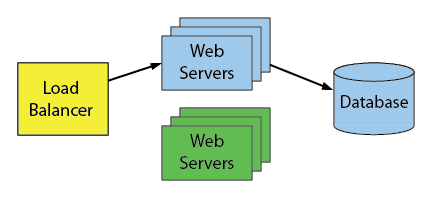
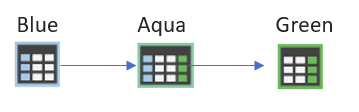
The Blue-Green plan would be simple:
The Trouble
But nothing is ever easy. Even SQL Server Data Tools (SSDT) gives up when I ask it to do this change with this error dialog:
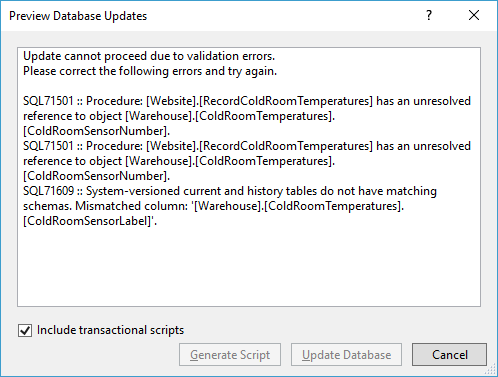
There’s two things going on here (and one hidden thing):
- The first two messages point out that a procedure is referencing the column
ColdRoomSensorNumberwith schemabinding. The reason it’s using schemabinding is because it’s a natively compiled stored procedure. And that tells me that the tableWarehouse.ColdRoomTemperaturesis an In-Memory table. That’s not all. I noticed another wrinkle. The procedure takes a table-valued parameter whose table type contains a column calledColdRoomSensorLabel. We’re going to have to replace that too. Ugh. Part of me wanted to look for another example. - The last message tells me that the table is a system versioned table. So there’s a corresponding archive table where history is maintained. That has to be dealt with too. Luckily Microsoft has a great article on Changing the Schema of a System-Versioned Temporal Table.
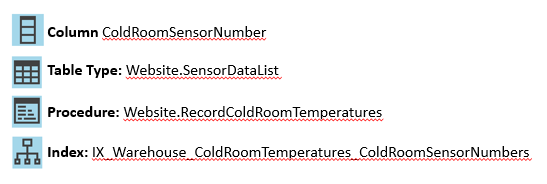
- One last thing to worry about is a index on
ColdRoomSensorNumber. That should be replaced with an index onColdRoomSensorLabel. SSDT didn’t warn me about that because apparently, it can deal with that pretty nicely.
So now my plan becomes:
Blue The original schema
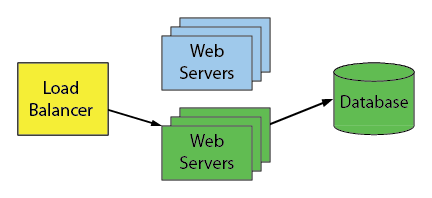
Aqua After the pre-migration scripts are run
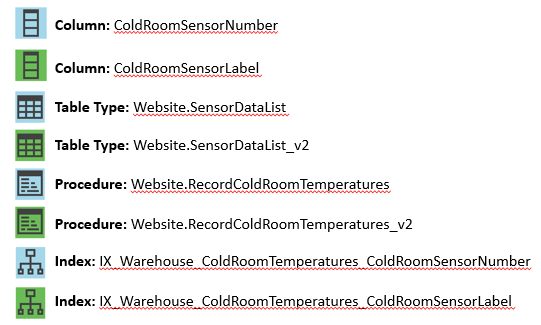
An extra step is required here to update the new column and keep the new and old columns in sync.
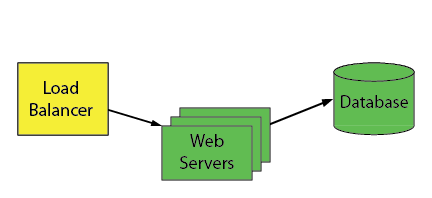
Green After the switch, we clean up the old objects and our schema change is finished:
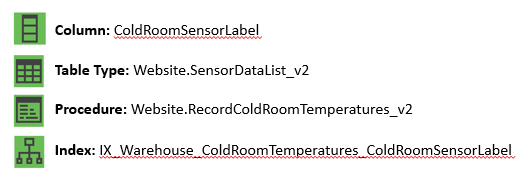
Without further ado, here are the scripts:
Pre-Migration (Add Green Objects)
In the following scripts, I’ve omitted the IF EXISTS checks for clarity.
-- Add the four green objects ALTER TABLE Warehouse.ColdRoomTemperatures ADD ColdRoomSensorLabel NVARCHAR(100) NOT NULL CONSTRAINT DF_Warehouse_ColdRoomTemperatures_ColdRoomSensorLabel DEFAULT ''; GO ALTER TABLE Warehouse.ColdRoomTemperatures ADD INDEX IX_Warehouse_ColdRoomTemperatures_ColdRoomSensorLabel (ColdRoomSensorLabel); GO CREATE TYPE Website.SensorDataList_v2 AS TABLE( SensorDataListID int IDENTITY(1,1) NOT NULL, ColdRoomSensorLabel VARCHAR(100) NULL, RecordedWhen datetime2(7) NULL, Temperature decimal(18, 2) NULL, PRIMARY KEY NONCLUSTERED (SensorDataListID) ) GO CREATE PROCEDURE Website.RecordColdRoomTemperatures_v2 @SensorReadings Website.SensorDataList_v2 READONLY AS --straight-forward definition left as exercise for reader GO |
Pre-Migration (Populate and Keep in Sync)
Normally, I would use triggers to keep the new and old column values in sync like this, but you can’t do that with In-Memory tables. So I altered the procedure Website.RecordColdRoomTemperatures to achieve something similar. The only alteration I made is to set the ColdRoomSensorLabel value in the INSERT statement:
ALTER PROCEDURE Website.RecordColdRoomTemperatures @SensorReadings Website.SensorDataList READONLY WITH NATIVE_COMPILATION, SCHEMABINDING, EXECUTE AS OWNER AS BEGIN ATOMIC WITH ( TRANSACTION ISOLATION LEVEL = SNAPSHOT, LANGUAGE = N'English' ) BEGIN TRY DECLARE @NumberOfReadings int = (SELECT MAX(SensorDataListID) FROM @SensorReadings); DECLARE @Counter int = (SELECT MIN(SensorDataListID) FROM @SensorReadings); DECLARE @ColdRoomSensorNumber int; DECLARE @RecordedWhen datetime2(7); DECLARE @Temperature decimal(18,2); -- note that we cannot use a merge here because multiple readings might exist for each sensor WHILE @Counter <= @NumberOfReadings BEGIN SELECT @ColdRoomSensorNumber = ColdRoomSensorNumber, @RecordedWhen = RecordedWhen, @Temperature = Temperature FROM @SensorReadings WHERE SensorDataListID = @Counter; UPDATE Warehouse.ColdRoomTemperatures SET RecordedWhen = @RecordedWhen, Temperature = @Temperature WHERE ColdRoomSensorNumber = @ColdRoomSensorNumber; IF @@ROWCOUNT = 0 BEGIN INSERT Warehouse.ColdRoomTemperatures (ColdRoomSensorNumber, ColdRoomSensorLabel, RecordedWhen, Temperature) VALUES (@ColdRoomSensorNumber, 'HQ-' + CAST(@ColdRoomSensorNumber AS NVARCHAR(50)), @RecordedWhen, @Temperature); END; SET @Counter += 1; END; END TRY BEGIN CATCH THROW 51000, N'Unable to apply the sensor data', 2; RETURN 1; END CATCH; END; |
That keeps the values in sync for new rows. But now it’s time to update the values for existing rows. In my example, I imagine that the initial label for the sensors are initially: “HQ-1”, “HQ-2”, etc…
UPDATE Warehouse.ColdRoomTemperatures SET ColdRoomSensorLabel = 'HQ-' + CAST(ColdRoomSensorNumber as nvarchar(50)); |
Eagle-eyed readers will notice that I haven’t dealt with the history table here. If the history table is large use batching to update it. Or better yet, turn off system versioning and then turn it back on immediately using a new/empty history table (if feasible).
Post-Migration
After a successful switch, the green application is only calling Website.RecordColdRoomTemperatures_v2. It’s time now to clean up. Again, remember that order matters.
DROP PROCEDURE Website.RecordColdRoomTemperatures; DROP TYPE Website.SensorDataList; ALTER TABLE Warehouse.ColdRoomTemperatures DROP INDEX IX_Warehouse_ColdRoomTemperatures_ColdRoomSensorNumber; ALTER TABLE Warehouse.ColdRoomTemperatures DROP COLUMN ColdRoomSensorNumber; |