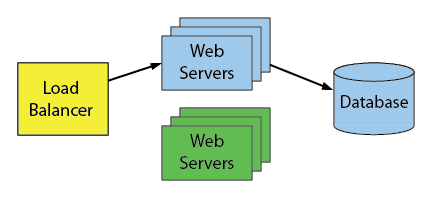
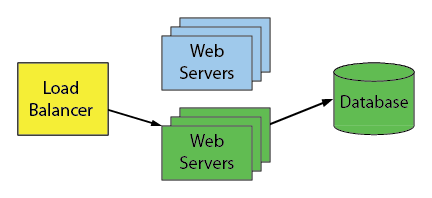
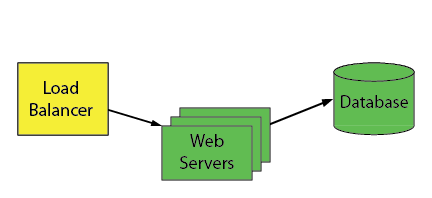
There’s increasing pressure to keep software services available all the time. But there’s also pressure to deploy improvements frequently. How many of us would love to reduce the duration of migration windows or better yet eliminate them entirely. It’s always been challenging to make changes safely without interrupting availability, especially database schema changes.
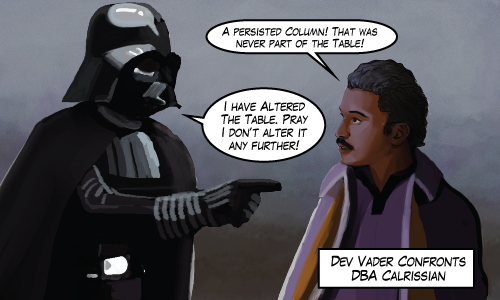
And when responsibilities are split between different groups – DBAs responsible for availability, developers responsible for delivering improvements – it causes some tension:
So I’m beginning a series describing the “Blue Green” continuous delivery technique. It’s a technique that really works well where I work, It helps us manage thousands of databases on hundreds of servers with monthly software updates and zero downtime.
Outline
Blue-Green
We use the Blue-Green deployment techniques described in Continuous Delivery by Humble and Farley and made popular by Martin Fowler in Blue Green Deployment. I’ll describe what the Blue-Green deployment technique is and how we use it.
We actually don’t follow the book perfectly. I’ll describe what we do differently, and why.
OLTP-Friendly
With some effort and creativity, we can break our database migrations into small chunks and deploy them while the application is still live.
Many changes to schema will lock tables for longer than we can tolerate. Often, the schema changes will need to take a brief SCH-M lock on certain objects and so this technique works best with OLTP workloads (workloads that don’t send many long-running queries).
I explore ways to make schema changes that run concurrently with an OLTP workload. What kinds of changes are easy to deploy concurrently and what kind of changes are enemies of concurrency?
Co-ordination is Key
This series is meant to help people investing in automation and other process improvements. It takes careful co-ordination between those responsible for uptime and those responsible for delivering improvements. So in your organization, if Dev Vader and DBA Calrissian are on the same team (or even the same person) then this series is especially for you.
UPDATE dbo.SOMETABLE
SET MyDateTime = GETUTCDATE()
WHERE SomeTableId = @SomeTableId
AND DATEDIFF(SECOND, GETUTCDATE(), MyDateTime) > 1;
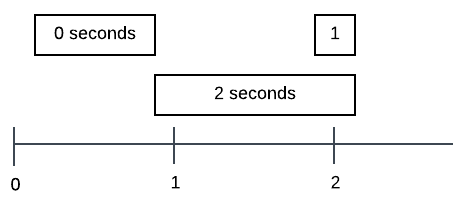
But I came across some problems. I assumed that the DATEDIFF function I wrote worked this way: Subtract the two dates to get a timespan value and then return the number of seconds (rounded somehow) in that timespan.
Msg 535, Level 16, State 0, Line 1
The datediff function resulted in an overflow. The number of dateparts separating two date/time instances is too large. Try to use datediff with a less precise datepart.
SQL Server 2016 introduced DATEDIFF_BIG to get around this specific problem. But I’m not there yet.
Use DATEADD
I eventually realized that I don’t actually need to measure a timespan. I really just need to answer the question “Does a particular DateTime occur before one second ago?” And I can do that with DATEADD
UPDATE dbo.SOMETABLE
SET MyDateTime = GETUTCDATE()
WHERE SomeTableId = @SomeTableId
AND MyDateTime < DATEADD(SECOND, -1, GETUTCDATE()) ;
Update: Adam Machanic points out another benefit to this syntax. The predicate AND MyDateTime < DATEADD(SECOND, -1, GETUTCDATE()) syntax is SARGable (unlike the DATEDIFF examples). Even though there might not be a supporting index or SQL Server might not choose to use such an index it in this specific case, I prefer this syntax even more.
So How About You?
Do you use DATEDIFF at all? Why? I'd like to hear about what you use it for. Especially if you rely on the datepart boundary crossing behavior.
Sometimes I get asked about work and our software development practices. Often these questions use words like agile, devops, or continuous delivery as in “Are you agile?” or “Do you do continuous delivery?”. But these questions rarely have yes or no answers. I always want to answer “It’s a work in progress”.
One of the things I like best about the PASS Summit is the opportunity to talk to people to find out how they do development. After speaking with others, it seems like everyone’s processes are always going to be works-in-progress. But I’ve come to realize that at D2L, we’re pretty far along. Here are just some of the things we do:
Things We Do
Deployments to production are scheduled and almost completely automatic. This lets us deploy way more often than we used to.
All code – including procedures and table definitions – are checked in.
Automatic tests are run on every pull request and merge.
Safety is a huge concern. We use feature flags and other techniques, but it remains difficult to maintain large complicated systems safely.
The database layer is an exception to this blue-green technique. So it’s very important to be able to rollback any changes or configuration.
Sardines and Whales
This means we must also support thousands of copies of our main database. They’re used for client sites, test sites, qa sites, or whatever. So that leads to a variety of server configurations that I refer to as sardines and whales:
Look at those sardines. They’re quite happy where they are. The server can handle up to a thousand databases when there’s almost no activity.
But that whale is on a huge server and is extremely busy. Because of the high volume of transactions, we sometimes encounter tempdb contention due to our frequent use of table valued parameters. One technique I’ve been looking forward to evaluating is using memory optimized table types.
Maybe We Can Use In Memory OLTP?
I’m actually not very interested in memory optimized tables. I’m much more interested in the memory optimized table types. Those types can be used for table valued parameters. I can’t tell you how excited I was that it might solve my tempdb pet peeve.
But our dreams for the feature died
We’re leaving the feature behind for a few reasons. There’s an assumption we relied on for the sardine servers: Databases that contain no data and serve no activity should not require significant resources like disk space or memory. However, when we turned on In Memory OLTP by adding the filegroup for the memory-optimized data, we found that the database began consuming memory and disk (about 2 gigabytes of disk per database). This required extra resources for the sardine servers. So for example, 1000 databases * 2Gb = 2Tb for a server that should be empty.
Another reason is that checkpoints began to take longer. Checkpoints are not guaranteed to be quick, but on small systems they take a while which impacts some of our Continuous Integration workflows.
At the PASS Summit, I talked to a Hekaton expert panel. I also talked to a couple people in the Microsoft SQL Server clinic about some of my issues. They all recommended that we upgrade to SQL Server 2016 (which we can’t yet). Maybe I didn’t phrase my questions well, but I didn’t come away with any useful strategy to pursue.
I later talked to a Speaker Idol contestant Brian Carrig (@briancarrig) after hearing him talk briefly about his experiences with In Memory OLTP. He mentioned his own hard-fought lessons with In Memory OLTP including some uncomfortable outages.
The final nail in the coffin, as it were, is that once you turn on In Memory OLTP, you can’t turn it off. Once the In Memory OLTP filegroup is added, it’s there for good. Like I said, safety is a huge concern for us so we’re giving up on the feature for now.
Resurrecting the Feature?
The feature was designed for whales, not sardines. Maybe someday we will try to get those sardine servers to not fail with In Memory OLTP. Until then, the feature goes back on the shelf.
“Above all else, show the data” says Edwarde Tufte. He’s the data visualization expert who promotes a high data-ink ratio in data visualizations. He describes data-ink as “the non-erasable core of a graphic”. In other words, avoid chartjunk.
SQL Junk
I buy that. Less is More. And we can apply that idea to SQL. If SQL is going to be maintained by a human, it’s best to use a style that is easy on the reader. There’s a lot of syntax in SQL that is redundant. By keeping only the non-erasable syntax in SQL statements, the SQL gets easier to understand and maintain.
Square Brackets
I know I’m not the only one who thinks so. I was watching Kendra Little’s presentation SSMS Shortcuts & Secrets. When someone asked whether there was a shortcut for removing brackets. There isn’t. Most people search and replace “[” with “” and then do the same thing with “]”. Kendra wondered if there was a regular expression that allowed a user to do both. There is, but it’s awkward because brackets need to be escaped: [\[\]] (which is only slightly easier to remember than ¯\_(ツ)_/¯).
SQL Junk in SSMS Generated Scripts
SSMS’s scripting engine is great at taking an object like a table and giving you a CREATE statement that will perfectly recreate what you need. But it’s a huge contributor of SQL Junk. I’ve seen so much SSMS-generated SQL get checked in to repositories that the style is assumed to be a best practice.
Here’s something that shows just how much SQL Junk can be removed. I think the resulting SQL is so much more clear and so much easier to maintain.
We encountered a CPU issue which took over a month to understand and fix. Since then, it’s been another couple months and so I think it may be time for a debrief.
The cause was identified as a growing number of ghost records that SQL Server would not clean up no matter what. Our fix was ultimately to restart SQL Server.
Symptoms and Data Collection
Here’s what we found.
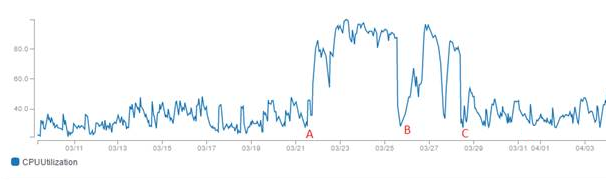
At time marked ‘A’ on the graph, we noticed that CPU increased dramatically. It was hard not to notice.
We used sp_whoisactive to identify a frequent query that was taking a large amount of CPU. That query had never been a problem before. It was a select against a queue table – a table whose purpose was to store data for an implementation of a work queue. This table had a lot of churn: many INSERTS and DELETES. But it was small, never more than 100 rows.
So next, we ran the query manually in Management Studio. SET STATISTICS IO, TIME ON gave us a surprise. A simple COUNT(*) of the table told us there were 30 rows in the table, but reading it took 800K logical page reads!
What pages could it be reading? It’s impossible for a table to be that fragmented, it would mean less than one row per page. To look at the physical stats we ran:
select
sum(record_count) as records,
sum(ghost_record_count) as ghost_records,
sum(version_ghost_record_count) as version_ghost_records
from sys.dm_db_index_physical_stats(db_id(), object_id('<table_name>'), default, default, 'detailed')
where index_id = 1
and index_level = 0
And that gave us these results:
Interesting. The ghost records that remain are version_ghost_records, not ghost_records. Which sounds like we’re using some sort of snapshot isolation (which we’re not), or online reindexing (which we are), or something else that uses row versions.
Over time, those version_ghost_records would constantly accumulate. This ghost record accumulation was also present in all other tables, but it didn’t hurt as much as the queue table which had the most frequent deletes.
Mitigation – Rebuild Indexes
Does an index rebuild clean these up? In this case, yes. An index rebuild reduced the number of version ghost records for the table. At the time marked ‘B’ in the timeline, we saw that an index rebuild cleaned up these records and restored performance. But only temporarily. The version_ghost_records continued to accumulate gradually.
At time ‘C’ in the timeline, we created a job that ran every 15 minutes to rebuild the index. This restored performance to acceptable levels.
More investigation online
Kendra Little – Why Is My Transaction Log Growing In My Availability Group?
This is a great video. Kendra describes a similar problem. Long running queries on secondary replicas can impact the primary server in an Availability Group (AG). But we found no long running queries on any replica. We looked using sp_whoisactive and DBCC OPENTRAN. We didn’t see any open transactions anywhere.
dba.stackexchange – GHOST_CLEANUP Lots of IO and CPU Usage
This stackexchange question also describes a problem with lots of CPU and an inefficient, ineffective ghost cleanup task for databases in an AG. There’s an accepted answer there, but it’s not really a solution.
Calling Microsoft Support
So we called Microsoft support. We didn’t really get anywhere. We spoke with many people over a month. We generated memory dumps, PSSDiag sessions and we conducted a couple screen sharing sessions. Everyone was equally stumped.
After much time and many diagnostic experiments. Here’s what we did find.
Availability Groups with readable secondaries are necessary (but not sufficient) to see the problem. This is where the version_ghost_records come from in the first place. Readable secondaries make use of the version store.
We ran an extended event histogram on the ghost_cleanup event. There was a ridiculous amount of events. Like millions per minute, but they weren’t actually cleaning up anything:
CREATE EVENT SESSION ghostbusters ON SERVER
ADD EVENT sqlserver.ghost_cleanup(ACTION( sqlserver.database_id))ADD TARGET package0.histogram(SET filtering_event_name=N'sqlserver.ghost_cleanup', source=N'sqlserver.database_id')
CREATE EVENT SESSION ghostbusters ON SERVER
ADD EVENT sqlserver.ghost_cleanup( ACTION( sqlserver.database_id ) )
ADD TARGET package0.histogram( SET filtering_event_name=N'sqlserver.ghost_cleanup', source=N'sqlserver.database_id' )
Microsoft let me down. They couldn’t figure out what was wrong. Each new person on the case had to be convinced that there were no open transactions. They couldn’t reproduce our problem. And on our server, we couldn’t avoid the problem.
Resolution
Ultimately the time came for an unrelated maintenance task. We had to do a rolling upgrade for some hardware driver update. We manually failed over the Availability Group and after that, no more problem!
It’s satisfying and not satisfying. Satisfying because the problem went away for us and we haven’t seen it since. After the amount of time I spent on this, I’m happy to leave this problem in the past.
But it’s not satisfying because we didn’t crack the mystery. And restarting SQL Server is an extreme solution for a problem associated with an “Always On” feature.
If you’re in the same boat as I was, go through the links in this post. Understand your environment. Look for long running queries on all replicas. And when you’ve exhausted other solutions, mitigate with frequent index rebuilds and go ahead and restart SQL Server when you can.
IBM holds a monthly math/programming challenge called “Ponder This”. This month’s problem (July 2017) is an interesting one because it can (mostly) be solved using SQL and highschool math:
“Find a way to assign a unique digit to each letter such that the 863,172nd digit after the decimal point of sin(PONDER) and of sin(THIS) are not zeros, but more than a fifth of the first million digits of sin(PONDER)*sin(THIS) are zeros.
“The parameters are in degrees, and we count the digits from 1, so for example, sin(100) = 0.9848077530122… so the fifth digit after the decimal point of sin(100) is zero.”
If you’re up to the challenge, use any technique you like, but you’ve only got a week. Next week (August 1st) after IBM publishes their solution, I’ll publish the SQL based solution that I used.
Update: My Solution
First I realized that PONDER and THIS represent integers greater than 360 degrees. That’s okay. All I need to do is find two numbers A and B between 1 and 360 with the desired properties and then take that solution and add 360 to either number until I get a six digit number and a four digit number with no shared digits.
So my guess is that SIN(A) * SIN(B) is a regular number.
I can look for that using SQL:
with Nums as(selecttop360 row_number()over(orderby(select1))as n
from sys.syscolumns)select A.nas a,
B.nas b,
sinA,
sinB,
sinA * sinB as sinA_x_sinB
from Nums A
crossjoin Nums B
cross apply
(selectSIN(RADIANS(A.n+0.0))as sinA,
SIN(RADIANS(B.n+0.0))as sinB
) calc
whereright(format(sinA * sinB, '###.00000000000'), 4)='0000'andright(format(sinA, '###.00000000000'), 4)<>'0000'andright(format(sinB, '###.00000000000'), 4)<>'0000'and A.n%10<> B.n%10orderby A.n, B.n
with Nums as
(
select top 360 row_number() over (order by (select 1)) as n
from sys.syscolumns
)
select A.n as a,
B.n as b,
sinA,
sinB,
sinA * sinB as sinA_x_sinB
from Nums A
cross join Nums B
cross apply
(
select SIN(RADIANS(A.n + 0.0)) as sinA,
SIN(RADIANS(B.n + 0.0)) as sinB
) calc
where right(format(sinA * sinB, '###.00000000000'), 4) = '0000'
and right(format(sinA, '###.00000000000'), 4) <> '0000'
and right(format(sinB, '###.00000000000'), 4) <> '0000'
and A.n % 10 <> B.n % 10
order by A.n, B.n
Notice the one extra filter I snuck in there: A.n % 10 <> B.n % 10. If A and B share the last digit, then PONDER and THIS would share the last digit and we can’t have that.
I’m going to focus on one solution, A = 54, and B = 18.
Can I add 360 to each of these to get an 6 digit and a 4 digit solution for PONDER and THIS? Yes.
selectTOP(27)54+360* row_number()over(orderby(select1))as id
into #nums4
from sys.messages a;
delete #nums4 where id <1000;
selectTOP(2777)18+360* row_number()over(orderby(select1))as id
into #nums6
from sys.messages a;
delete #nums6 where id <100000;
select #nums4.id, #nums6.idfrom #nums4
crossjoin #nums6
where dbo.HasDuplicate(10000*#nums6.id+#nums4.id)=0
select TOP (27) 54 + 360 * row_number() over (order by (select 1)) as id
into #nums4
from sys.messages a;
delete #nums4 where id < 1000;
select TOP (2777) 18 + 360 * row_number() over (order by (select 1)) as id
into #nums6
from sys.messages a;
delete #nums6 where id < 100000;
select #nums4.id, #nums6.id
from #nums4
cross join #nums6
where dbo.HasDuplicate(10000*#nums6.id+#nums4.id) = 0
Where HasDuplicate is a CLR function I wrote that returns whether a number has repeat digits.
This gives me a few solutions, for example PONDER = 102978 and THIS = 3654.
I get a kick out of these puzzles and as an added bonus, I get to exercise my SQL skills.
Update 2
Stephen pointed out in the comments that I didn’t even check to see whether the 863,172nd digit of SIN(PONDER) or SIN(THIS) is nonzero. How did I do that? Well, I didn’t use SQL. I used google. Searching for “What’s the exact value of SIN(18)” gives me this page Exact Value of sin 18°. The internet’s amazing. So I trust that the exact value is sin(18) = ( -1 + sqrt(5) ) / 4 which has the same 863,172nd digit as sqrt(5) / 4. The same reasoning works for SIN(54) because sin(54) = ( 1 + sqrt(5) ) / 4.
Rather than figure out how to calculate the 863,172nd digit of sqrt(5) / 4, I searched for and found the first million digits of sqrt(5). The internet’s amazing. I know that when you divide a number by four, any digit in that number usually has a limited scope of influence on the digits in the answer. I divided the digits around the 863172 place by 4 to convince myself that the 863172nd digit of sqrt(5) / 4 is not 0.
In 2015, Postgres added support for ON CONFLICT DO UPDATE to their INSERT statements. Their docs say that using this syntax guarantees an atomic INSERT or UPDATE outcome; one of those two outcomes is guaranteed, even under high concurrency.
Now, that is one amazing feature isn’t it? Postgres worked really hard to include that feature and kudos to them. I would trade ten features like stretch db for one feature like this. It makes a very common use case simple. And it takes away the awkwardness from the developer.
But if you work with SQL Server, the awkwardness remains and you have to take care of doing UPSERT correctly under high concurrency.
I wrote a post in 2011 called Mythbusting: Concurrent Update/Insert Solutions. But since then, I learned new things, and people have suggested new UPSERT methods. I wanted to bring all those ideas together on one page. Something definitive that I can link to in the future.
The Setup
I’m going consider multiple definitions of a procedure called s_AccountDetails_Upsert. The procedure will attempt to perform an UPDATE or INSERT to this table:
CREATETABLE dbo.AccountDetails(
Email NVARCHAR(400)NOTNULLCONSTRAINT PK_AccountDetails PRIMARYKEY,
Created DATETIMENOTNULLDEFAULTGETUTCDATE(),
Etc NVARCHAR(MAX));
CREATE TABLE dbo.AccountDetails
(
Email NVARCHAR(400) NOT NULL CONSTRAINT PK_AccountDetails PRIMARY KEY,
Created DATETIME NOT NULL DEFAULT GETUTCDATE(),
Etc NVARCHAR(MAX)
);
Then I’m going to test each definition by using a tool like SQL Query Stress to run this code
CREATE PROCEDURE s_AccountDetails_Upsert ( @Email nvarchar(4000), @Etc nvarchar(max) )
AS
MERGE dbo.AccountDetails AS myTarget
USING (SELECT @Email Email, @Etc etc) AS mySource
ON mySource.Email = myTarget.Email
WHEN MATCHED THEN UPDATE
SET etc = mySource.etc
WHEN NOT MATCHED THEN
INSERT (Email, Etc)
VALUES (@Email, @Etc);
Primary Key violations are still generated under high concurrency. Even though it’s a single statement, it’s not isolated enough.
Antipattern: Inside a Transaction
If you try putting the vanilla solution inside a transaction, it makes the whole thing atomic, but still not isolated. You still get primary key violations:
CREATE PROCEDURE s_AccountDetails_Upsert ( @Email nvarchar(4000), @Etc nvarchar(max) )
AS
SET TRANSACTION ISOLATION LEVEL SERIALIZABLE
BEGIN TRAN
IF EXISTS ( SELECT * FROM dbo.AccountDetails WHERE Email = @Email )
UPDATE dbo.AccountDetails
SET Etc = @Etc
WHERE Email = @Email;
ELSE
INSERT dbo.AccountDetails ( Email, Etc )
VALUES ( @Email, @Etc );
COMMIT
Antipattern: Using IGNORE_DUP_KEY
I want to mention one more bad solution before I move on to the good solutions. It works and it’s interesting, but it’s a bad idea.
ALTERTABLE dbo.AccountDetailsDROPCONSTRAINT PK_AccountDetails;
ALTERTABLE dbo.AccountDetailsADDCONSTRAINT PK_AccountDetails
PRIMARYKEY( Email )WITH( IGNORE_DUP_KEY =ON)
GO
CREATEPROCEDURE dbo.s_AccountDetails_Upsert( @Email nvarchar(4000), @Etc nvarchar(max))AS-- This statement will not insert if there's already a duplicate row,-- But it won't raise an error eitherINSERT dbo.AccountDetails( Email, Etc )VALUES( @Email, @Etc );
UPDATE dbo.AccountDetailsSET @Etc = Etc
WHERE @Email = Email;
ALTER TABLE dbo.AccountDetails
DROP CONSTRAINT PK_AccountDetails;
ALTER TABLE dbo.AccountDetails
ADD CONSTRAINT PK_AccountDetails
PRIMARY KEY ( Email ) WITH ( IGNORE_DUP_KEY = ON )
GO
CREATE PROCEDURE dbo.s_AccountDetails_Upsert ( @Email nvarchar(4000), @Etc nvarchar(max) )
AS
-- This statement will not insert if there's already a duplicate row,
-- But it won't raise an error either
INSERT dbo.AccountDetails ( Email, Etc )
VALUES ( @Email, @Etc );
UPDATE dbo.AccountDetails
SET @Etc = Etc
WHERE @Email = Email;
So what are some better solutions?
Pattern: Inside a Transaction With Lock Hints (Update More Common)
CREATE PROCEDURE s_AccountDetails_Upsert ( @Email nvarchar(4000), @Etc nvarchar(max) )
AS
SET XACT_ABORT ON;
BEGIN TRAN
UPDATE TOP (1) dbo.AccountDetails WITH (UPDLOCK, SERIALIZABLE)
SET Etc = @Etc
WHERE Email = @Email;
IF (@@ROWCOUNT = 0)
BEGIN
INSERT dbo.AccountDetails ( Email, Etc )
VALUES ( @Email, @Etc );
END
COMMIT
Using some tips from Aaron Bertrand in Please stop using this UPSERT anti-pattern.
This is a solid solution, but every implementation is different so every time you use this pattern, test for concurrency.
Pattern: Inside a Transaction With Lock Hints (Insert More Common)
CREATE PROCEDURE s_AccountDetails_Upsert ( @Email nvarchar(4000), @Etc nvarchar(max) )
AS
SET XACT_ABORT ON;
BEGIN TRAN
INSERT dbo.AccountDetails ( Email, Etc )
SELECT @Email, @Etc
WHERE NOT EXISTS (
SELECT *
FROM dbo.AccountDetails WITH (UPDLOCK, SERIALIZABLE)
WHERE Email = @Email
)
IF (@@ROWCOUNT = 0)
BEGIN
UPDATE TOP (1) dbo.AccountDetails
SET Etc = @Etc
WHERE Email = @Email;
END
COMMIT
Pattern: MERGE Statement With Serializable Isolation
CREATE PROCEDURE s_AccountDetails_Upsert ( @Email nvarchar(4000), @Etc nvarchar(max) )
AS
SET TRANSACTION ISOLATION LEVEL SERIALIZABLE;
MERGE dbo.AccountDetails AS myTarget
USING (SELECT @Email Email, @Etc etc) AS mySource
ON mySource.Email = myTarget.Email
WHEN MATCHED THEN UPDATE
SET etc = mySource.etc
WHEN NOT MATCHED THEN
INSERT (Email, Etc)
VALUES (@Email, @Etc);
For alternative syntax, skip the SET TRANSACTION ISOLATION LEVEL SERIALIZABLE and include a lock hint: MERGE dbo.AccountDetails WITH (HOLDLOCK) AS myTarget.
CREATE PROCEDURE s_AccountDetails_Upsert ( @Email nvarchar(4000), @Etc nvarchar(max) )
AS
BEGIN TRY
INSERT INTO dbo.AccountDetails (Email, Etc) VALUES (@Email, @Etc);
END TRY
BEGIN CATCH
-- ignore duplicate key errors, throw the rest.
IF ERROR_NUMBER() IN (2601, 2627)
UPDATE dbo.AccountDetails
SET Etc = @Etc
WHERE Email = @Email;
END CATCH
I have no concurrency concerns here but because of this issue – not to mention performance concerns – it’s no longer my first preference.
Performance and Other Concerns
When describing each pattern so far, I haven’t paid attention to performance, just concurrency. There are many opportunities to improve the performance of these solutions. In particular, pay very close attention to your average use case. If your workload UPDATEs a row 99% of the time and INSERTs a row only 1% of the time, then optimal implementation will look different than if the UPDATE and INSERT frequency is reversed.
Today marks my tenth anniversary working for D2L and it also marks ten years since I specialized in databases full time.
I’ve never worked anywhere this long. I always told myself that I’d stick around as long as there were new and interesting challenges to tackle and there’s no end in sight.
So I thought I’d compile a list of things I didn’t know in 2007.
1. Database Performance Improvements Are Often Dramatic
A poorly performing database query can run orders of magnitude slower than a tuned query. Compare that to poorly performing application code. Improvements there are usually more modest.
But this can work out. It makes you look like a genius. You get to brag how that report that once took 32 hours now takes 10 minutes. Even though that missing index suggestion in the query plan turned out to be right this time, take the credit, you deserve it.
I’ve been writing here for nearly ten years. One day, I decided to include an illustration with each blog post. For some reason it makes each post just a little more compelling than a wall of text. Drawing has been a very rewarding hobby for me. I highly recommend it.
4. There Are Dozens of Walkable Lunch Options In Downtown Kitchener
Here are a few of my favorites
Kava Bean: Excellent all day breakfast
City Cafe: Awesome bagels in the morning.
Darlise: You have to hunt for it, but it’s great food
Holy Guacamole: Especially if you’re a fan of cilantro
If you’re in town, send me an email. I’ll introduce you to one of these places.
5. Don’t Overestimate Normal Forms
Knowing normal forms is a lot less useful than I thought it would be. Normal forms are an academic way of describing a data model and it’s ability to avoid redundant data. But knowing the difference between the different normal forms has never helped me avoid trouble.
Just use this rule of thumb: Avoid storing values in more than one place. That will get you most of the way. Do it right and you’ll never hear anyone say things like
We need a trigger to keep these values in sync
We need to write a script to correct bad data
6. “How Do You Know That?”
This is one of my favorite lines. I use it when troubleshooting a technical problem. It’s a line that helps me avoid red-herrings or to maybe find out if that info is coming via telephone game. It’s kind of my version of Missouri’s “you’ve got to show me”. It might go something like this:
Say a colleague says “I/O is slow lately.”
So I’d ask “How do you know?”
They might say something like:
“Hinky McUnreliable thought that’s what it was. He told me in the hallway just now”
The error log reports 3 instances of I/O taking longer than 15 seconds
I measured it on the QA box.
7. Reduce Query Frequency
The impact of a particular procedure or query on a server is simply the frequency of a query multiplied by the cost of that query. To reduce the impact on the server it’s often more valuable to focus on reducing the number of calls to that query in addition to tuning it.
Look for duplicate queries. You’d be surprised how often a web page asks for the same information.
Cache the results of queries that are cache-able. I rely on this one heavily.
Consider techniques like lazy loading. Only request values the moment they’re needed.
8. Schema Drift Is Real
If you have multiple instances of a database then schema will drift over time. In other words, the definition of objects like tables, views and procedures will be out of alignment with what’s expected. The drift is inevitable unless you have an automated process to check for misalignment.
We wrote our own but tools like Redgate’s Schema Compare can help with this kind of effort.
9. Get Ahead Of Trouble
Software will change over time and it requires deliberate attention and maintenance to remain stable. Watch production and look for expensive queries before they impact end users.
When I type it out like that, it seems obvious. But the question really then becomes, how much time do you want to invest in preventative maintenance? My advice would be more.
Not enough time means that your team gets really good practice firefighting urgent problems. I work directly with a dream team of troubleshooters. They’re smart, they’re cool during a crisis and they’re awesome at what they do. Fixing issues can be thrilling at times, but it pulls us away from other projects.
And what do they say about people who can’t remember the past? Sometimes we have to relearn this lesson every few years.
10. D2L Is A Great Employer
D2L values learning of course and that includes employee professional development. They have always supported my blogging and speaking activities and they recognize the benefits of it.
The people I work with are great. I couldn’t ask for a better team.
And we’ve got a decent mission. I’m really glad to be part of a team that works so hard to transform the way the world learns. Thanks D2L!
A .Net tick is a duration of time lasting 0.1 microseconds. When you look at the Tick property of DateTime, you’ll see that it represents the number of ticks since January 1st 0001.
But why 0.1 microseconds? According to stackoverflow user CodesInChaos “ticks are simply the smallest power-of-ten that doesn’t cause an Int64 to overflow when representing the year 9999”.
Even though it’s an interesting idea, just use one of the datetime data types, that’s what they’re there for. I avoid ticks whenever I can.
But sometimes things are out of your control. If you do want to convert between datetime2 and ticks inside SQL Server instead of letting the application handle it, then you need to do some date math. It can get a bit tricky avoiding arithmetic overflows and keeping things accurate:
A review of Designing Data-Intensive Applications The Big Ideas Behind Reliable, Scalable, and Maintainable Systems by Martin Kleppman, published by O’Reilly.
Martin Kleppmann
In my time exploring the world of data, I often feel intrigued by the unfamiliar. But like most, I’m leery of buzzwords and maybe a little worried that I’m missing out on the thing that we’ll all need to learn to extend our careers beyond the next five years.
Adding to the frustration, I have difficulty evaluating new technologies when the only help I’ve got is a vendor’s brochure, or a blog titled “Why X is way way better than Y”. Balanced, unbiased help is hard to find. And I really value unbiased ideas. Personally, I try not to appear the Microsoft groupie. I value my MVP award, but I also like to stress the “independent” part of that.
I’m also wary of some academic researchers. The theory can sometimes drift too far away from the practical (dba.stackexchange only has 411 results for “normal form” and I suspect many of those are homework questions). Some academics almost seem offended whenever a vendor deviates from relational theory.
That’s why I was so thrilled (and bit relieved) to discover Martin Kleppmann’s Designing Data-Intensive Applications. Martin is an amazing writer who approached his book with a really balanced style. He’s also a researcher with real-world experience that helps him focus on the practical.
First let me just say that the book has a really cool wild boar on the cover. The boar reminds me of Porcellino at the University of Waterloo.
Designing Data-Intensive Applications is a book that covers database systems very comprehensively. He covers both relational systems and distributed systems. He covers data models, fault tolerance strategies and so much more. In fact he covers so many topics that the whole book seems like a table of contents for our data industry.
Here’s the thing. When I read the parts I know, he’s a hundred percent right and that helps me trust him when he talks about the parts that I don’t know about.
Martin talks a lot about distributed systems, both the benefits and drawbacks, and even though you may have no plans to write a Map-Reduce job, you’ll be equipped to talk about it intelligently with those that do. The same goes for other new systems. For example, after reading Martin’s book, you’ll be able to read the spec sheet on Cosmos DB and feel more comfortable reasoning about its benefits (but that’s a post for another day).
Event Sourcing
Martin then goes on to write about event sourcing. Martin is a fan of event sourcing (as are several of my colleagues). In fact I first learned about event sourcing when a friend sent me Martin’s video Turning the Database Inside Out With Apache Samza.
A ridiculously simplified summary is this. Make the transaction log the source of truth and make everything else a materialized view. It allows for some really powerful data solutions and it simplifies some problems you and I have learned to live with. So I wondered whether his chapter on event sourcing would sound like a commercial. Nope, that chapter is still remarkably well balanced.
By the way, when the revolution comes it won’t bother me at all. There’s no longer such thing as a one-size-fits-all data system and the fascinating work involves fitting all the pieces together. I’m working in the right place to explore this brave new world and excited to learn the best way to move from here to there.
Some Other Notes I Made
This feels like the RedBook put together by Michael Stonebraker but it deals with more kinds of systems. I hope Martin refreshes this book every few years with new editions as the industry changes.
Martin suggests that the C in ACID might have been introduced for the purpose of the acronym. I knew it!
Martin calls the CAP theorem unhelpful and explains why. He admits the CAP theorem “encouraged engineers to explore a wider design space” but it is probably better left behind.
My wife Leanne doesn’t like fantasy books and she won’t read a book that has a map in the front. My friend Paul won’t read a book without one. Martin is very professional, but his style shows and I love it. He’s got a map at the beginning of every chapter.
The quotes at the beginning of each chapter are really well chosen. They come from Douglas Adams, Terry Pratchett and others. But my favorite is from Thomas Aquinas “If the highest aim of a captain were to preserve his ship, he would keep it in port forever.”
Martin writes “The goal of this book is to help you navigate the fast and diverse changing landscapes of technologies for processing and storing data”. I believe he met that goal.