Fifty years ago this week, Percy Sledge had the number one single with “When A Man Loves A Woman”. I’m going to break my SQL-only rule and write just this once about something besides SQL or data. Call it my NoSQL post.
I’m going to break down the song into parts and grade it. Here’s the song:
Vocals
Percy Sledge sang his heart out and he’s never sung better since. Which is kind of unfortunate because this was his first hit. Still if you want to leave a legacy, you could do a lot worse than “When A Man Loves A Woman”. He also benefits from retroactive comparison to Michael Bolton’s version. I was never a fan of Michael Bolton. He starts every song 100% full out and he has nowhere to go. Good work Percy Sledge! A+
Organ
The organ has a big job in this song, it carries the chord progression (the classic Pachelbel’s Canon one). There’s something really funky about the organ. Somehow it got replaced by the synthesizer in the seventies. Then the synthesizer got cheesy in the eighties (think Van Halen’s Jump) so the sound disappeared after that. Personally, I would welcome an organ comeback. A
Drums, Guitar, Backing Vocals, Bass
Competent, they do their job. But most importantly, they don’t stand out at all. This isn’t their show.B
Horns
The horns in this song are the WORST! They don’t really come in until the last twenty seconds but when they do, they’re way too loud. I have a theory that the guy who did the horns was the cousin of the sound mixer in the studio. Wikipedia tells me that the horns are also out of tune. They were re-recorded but the old horns somehow got released on the track anyway. Ugh. So now I can’t not notice them. They make a great soul song just a little less great. F
Update: the roundup post
Time to exercise those blogging fingers. It’s T-SQL Tuesday again! And this month’s T-SQL Tuesday is going to rock!
SQL Server 2016 is Out!
SQL Server 2016 went RTM this week and so naturally, we’re going to write about it. Here are a few writing prompts for you:
Check out what’s new. Microsoft has written a lot about their new features. Thomas Larock has written a really nice landing page for those posts, SQL Server 2016: It Just Runs Faster – Thomas Larock. Look through those links. Do you feel optimistic about 2016? Or maybe a bit disappointed? Let us know either way
Haven’t had time to download the bits, install them, explore and form thoughts on 2016 yet? Have no fear, check out Microsoft’s Virtual Labs. It lets you explore features without worrying about all the setup. In minutes you’ll be typing SELECT 'hello world';
Still Not Inspired Eh?
Write a post starting with “It’s 2016, why is this still (not) a thing?” <cough>regular expressions</cough>
Think outside the box and maybe write about something besides SQL Server. Write about something you did in 2016 that would have been impossible at the same time last year.
Follow These Rules
The post must go live on your blog between 00:00 GMT Tuesday, June 14, 2016 and 00:00 GMT Wednesday, June 15, 2016.
In other words, set your sql server date, time and timezone properly and run this script:
IFGETUTCDATE()BETWEEN'20160614'AND'20160615'SELECT'You Can Post'ELSESELECT'Not Time To Post'
IF GETUTCDATE() BETWEEN '20160614' AND '20160615'
SELECT 'You Can Post'
ELSE
SELECT 'Not Time To Post'
Your post has to link back to this post, and the link must be anchored from the logo which must also appear at the top of the post. (A thing about logos. We’re sticking with the status quo. Find cleaned up versions here)
Leave a comment here (below) or I won’t be able to find your post. I really encourage you to participate and then come back in a week for the round up. I think you’ll like it.
So today is the last Tuesday in May which means that next Tuesday is the first Tuesday in June. On that day, you can expect me to invite all SQL bloggers to participate in June’s T-SQL Tuesday. So I’m thinking about my invite post: What will be the topic? What illustration will I include?
The T-SQL Tuesday Logo
When thinking about an illustration to include, I began to look more closely at the T-SQL Tuesday logo:
The logo includes a cylinder which is the standard way to represent a database (did you ever wonder why?). That’s what ties “T-SQL” to the logo.
But I want to point out something that not a lot of people notice. If you look really closely, you can see that the grid is actually a calendar for some month and the second Tuesday is highlighted. And that’s what ties “Tuesday” to the logo. Here, I’ll blow it up a bit:
But the resolution makes it hard to read or notice so as an exercise (and for my invite post illustration), I recreated the logo:
Another Take on the Logo
I happen to sit near some really cool graphics designers. And after some discussions about what makes a good logo, I came up with
Now don’t get too excited, it’s definitely not Machanic-approved. And I won’t be using this logo, it’s just an exercise.
But here are some of my thoughts.
It gets away from gradients which is a recent trend in logos and I keep it as uncomplicated as possible.
I stuck with blue (or Cyan actually). Microsoft seems to do that with Azure for example and there’s no sense in changing that.
I dropped the tie with Tuesday. When I think of T-SQL Tuesday, I think of databases and blogging, not the day of the week.
It’s meant to remind you of ERDs. Join diagrams are such a visual thing already and they’re closer to what we deal with on a day to day basis rather than the stereotypical cylinder.
Takeaway: Undocked query windows in SSMS are now top-level windows.
SSMS Release Cycle
As you may know, SQL Server Management Studio (SSMS) now has its own release cycle independent of SQL Server’s release cycle. This means the Microsoft team who work on SSMS now get to release as often as they like. And it looks like they are. In fact it looks like they’ve released five times so far in 2016.
Many of the changes are small changes, and many of them don’t impact me, but I noticed one cool change that I’d like to draw more attention to.
Undocked Query Windows are Spiffier
The March 2016 Refresh (13.0.13000.55 Changelog) updates SSMS to use the new Visual Studio 2015 shell. Part of that change means that undocked windows are now top-level windows.
Top level windows are windows without parents so the undocked window is not a child window of the main SSMS window (but it is part of the same process). And so it gets its own space in the task bar, and participates in alt+tab when you switch between windows.
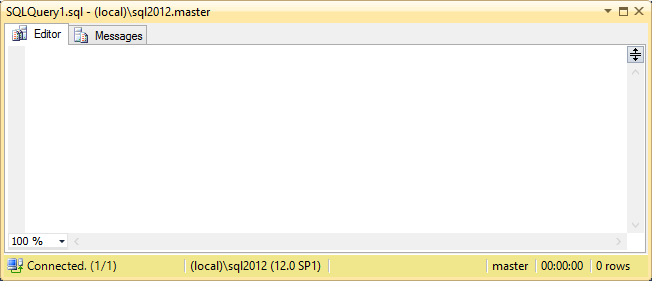
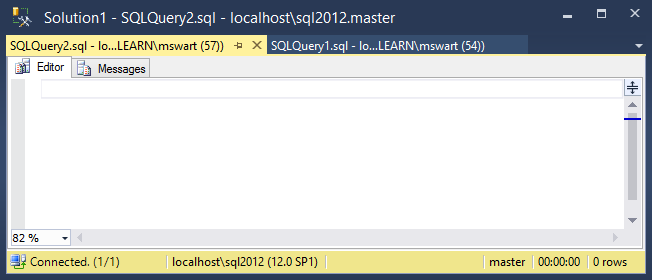
Also these undocked windows can be a collection of query windows. Compare the new style with the old style.
Old Style, limit of one query window:
New Style, many query windows:
If you’re a multitasking Developer or DBA who works with SSMS a lot, I think you’ll like this new feature. Undocked query windows now feel like real windows.
Remember SSMS is free (even though SQL Server is not). If you want to download the latest version of SSMS, you can do that here.
Have you ever played “Fortunately/Unfortunately”? It’s a game where players alternately give good news and bad news. It goes something like this:
Databases such as SQL Server make it easy to retrieve sets of data. Unfortunately, it’s kind of awkward to send sets of data to SQL Server. Fortunately, table-valued parameters (TVPs) make this easier. Unfortunately, queries that use TVPs often suffer from non-optimal query plans. Fortunately, creating primary key or unique key constraints gives us a way to index table types. Unfortunately, those constraints prevent any kind of plan forcing. Fortunately, SQL Server 2014 lets us create named indexes for table types which lets us force plans if we need to.
Let’s break this down:
Sending Sets of Data to SQL Server is Awkward
It always has been. Originally, developers were forced to send a CSV string to SQL Server and write a do-it-yourself function to split the string into a set of values.
In 2005, Microsoft introduced XML and CLR which let developers shred or split strings in new ways,
In 2008, Microsoft introduced table-valued parameters,
In 2014, they introduced In-Memory TVPs,
In 2016, there’s a new SPLIT_STRING() function
So there are more options now then there ever have been and they each have their own issues.
Aaron Bertrand explores some of those performance issues in STRING_SPLIT() in SQL Server 2016. It’s a specific use-case where he focuses on duration. In our case, we focus on aggregated system load like worker time or reads so we don’t necessarily value parallel query plans. But I love his methods. He gives us tools that let us evaluate our own situation based on our own criteria.
I’m going to focus on TVPs which is the most natural method of sending sets of data to SQL Server from a syntax point of view.
Indexes on Table Types
Table-valued parameters are implemented using table types. Before SQL Server 2014, the only way to index a table type was to define a primary key or a unique key on it like this:
create type dbo.TypeWithPKastable( id intprimarykey);
create type dbo.TypeWithPK
as table ( id int primary key );
The syntax for CREATE TYPEprevents us from naming our primary key and this turns out to be important. Every time I define and use a table variable, SQL Server will dynamically generate a name for the primary key. So when I look at the plan for
declare @ids dbo.TypeWithPK;
select*from @ids
declare @ids dbo.TypeWithPK;
select * from @ids
I see that it has a primary key named [@ids].[PK__#A079849__3213E83FDB6D7A43]:
As I’ll show later, this dynamically generated name prevents any kind of query plan forcing. But as of SQL Server 2014, we can include indexes in our table type definitions. More importantly, we can name those indexes:
create type dbo.TypeWithIndexastable( id intindex IX_TypeWithIndex );
go
declare @ids dbo.TypeWithIndex;
select*from @ids;
create type dbo.TypeWithIndex
as table ( id int index IX_TypeWithIndex );
go
declare @ids dbo.TypeWithIndex;
select * from @ids;
This has a primary key named [@ids].[IX_TypeWithIndex] which is what we expect.
Plan Forcing is Not Allowed For TVPs with PKs
Where does plan forcing fit in your tool belt? For me, I’ve never used plan forcing as a permanent solution to a problem, but when I see a query that often suffers from suboptimal query plan choices, I look to plan guides to give me some stability while I work at fixing and deploying a permanent solution.
Plan forcing in SQL Server involves specifying a plan for a particular query. But the primary key name for a table variable is always different so the specified query plan is never going to match. In other words SQL Server is never going to use your query plan because your plan includes index [@ids].[PK__#A079849__3213E83FDB6D7A43], but the query it’s compiling has a differently named index like [@ids].[PK__#AA02EED__3213E83FAF123E51].
If you try, this is what that failure looks like:
USE PLAN
If you try to use the USE PLAN query hint, you’ll get error 8712:
Msg 8712, Level 16, State 0, Line 15
Index '@ids.PK__#B305046__3213E83F57A32F24', specified in the USE PLAN hint, does not exist. Specify an existing index, or create an index with the specified name.
Plan Guides
If you try to force the plan by creating a plan guide, you’ll also see message 8712:
select*from sys.plan_guidesouter apply fn_validate_plan_guide(plan_guide_id)-- Index '@ids.PK__#BA711C0__3213E83F44A3F2C8', specified in the USE PLAN hint, does not exist. Specify an existing index, or create an index with the specified name.
select *
from sys.plan_guides
outer apply fn_validate_plan_guide(plan_guide_id)
-- Index '@ids.PK__#BA711C0__3213E83F44A3F2C8', specified in the USE PLAN hint, does not exist. Specify an existing index, or create an index with the specified name.
Query Store
And if you try to force a plan using SQL Server 2016’s Query Store, you’ll see this:
select plan_id, last_force_failure_reason_desc
from sys.query_store_planwhere is_forced_plan =1-- last_force_failure_reason_desc = 'NO_INDEX'
select plan_id, last_force_failure_reason_desc
from sys.query_store_plan
where is_forced_plan = 1
-- last_force_failure_reason_desc = 'NO_INDEX'
Summary
When defining table variables, avoid primary key or unique key constraints. Opt instead for named indexes if you’re using SQL Server 2014 or later. Otherwise, be aware that plan forcing is limited to queries that don’t use these table variables.
Typically, T-SQL is not the best platform for programming (understatement). If you have many procedures that call other procedures, that’s a signal that you might be programming in the database.
Find out using this query:
select
OBJECT_SCHEMA_NAME(p.object_id)as schemaName,
OBJECT_NAME(p.object_id)as procedureName,
count(*)as[calls to other procedures]from sys.procedures p
cross apply sys.dm_sql_referenced_entities(schema_name(p.schema_id)+'.'+ p.name, 'OBJECT') re
where re.referenced_entity_namein(select name from sys.procedures)groupby p.object_idorderbycount(*)desc;
select
OBJECT_SCHEMA_NAME(p.object_id) as schemaName,
OBJECT_NAME(p.object_id) as procedureName,
count(*) as [calls to other procedures]
from sys.procedures p
cross apply sys.dm_sql_referenced_entities(schema_name(p.schema_id) + '.' + p.name, 'OBJECT') re
where re.referenced_entity_name in (select name from sys.procedures)
group by p.object_id
order by count(*) desc;
in Adventureworks, we see this result:
To drill down into those results, use this query:
selectdistinctQUOTENAME(OBJECT_SCHEMA_NAME(p.object_id))+'.'+QUOTENAME(OBJECT_NAME(p.object_id))[This procedure...],
QUOTENAME(OBJECT_SCHEMA_NAME(p_ref.object_id))+'.'+QUOTENAME(OBJECT_NAME(p_ref.object_id))[... calls this procedure]from sys.procedures p
cross apply sys.dm_sql_referenced_entities(schema_name(p.schema_id)+'.'+ p.name, 'OBJECT') re
join sys.procedures p_ref
on re.referenced_entity_name= p_ref.nameorderby1,2
select distinct
QUOTENAME(OBJECT_SCHEMA_NAME(p.object_id)) + '.'
+ QUOTENAME(OBJECT_NAME(p.object_id)) [This procedure...],
QUOTENAME(OBJECT_SCHEMA_NAME(p_ref.object_id)) + '.'
+ QUOTENAME(OBJECT_NAME(p_ref.object_id)) [... calls this procedure]
from sys.procedures p
cross apply sys.dm_sql_referenced_entities(schema_name(p.schema_id) + '.' + p.name, 'OBJECT') re
join sys.procedures p_ref
on re.referenced_entity_name = p_ref.name
order by 1,2
which gives results like this:
Adventureworks seems just fine to me. Only four instances of procedures calling procedures. I looked at the database I work with most. Hundreds of procedures (representing 15% of the procedures) call other procedures. On the other end of the spectrum is Stackoverflow. I understand that they don’t use stored procedures at all.
There’s a sort of recurring company chat joke about people who flip out over rows and columns vs. fields and records, etc. And of course, there’s this outdoorsman magazine called Field & Stream.
And he suggested a parody of Field & Stream called Field & Record. That led directly to this:
I’m definitely a descriptivist. Language is always changing and if a word or phrase gets adopted widely enough, it is no longer “wrong” (whatever that means).
So when I hear “Field” and “Record” they’re acceptable to me. But if I’m explaining something, I don’t want to distract from the thing I’m saying. And from that point of view, I try to use “Row” and “Column” because I don’t know anyone who blinks at those terms. In other words
When speaking, I use “row” and “column”
When listening, I do not correct “field” and “record”.
This also means I never use the word “whom” which is a word that has the strange quality of being distracting and correct.
Exceptions
I can think of a couple exceptions
Kendra Little made a list of confusing words or phrases. When terms are confusing and it’s important to be precise. In that case, a correction is necessary.
Takeaway: WRITELOG waits are associated with a busy or slow transaction log. To tackle these waits, we need to measure transaction log activity. I describe a lightweight way to examine transaction log usage for busy OLTP systems.
Start with Microsoft’s Advice: I’m not going to introduce the topic of transaction log performance. Microsoft’s SQL Customer Advisory Team already provides a great introduction with Diagnosing Transaction Log Performance Issues and Limits of the Log Manager. Their advice includes watching the “Log Bytes Flushed/sec” performance counter found in the “SQL Server:Databases” object.
Spiky Activity: It’s not too difficult to find infrequent activities that write a lot of data to the transaction log; activities like data warehouse ETLs, or index rebuilds. Use a trace or extended events to look for statements with large values for “writes”.
Scalability of OLTP Workloads
WRITELOG waits are a scalability challenge for OLTP workloads under load. Chris Adkin has a lot of experience tuning SQL Server for high-volume OLTP workloads. So I’m going to follow his advice when he writes we should minimize the amount logging generated. And because I can’t improve something if I can’t measure it, I wonder what’s generating the most logging? OLTP workloads are characterized by frequent tiny transactions so I want to measure that activity without filters, but I want to have as little impact to the system as I can. That’s my challenge.
Getting #SQLHelp
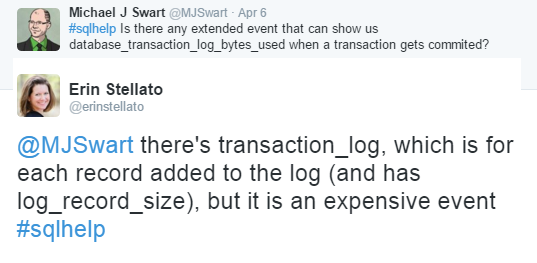
So I asked twitter. And I got some great advice from Erin Stellato:
Erin also pointed out that the UI warns you that it’s a very high volume event.
Combining fn_dblog With Extended Events
So to avoid that kind of volume, I got the idea to read straight from the transaction log and combine that with a lighter extended events session to get the SQL text. The transaction_id captured by the extended events session corresponds to the XAct ID column in fn_dblog.
Here’s how that went:
The Script
The details for this script are kind of fussy, but it all comes together in a solution that won’t drag a server down. Care is still recommended; start with 10 seconds and go from there.
declare @Duration varchar(10)='00:00:10';
declare @FileSize varchar(10)='5'; -- in megabytes-- create sessionDECLARE @CreateSessionSQL nvarchar(max)= N'
CREATE EVENT SESSION query_writes ON SERVER
ADD EVENT sqlserver.sp_statement_completed (
SET collect_statement=(0)
ACTION(sqlserver.transaction_id, sqlserver.database_name)
WHERE sqlserver.transaction_id > 0
AND sqlserver.database_name = '''+DB_NAME()+ N''')
ADD TARGET package0.asynchronous_file_target(
SET filename = N''query_writes.xel'',
max_file_size = '+ @FileSize + N',
max_rollover_files = 1)
WITH (
STARTUP_STATE=ON,
EVENT_RETENTION_MODE=ALLOW_SINGLE_EVENT_LOSS,
TRACK_CAUSALITY=OFF)';
execsp_executesql @CreateSessionSQL;
ALTER EVENT SESSION query_writes ON SERVER
STATE=START;
-- get the latest lsn for current DBdeclare @xact_seqno binary(10);
declare @xact_seqno_string_begin varchar(50);
exec sp_replincrementlsn @xact_seqno OUTPUT;
set @xact_seqno_string_begin ='0x'+CONVERT(varchar(50), @xact_seqno, 2);
set @xact_seqno_string_begin =stuff(@xact_seqno_string_begin, 11, 0, ':')set @xact_seqno_string_begin =stuff(@xact_seqno_string_begin, 20, 0, ':');
-- wait a minutewaitfor delay @Duration;
-- get the latest lsn for current DBdeclare @xact_seqno_string_end varchar(50);
exec sp_replincrementlsn @xact_seqno OUTPUT;
set @xact_seqno_string_end ='0x'+CONVERT(varchar(50), @xact_seqno, 2);
set @xact_seqno_string_end =stuff(@xact_seqno_string_end, 11, 0, ':')set @xact_seqno_string_end =stuff(@xact_seqno_string_end, 20, 0, ':');
-- Stop the sessionALTER EVENT SESSION query_writes ON SERVER
STATE=STOP;
-- read from transaction logselectmax([Xact ID])as transactionId,
max([Transaction Name])as transactionName,
sum([Log Record Length])as logSize,
count(*)as[logRowCount]into #TLOGS
from fn_dblog(@xact_seqno_string_begin, @xact_seqno_string_end) f
groupby[Transaction Id]-- read from session dataCREATETABLE #SessionData (
id intidentityprimarykey,
XEXml xml NOTNULL)INSERT #SessionData(XEXml)SELECTCAST(fileData.[event_data]as xml)FROM sys.fn_xe_file_target_read_file('query_writes*xel', null, null, null) fileData;
-- find minimum transactionId captured by xes -- (almost always the first one, depending on luck here)declare @minTXFromSession bigint;
selectTOP(1) @minTXFromSession = S.XEXml.value('(/event/action[(@name=''transaction_id'')]/value)[1]', 'bigint')from #SessionData S;
WITH SD AS(SELECT
S.XEXml.value('(/event/action[(@name=''transaction_id'')]/value)[1]', 'bigint')as transactionId,
S.XEXml.value('(/event/data[(@name=''object_id'')]/value)[1]', 'bigint')as objectId
FROM #SessionData S
)SELECT
ISNULL(T.transactionName, 'Unknown')as transactionTypeName,
OBJECT_NAME(S.objectid)as ObjectName,
SUM(T.logsize)as totalLogSizeBytes,
SUM(T.logRowCount)as totalLogRowCount,
COUNT(*)as executions
FROM #TLOGS T
LEFTJOIN(SELECTDISTINCT*FROM SD) S
ON T.transactionId= S.transactionIdWHERE T.transactionId>= @minTXFromSession
GROUPBY T.transactionName, S.objectIdORDERBYSUM(T.logsize)DESC-- clean upDROP EVENT SESSION query_writes ON SERVER;
DROPTABLE #TLOGS
DROPTABLE #SessionData
declare @Duration varchar(10) = '00:00:10';
declare @FileSize varchar(10) = '5'; -- in megabytes
-- create session
DECLARE @CreateSessionSQL nvarchar(max) = N'
CREATE EVENT SESSION query_writes ON SERVER
ADD EVENT sqlserver.sp_statement_completed (
SET collect_statement=(0)
ACTION(sqlserver.transaction_id, sqlserver.database_name)
WHERE sqlserver.transaction_id > 0
AND sqlserver.database_name = ''' + DB_NAME() + N''')
ADD TARGET package0.asynchronous_file_target(
SET filename = N''query_writes.xel'',
max_file_size = ' + @FileSize + N',
max_rollover_files = 1)
WITH (
STARTUP_STATE=ON,
EVENT_RETENTION_MODE=ALLOW_SINGLE_EVENT_LOSS,
TRACK_CAUSALITY=OFF)';
exec sp_executesql @CreateSessionSQL;
ALTER EVENT SESSION query_writes ON SERVER
STATE=START;
-- get the latest lsn for current DB
declare @xact_seqno binary(10);
declare @xact_seqno_string_begin varchar(50);
exec sp_replincrementlsn @xact_seqno OUTPUT;
set @xact_seqno_string_begin = '0x' + CONVERT(varchar(50), @xact_seqno, 2);
set @xact_seqno_string_begin = stuff(@xact_seqno_string_begin, 11, 0, ':')
set @xact_seqno_string_begin = stuff(@xact_seqno_string_begin, 20, 0, ':');
-- wait a minute
waitfor delay @Duration;
-- get the latest lsn for current DB
declare @xact_seqno_string_end varchar(50);
exec sp_replincrementlsn @xact_seqno OUTPUT;
set @xact_seqno_string_end = '0x' + CONVERT(varchar(50), @xact_seqno, 2);
set @xact_seqno_string_end = stuff(@xact_seqno_string_end, 11, 0, ':')
set @xact_seqno_string_end = stuff(@xact_seqno_string_end, 20, 0, ':');
-- Stop the session
ALTER EVENT SESSION query_writes ON SERVER
STATE=STOP;
-- read from transaction log
select
max([Xact ID]) as transactionId,
max([Transaction Name]) as transactionName,
sum([Log Record Length]) as logSize,
count(*) as [logRowCount]
into #TLOGS
from fn_dblog(@xact_seqno_string_begin, @xact_seqno_string_end) f
group by [Transaction Id]
-- read from session data
CREATE TABLE #SessionData (
id int identity primary key,
XEXml xml NOT NULL
)
INSERT #SessionData(XEXml)
SELECT CAST(fileData.[event_data] as xml)
FROM sys.fn_xe_file_target_read_file ( 'query_writes*xel', null, null, null) fileData;
-- find minimum transactionId captured by xes
-- (almost always the first one, depending on luck here)
declare @minTXFromSession bigint;
select TOP (1) @minTXFromSession = S.XEXml.value(
'(/event/action[(@name=''transaction_id'')]/value)[1]', 'bigint')
from #SessionData S;
WITH SD AS
(
SELECT
S.XEXml.value(
'(/event/action[(@name=''transaction_id'')]/value)[1]', 'bigint') as transactionId,
S.XEXml.value(
'(/event/data[(@name=''object_id'')]/value)[1]', 'bigint') as objectId
FROM #SessionData S
)
SELECT
ISNULL(T.transactionName, 'Unknown') as transactionTypeName,
OBJECT_NAME(S.objectid) as ObjectName,
SUM(T.logsize) as totalLogSizeBytes,
SUM(T.logRowCount) as totalLogRowCount,
COUNT(*) as executions
FROM #TLOGS T
LEFT JOIN (SELECT DISTINCT * FROM SD) S
ON T.transactionId = S.transactionId
WHERE T.transactionId >= @minTXFromSession
GROUP BY T.transactionName, S.objectId
ORDER BY SUM(T.logsize) DESC
-- clean up
DROP EVENT SESSION query_writes ON SERVER;
DROP TABLE #TLOGS
DROP TABLE #SessionData
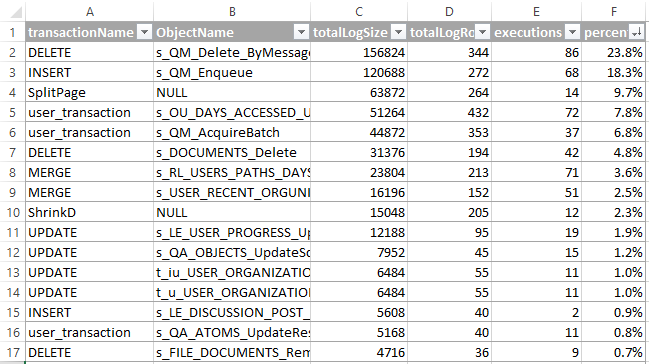
Sample Results
Here’s an example of what the results would look like. It’s an aggregated view of all transaction log activity in a database for 10 seconds.
Notes
Notice that the session is database specific. That’s because transaction logs are database specific. To help focus on the right database, use the “Log Bytes Flushed/sec” performance counter found in the “SQL Server:Databases” object.
Also notice that I’m tracking ObjectIds. That’s because we use procedures quite heavily. You may want to adapt this code to use query_hash instead. In both cases, collecting the statement text is not recommended.
The sample of data is limited by the size of the extended events target file or the duration variable, whichever is smaller.
@sqL_handLe pointed out to me that reading the log using fn_dblog will prevent the transaction log from truncating. Reading from the transaction log can be very tricky to do efficiently. Luckily we can use the sp_replincrementlsn trick to get LSN parameter values for fn_dblog.
Takeaway: SQL Server Developer Edition is now free. This makes it very easy for newcomers to learn about SQL Server.
Some Skills Are Hard to Teach
Working with SQL Server and teaching SQL Server are very, very different skills. I sometimes get asked to teach others about how to tackle SQL Server problems in a teach-someone-to-fish kind of way. But I find it very difficult and I often don’t know what to say. What works for me may not work for others. For example, none of these activities are easy:
Develop a strong curiosity about SQL Server
Practice
Read as much as you can about SQL Server
More Practice
Find yourself in high-pressure situations where you have to tackle a difficult technical problem. Then when you give up, find yourself still facing the problem which hasn’t gone away.
… and iterate.
It’s challenging to fit those lessons into a session.
But Everyone Loves Free SQL Server Resources
So I’ve discovered that what is helpful are all the free resources available to me. And giving people a list of free resources is always well-received. To stretch the metaphor, maybe I can’t teach someone to fish, but here’s a free fishing rod.
For example, This list is more constructive and helpful than the last list:
Free tools like sp_whoisactive and sql sentry plan explorer
Free events like SQL Saturdays or local user group meetings
Free forums like Stackoverflow and Twitter
With those resources, it’s pretty easy to get started with SQL Server. In other words, there’s a very small barrier to entry to the world of SQL Server.
One More Free Resource
Well yesterday, Microsoft just made it even easier. They just got rid of the cover charge for using SQL Server. SQL Server (Developer Edition) is now free.
All editions have had a free trial period which allowed people to evaluate SQL Server for a limited time. This announcement removes even that restriction. If you have a computer and an internet connection, you can get started today by joining Visual Studio Dev Essentials.
Takeaway: The best way to avoid tempdb GAM and PFS contention caused by table-valued parameters (TVPs) is to use Memory-Optimized Table Variables.
This is my last post about tempdb. You can’t believe how wonderful it is to type that.*
SQL Server 2014 can eradicate tempdb contention and I didn’t even know it. Just yesterday I was saying that if I could have my one SQL Server wish, it would be to use table-valued parameters at high frequency without suffering from tempdb latch contention on GAM or PFS.
So now in addition to database with types like this:
CREATE TYPE dbo.BIGINTSETASTABLE([Value]BIGINTNOTNULLINDEX IX_BIGINTSET);
CREATE TYPE dbo.BIGINTSET AS TABLE
([Value] BIGINT NOT NULL INDEX IX_BIGINTSET);
I can add an additional memory optimized type like this:
CREATE TYPE dbo.BIGINTSET_OLTPASTABLE([Value]BIGINTNOTNULLINDEX IX_BIGINTSET_OLTP)WITH(MEMORY_OPTIMIZED=ON);
CREATE TYPE dbo.BIGINTSET_OLTP AS TABLE
([Value] BIGINT NOT NULL INDEX IX_BIGINTSET_OLTP)
WITH (MEMORY_OPTIMIZED=ON);
Any procedures that use the new table type BIGINTSET_OLTP will not touch tempdb.
It seems pretty easy doesn’t it? In this example, the reason I don’t just replace the existing type is because I want to be very deliberate about choosing memory optimized parameters. By adding a new table type, I make that choice in each procedure or query on a case by case basis.
To see whether this technique avoids hitting tempdb as advertised, I wrote this demo.
A Complete Demo
use master
GO
IF(DB_ID('MyTVPTest')ISNOTNULL)BEGINALTERDATABASE MyTVPTest SET SINGLE_USER WITHROLLBACKIMMEDIATE;
DROPDATABASE MyTVPTest;
END
GO
CREATEDATABASE MyTVPTest;
ALTERDATABASE MyTVPTest
ADD FILEGROUP MyTVPTest_MOD CONTAINS MEMORY_OPTIMIZED_DATA;
ALTERDATABASE MyTVPTest
ADDFILE(name='MyTVPTest_MOD1', filename='c:\sqldata\MyTVPTest_MOD1')TO FILEGROUP MyTVPTest_MOD;
GO
use MyTVPTest;
GO
CREATE TYPE dbo.MyMOIntSetASTABLE([Value]INTNOTNULLINDEX IX_MyMOIntSet)WITH(MEMORY_OPTIMIZED=ON);
CREATE TYPE dbo.MyIntSetASTABLE([Value]INTNOTNULLINDEX IX_MyIntSet);
GO
CREATETABLE dbo.MyTable(
id intnotnullprimarykey);
INSERT dbo.MyTable(id)SELECTtop1000 ROW_NUMBER()OVER(ORDERBY(SELECT1))FROM sys.messages;
GO
CREATEPROCEDURE dbo.s_FetchMyTableRowsWithFilter
@Filter MyIntSet READONLY
ASSELECT MT.idFROM dbo.MyTable MT
JOIN @Filter FT
ON FT.[Value]= MT.id;
GO
CREATEPROCEDURE dbo.s_FetchMyTableRowsWithMOFilter
@Filter MyMOIntSet READONLY
ASSELECT MT.idFROM dbo.MyTable MT
JOIN @Filter FT
ON FT.[Value]= MT.id;
GO
-- Call procedure using Memory Optimized table typeDECLARE @F_MO MyMOIntSet;
INSERT @F_MO ([Value])VALUES(1), (3), (5);
EXEC dbo.s_FetchMyTableRowsWithMOFilter @F_MO;
-- Call procedure using regular table typeDECLARE @F MyIntSet;
INSERT @F ([Value])VALUES(1), (3), (5);
EXEC dbo.s_FetchMyTableRowsWithFilter @F;
use master
GO
IF ( DB_ID('MyTVPTest') IS NOT NULL )
BEGIN
ALTER DATABASE MyTVPTest SET SINGLE_USER WITH ROLLBACK IMMEDIATE;
DROP DATABASE MyTVPTest;
END
GO
CREATE DATABASE MyTVPTest;
ALTER DATABASE MyTVPTest
ADD FILEGROUP MyTVPTest_MOD CONTAINS MEMORY_OPTIMIZED_DATA;
ALTER DATABASE MyTVPTest
ADD FILE (name='MyTVPTest_MOD1', filename='c:\sqldata\MyTVPTest_MOD1')
TO FILEGROUP MyTVPTest_MOD;
GO
use MyTVPTest;
GO
CREATE TYPE dbo.MyMOIntSet AS TABLE
([Value] INT NOT NULL INDEX IX_MyMOIntSet)
WITH (MEMORY_OPTIMIZED=ON);
CREATE TYPE dbo.MyIntSet AS TABLE
([Value] INT NOT NULL INDEX IX_MyIntSet);
GO
CREATE TABLE dbo.MyTable
(
id int not null primary key
);
INSERT dbo.MyTable (id)
SELECT top 1000 ROW_NUMBER() OVER (ORDER BY (SELECT 1))
FROM sys.messages;
GO
CREATE PROCEDURE dbo.s_FetchMyTableRowsWithFilter
@Filter MyIntSet READONLY
AS
SELECT MT.id
FROM dbo.MyTable MT
JOIN @Filter FT
ON FT.[Value] = MT.id;
GO
CREATE PROCEDURE dbo.s_FetchMyTableRowsWithMOFilter
@Filter MyMOIntSet READONLY
AS
SELECT MT.id
FROM dbo.MyTable MT
JOIN @Filter FT
ON FT.[Value] = MT.id;
GO
-- Call procedure using Memory Optimized table type
DECLARE @F_MO MyMOIntSet;
INSERT @F_MO ([Value]) VALUES (1), (3), (5);
EXEC dbo.s_FetchMyTableRowsWithMOFilter @F_MO;
-- Call procedure using regular table type
DECLARE @F MyIntSet;
INSERT @F ([Value]) VALUES (1), (3), (5);
EXEC dbo.s_FetchMyTableRowsWithFilter @F;
Look at the last two queries. The first one invokes a procedure that uses a memory-optimized table variable. The other one invokes a different procedure that uses a standard table variable. Then look at what’s going on in tempdb’s transaction log (using techniques found here). With the standard table variable I see this sort of activity in tempdb’s log:
But I see that memory-optimized queries avoids all tempdb activity. It’s not just the logging activity that’s avoided, all tempdb activity is avoided. The tempdb is simply not touched in this case.
Caveats
Notice a few things:
This mainly addresses tempdb contention experienced by workloads with extremely frequent TVP use (thousands per second).
In SQL Server 2014, memory-optimized table variables precludes the use of parallel queries.
As the feature name suggests, the temp tables live in memory.
Luckily the high frequency described by the first caveat means that the queries I use must be as lightweight as possible. And that means that I don’t mind the second or third caveat so much. Aaron Bertrand dives deeper on the performance of Memory-Optimized table variables at Hekaton with a twist: In-memory TVPs – Part 3.
In the past, my colleagues and I have been incredibly frustrated at this bottleneck. A bottleneck that could not be fixed, not even with dollars. And so I’m looking forward to this feature more than any other single feature introduced in 2014 or 2016. We vendors are often constrained to use only those features present in every SQL Server version we support. In my case, it will be a while before we de-support SQL Server 2012 but that day will be like Christmas.
—
* I’ve written before about TVPs and the different kinds of contention caused by frequent use of TVPs: