When I was younger, I put posters on my bedroom wall. My favorite was of the Beatles. I don’t decorate my bedroom with posters any more, but I do decorate my office. And I suspect a lot of you do too.
I can help you with that! I’ve opened an Etsy store where I’m selling art prints.
I’ve started doing drawings (in my own style) at a resolution that is print-worthy. These prints use card stock and are worthy of framing. But if you would rather tack them to a wall with pushpins, that’s fine too 🙂 .
This is Carrie Fisher as Princess Leia of course. It’s the end of Empire Strikes Back. She’s thinking about Han and Luke. Leia isn’t in a panic. She’s worried and concerned but not anxious. I drew this as if she’s on cloud city at sundown.
Fun fact. This scene doesn’t actually exist, because our heroes don’t get to catch their breath until they’re away from the planet, but I like the red.
I’m a relatively new fan of westerns and of John Wayne in particular. But I know many people love him because they grew up watching him with their family.
This is the Duke as Rooster Cogburn in True Grit (1969). In the story, Rooster is a real bad ass which is perfect for John Wayne. This picture is from a scene where Rooster opens up about his past. He’s sitting at a campfire talking with Maddie but instead of being tough on the outside and soft in the middle, we see that Rooster is tough as nails right through “She said, ‘Goodbye, Reuben, a love for decency does not abide in you.'”
Adam Machanic tweeted this advice last week:
https://twitter.com/AdamMachanic/status/799365663781519360
Are you missing any of these check constraints? Run this query to check.
This query looks for any columns in the same table that begin with “Start” and “End”. It then looks for check constraints that reference both these columns. If it doesn’t find them, it suggests a check constraint.
WITH StartColumnNames AS(SELECTobject_id,
column_id,
name AS column_name
FROM sys.columnsWHERE name like'start%'),
EndColumnNames AS(SELECTobject_id,
column_id,
name AS column_name
FROM sys.columnsWHERE name like'end%')SELECT t.object_id,
OBJECT_SCHEMA_NAME(t.object_id)AS[schema_name],
t.[name]AS table_name,
s.column_nameAS start_column,
e.column_nameAS end_column,
N'ALTER TABLE '+QUOTENAME(OBJECT_SCHEMA_NAME(t.object_id))+ N'.'+QUOTENAME(t.name)+
N' ADD CONSTRAINT '+QUOTENAME(N'CK_'+ t.name+ N'_'+ s.column_name+ N'_'+ e.column_name)+
N' CHECK ('+QUOTENAME(s.column_name)+ N' <= '+QUOTENAME(e.column_name)+ N');'as check_suggestion
FROM StartColumnNames s
JOIN EndColumnNames e
ON s.object_id= e.object_idAND s.column_id<> e.column_idANDREPLACE(s.column_name, 'start', 'end')= e.column_nameJOIN sys.tables t
ON t.object_id= s.object_idWHERENOTEXISTS(SELECT*FROM sys.check_constraints c
JOIN sys.sql_expression_dependencies start_dependency
ON start_dependency.referencing_id= c.object_idAND start_dependency.referenced_id= t.object_idAND start_dependency.referenced_minor_id= s.column_idJOIN sys.sql_expression_dependencies end_dependency
ON end_dependency.referencing_id= c.object_idAND end_dependency.referenced_id= t.object_idAND end_dependency.referenced_minor_id= e.column_idWHERE c.parent_object_id= t.object_id)
WITH StartColumnNames AS
(
    SELECT object_id,
           column_id,
           name AS column_name
      FROM sys.columns
     WHERE name like 'start%'
),
EndColumnNames AS
(
    SELECT object_id,
           column_id,
           name AS column_name
      FROM sys.columns
     WHERE name like 'end%'
)
SELECT t.object_id,
       OBJECT_SCHEMA_NAME(t.object_id) AS [schema_name],
       t.[name] AS table_name,
       s.column_name AS start_column,
       e.column_name AS end_column,
       N'ALTER TABLE ' + QUOTENAME(OBJECT_SCHEMA_NAME(t.object_id)) + N'.' + QUOTENAME(t.name) +
           N' ADD CONSTRAINT ' +
           QUOTENAME(N'CK_' + t.name + N'_' + s.column_name + N'_' + e.column_name) +
           N' CHECK (' + QUOTENAME(s.column_name) + N' <= ' + QUOTENAME(e.column_name) + N');' as check_suggestion
  FROM StartColumnNames s
  JOIN EndColumnNames e
       ON s.object_id = e.object_id
       AND s.column_id <> e.column_id
       AND REPLACE(s.column_name, 'start', 'end') = e.column_name
  JOIN sys.tables t
       ON t.object_id = s.object_id
 WHERE NOT EXISTS
       (
           SELECT *
             FROM sys.check_constraints c
             JOIN sys.sql_expression_dependencies start_dependency
                  ON start_dependency.referencing_id = c.object_id
                  AND start_dependency.referenced_id = t.object_id
                  AND start_dependency.referenced_minor_id = s.column_id
             JOIN sys.sql_expression_dependencies end_dependency
                  ON end_dependency.referencing_id = c.object_id
                  AND end_dependency.referenced_id = t.object_id
                  AND end_dependency.referenced_minor_id = e.column_id
            WHERE c.parent_object_id = t.object_id
       )
Caveats
Don’t blindly run scripts that you got from some random guy’s blog. Even if that someone is me. That’s terribly irresponsible.
But this query may be useful if you do want to look for a very specific, simple kind of constraint that may match your business specs. These constraints are just suggestions and may not match your business rules. For example, when I run this query on Adventureworks, I get one “missing” check constraint for HumanResources.Shift(StartTime, EndTime) and when I look at the contents of the Shift table, I get this data:
Notice that I can’t create a constraint on this table because of the night shift. The constraint doesn’t make sense here.
Creating constraints on existing tables may take time if the table is huge. Locks may be held on that table for an uncomfortably long time.
Of course if your table has data that would violate the constraint, you can’t create it. But now you have to make some other choices. You can correct or delete the offending data or you can add the constraint with NOCHECK.
Thank you Andy Yun for hosting this month’s T-SQL Tuesday. Andy asks us to write about speaking which is a bit apropos because like Andy I got to speak the PASS Summit this year.
If you have visited any post on this site, you’ll realize two things very quickly. (1) I love writing about SQL Server and (2) I like drawing. When doing either of those things, I rely heavily on the undo button. Whether it’s Ctrl+Z or Backspace. It helps me be fearless. Fearless when drawing, fearless when writing. It helps me be perfect at the cost of efficiency – or at least as close to perfect as I want to be.
But there’s no undo button when speaking. Speaking is a kind of performance and I think I get hung up on that which makes me nervous. So this post then is kind of a narrative essay of my experience speaking at the PASS Summit.
Applying to Speak
Back in January, I set a goal for myself, write once a week and speak once a month. This meant looking for places to speak. So when the call PASS Summit call for speakers came around I decided to apply. I read two or three blog posts on what makes a compelling abstract and followed most of the advice. The piece of advice I followed most closely was “talk about what you know”. So I signed up with one abstract (only one) on a topic near and dear to my heart, SQL Server concurrency.
The thing I knew I had going for me was that I live this topic. At work we’ve successfully refactored a legacy system that has handled a peak load of over 50,000 transactions per second (And that’s without Hekaton). Most of the talk includes lessons we’ve learned and things I wish I knew earlier.
Getting Accepted
So I got accepted. I have to describe the experience of getting accepted, because the notification comes via email and is nothing like a college letter. College acceptance letters usually start with words like “Congratulations”, or “I am pleased to inform…”. While College rejection letters start with “We regret” or “Unfortunately”.
Well, the letter from PASS is nothing like that. It’s a form letter where they introduce definitions of Accepted/Alternate/Not Accepted. And then 250 words later (scroll scroll scroll on my phone) I see a tiny word beside my session title: “accepted”. That was celebration time.
Do you know when a rookie manages to get a hit at their first at bat in the majors? For a few minutes at least, they’re batting a thousand. That’s me right now. I realize how fortunate that makes me.
The Big Room
So a week before the summit, I hopped onto the speaker orientation conference call where Allan White tells us about which rooms are being recorded. He mentions one room which is set up for PASS TV. Room 6E. I checked the schedule and found my name. Now to check the room, (scroll, scroll, scroll) 6E Gulp!
In the end, the room was a blessing and a curse. It was huge. I figure it could have held maybe 1000 people. There’s no way that was going to be full on the second last session right after lunch on a Friday afternoon! And although the audience was probably the largest audience I’ve ever had, it felt empty.
The Talk
The talk went well. It started out rocky but once I got into the SQL, I got more comfortable. I had friends in the audience and I really appreciated their presence. The questions after were great. One lesson I’m taking for next time is to end maybe five or ten minutes early so I’m not in such a rush to get off the stage. There were many people who were waiting to ask me a question that never got a chance to.
It was a good experience and I want to do more of it. That means more practice. I’m double lucky because this week, I get to give the talk again for work! D2L is hosting an internal conference and I’m excited to deliver it to the home team.
For most of 2016, I worked with a small team of three called the Samurai team. The team name was taken from the wandering Samurai who wanders from village to village doing good where ever injustice was found. Our job was to go around doing good wherever technical debt was found.
And that was the point. It was wherever we found the technical debt. It was an exercise in trust I suppose. They trusted us to do what was important. We had more autonomy then I’ve ever enjoyed before. There was still accountability and everything we did was data-driven and pragmatic. But I really enjoyed the experience.
We did a lot of work and on the database scalability side, we focused on these things:
Avoiding queries
Tuning queries
Stabilizing execution plans
Concurrency
Database Concurrency
In 2016, more than ever before, I got to exercise my database concurrency skills in a real practical sense. It was cool to find out what rules of thumb were true and what rules of thumb didn’t matter.
Developing Highly Concurrent Databases
That’s why I’m really excited to talk about database concurrency at the PASS Summit. Developing Highly Concurrent Databases I’m here in Seattle this week and I get to deliver my talk called talk on Friday at 2PM.
But if you’re not in Seattle, you can choose to watch me on PASS TV! They’re live streaming one session room throughout the conference. And I’m fortunate enough to be presenting in that room.
If you’re here at PASS, mark your schedule for room 6E on Friday at 2PM (Pacific).
And if you’re not, you can still catch me and other presenters on PASStv (Friday at 5PM Eastern) http://www.sqlpass.org/summit/2016/Live.aspx.
There are so many ways to look inside SQL Server. New extended events and dynamic management views are introduced every version. But if you want to collect something that’s unavailable, with a little bit of creativity, you can create your own tools.
I had a deadlock graph I wanted to tackle, but I was having trouble reproducing it. I needed to know more about the queries involved. But the query plans were no longer in cache. So here’s the problem
Can I collect the execution plans that were used for the queries involved in a deadlock graph?
I want to use that information to reproduce – and ultimately fix – the deadlock.
The Right Tool For the Job
If you don’t have enough data to get to the root cause of an issue, put something in place for next time.
Can I Use Out-Of-The-Box Extended Events?
I’m getting used to extended events and so my first thought was “Is there a query plan field I can collect with the deadlock extended event? There is not. Which isn’t too surprising. Deadlock detection is independent of any single query.
So How Do I Get To The Execution Plans?
So when I look at a deadlock graph, I can see there are sql_handles. Given that, I can grab the plan_handle and then the query plan from the cache, but I’m going to need to collect it automatically at the time the deadlock is generated. So I’m going to need
XML shredding skills
Ability to navigate DMVs to get at the cached query plans
A way to programatically respond to deadlock graph events (like an XE handler or a trigger)
Responding Automatically to Extended Events
This is when I turned to #sqlhelp. And sure enough, six minutes later, Dave Mason helped me out:
I had never heard of Event Notifications, so after some googling, I discovered two things. The first thing is that I can only use Event Notifications with DDL or SQLTrace events rather than the larger set of extended events. Luckily deadlock graphs are available in both. The second thing is that Event Notifications aren’t quite notifications the way alerts are. They’re a way to push event info into a Service Broker queue. If I want automatic actions taken on Service Broker messages, I have to define and configure an activation procedure to process each message. In pictures, here’s my plan so far:
Will It Work?
I think so, I’ve had a lot of success creating my own tools in the past such as
USE master;
IF(DB_ID('DeadlockLogging')ISNOTNULL)BEGINALTERDATABASE DeadlockLogging SET SINGLE_USER WITHROLLBACKIMMEDIATE;
DROPDATABASE DeadlockLogging;
ENDCREATEDATABASE DeadlockLogging WITH TRUSTWORTHY ON;
GO
USE master;

IF (DB_ID('DeadlockLogging') IS NOT NULL)
BEGIN
    ALTER DATABASE DeadlockLogging SET SINGLE_USER WITH ROLLBACK IMMEDIATE;
    DROP DATABASE DeadlockLogging;
END

CREATE DATABASE DeadlockLogging WITH TRUSTWORTHY ON;
GO
Create the Service Broker Objects
I’ve never used Service Broker before, so a lot of this comes from examples found in Books Online.
use DeadlockLogging;
CREATE QUEUE dbo.LogDeadlocksQueue;
CREATE SERVICE LogDeadlocksService
ON QUEUE dbo.LogDeadlocksQueue([http://schemas.microsoft.com/SQL/Notifications/PostEventNotification]);
CREATE ROUTE LogDeadlocksRoute
WITH SERVICE_NAME ='LogDeadlocksService',
ADDRESS ='LOCAL';
-- add server level notificationIFEXISTS(SELECT*FROM sys.server_event_notificationsWHERE[name]='LogDeadlocks')DROP EVENT NOTIFICATION LogDeadlocks ON SERVER;
DECLARE @SQLNVARCHAR(MAX);
SELECT @SQL= N'
CREATE EVENT NOTIFICATION LogDeadlocks
ON SERVER
FOR deadlock_graph -- name of SQLTrace event type
TO SERVICE ''LogDeadlocksService'', '''+CAST(service_broker_guid asnvarchar(max))+''';'FROM sys.databasesWHERE[name]=DB_NAME();
EXECsp_executesql @SQL;
GO
use DeadlockLogging;

CREATE QUEUE dbo.LogDeadlocksQueue;

CREATE SERVICE LogDeadlocksService
    ON QUEUE dbo.LogDeadlocksQueue
    ([http://schemas.microsoft.com/SQL/Notifications/PostEventNotification]);

CREATE ROUTE LogDeadlocksRoute
    WITH SERVICE_NAME = 'LogDeadlocksService',
    ADDRESS = 'LOCAL';

-- add server level notification
IF EXISTS (SELECT * FROM sys.server_event_notifications WHERE [name] = 'LogDeadlocks')
    DROP EVENT NOTIFICATION LogDeadlocks ON SERVER;

DECLARE @SQL NVARCHAR(MAX);
SELECT @SQL = N'
    CREATE EVENT NOTIFICATION LogDeadlocks
    ON SERVER
    FOR deadlock_graph -- name of SQLTrace event type
    TO SERVICE ''LogDeadlocksService'', ''' + CAST(service_broker_guid as nvarchar(max))+ ''';'
FROM sys.databases
WHERE [name] = DB_NAME();
EXEC sp_executesql @SQL;
GO
The dynamic SQL is used to fetch the database guid of the newly created database.
a Place to Store Deadlocks
-- Create a place to store the deadlock graphs along with query plan informationCREATESEQUENCE dbo.DeadlockIdentitySTARTWITH1;
CREATETABLE dbo.ExtendedDeadlocks(
DeadlockId bigintnotnull,
DeadlockTime datetimenotnull,
SqlHandle varbinary(64),
StatementStart int,
[Statement]nvarchar(max)null,
Deadlock XML notnull,
FirstQueryPlan XML
);
CREATECLUSTEREDINDEX IX_ExtendedDeadlocks
ON dbo.ExtendedDeadlocks(DeadlockTime, DeadlockId);
GO
-- Create a place to store the deadlock graphs along with query plan information
CREATE SEQUENCE dbo.DeadlockIdentity START WITH 1;

CREATE TABLE dbo.ExtendedDeadlocks
(
    DeadlockId bigint not null,
    DeadlockTime datetime not null,
    SqlHandle varbinary(64),
    StatementStart int,
    [Statement] nvarchar(max) null,
    Deadlock XML not null,
    FirstQueryPlan XML
);

CREATE CLUSTERED INDEX IX_ExtendedDeadlocks
    ON dbo.ExtendedDeadlocks(DeadlockTime, DeadlockId);
GO
The Procedure That Processes Queue Messages
CREATEPROCEDURE dbo.ProcessDeadlockMessageASDECLARE @RecvMsg NVARCHAR(MAX);
DECLARE @RecvMsgTime DATETIME;
SET XACT_ABORT ON;
BEGINTRANSACTION;
WAITFOR(
RECEIVE TOP(1)
@RecvMsgTime = message_enqueue_time,
@RecvMsg = message_body
FROM dbo.LogDeadlocksQueue), TIMEOUT 5000;
IF(@@ROWCOUNT=0)BEGINROLLBACKTRANSACTION;
RETURN;
ENDDECLARE @DeadlockId BIGINT=NEXTVALUEFOR dbo.DeadlockIdentity;
DECLARE @RecsvMsgXML XML =CAST(@RecvMsg AS XML);
DECLARE @DeadlockGraph XML = @RecsvMsgXML.query('/EVENT_INSTANCE/TextData/deadlock-list/deadlock');
WITH DistinctSqlHandles AS(SELECTDISTINCT node.value('@sqlhandle', 'varchar(max)')as SqlHandle
FROM @RecsvMsgXML.nodes('//frame')AS frames(node))INSERT ExtendedDeadlocks (DeadlockId, DeadlockTime, SqlHandle, StatementStart, [Statement], Deadlock, FirstQueryPlan)SELECT @DeadlockId,
@RecvMsgTime,
qs.sql_handle,
qs.statement_start_offset,
[statement],
@DeadlockGraph,
qp.query_planFROM DistinctSqlHandles s
LEFTJOIN sys.dm_exec_query_stats qs
on qs.sql_handle=CONVERT(VARBINARY(64), SqlHandle, 1)OUTER APPLY sys.dm_exec_query_plan(qs.plan_handle) qp
OUTER APPLY sys.dm_exec_sql_text(CONVERT(VARBINARY(64), SqlHandle, 1)) st
OUTER APPLY (SELECTSUBSTRING(st.[text],(qs.statement_start_offset+2)/2,
(CASEWHEN qs.statement_end_offset=-1THENLEN(CONVERT(NVARCHAR(MAX), st.text))*2ELSE qs.statement_end_offset+2END- qs.statement_start_offset)/2))as sqlStatement([statement]);
-- clean up old deadlocksDECLARE @limitBIGINTSELECTDISTINCTTOP(500) @limit= DeadlockId
FROM ExtendedDeadlocks
ORDERBY DeadlockId DESC;
DELETE ExtendedDeadlocks
WHERE DeadlockId < @limit;
COMMIT
GO
CREATE PROCEDURE dbo.ProcessDeadlockMessage
AS
  DECLARE @RecvMsg NVARCHAR(MAX);
  DECLARE @RecvMsgTime DATETIME;
  SET XACT_ABORT ON;
  BEGIN TRANSACTION;

    WAITFOR (
        RECEIVE TOP(1)
            @RecvMsgTime = message_enqueue_time,
            @RecvMsg = message_body
        FROM dbo.LogDeadlocksQueue
    ), TIMEOUT 5000;

    IF (@@ROWCOUNT = 0)
    BEGIN
      ROLLBACK TRANSACTION;
      RETURN;
    END

    DECLARE @DeadlockId BIGINT = NEXT VALUE FOR dbo.DeadlockIdentity;
    DECLARE @RecsvMsgXML XML = CAST(@RecvMsg AS XML);
    DECLARE @DeadlockGraph XML = @RecsvMsgXML.query('/EVENT_INSTANCE/TextData/deadlock-list/deadlock');

    WITH DistinctSqlHandles AS
    (
        SELECT DISTINCT node.value('@sqlhandle', 'varchar(max)') as SqlHandle
        FROM @RecsvMsgXML.nodes('//frame') AS frames(node)
    )
    INSERT ExtendedDeadlocks (DeadlockId, DeadlockTime, SqlHandle, StatementStart, [Statement], Deadlock, FirstQueryPlan)
    SELECT @DeadlockId,
        @RecvMsgTime,
        qs.sql_handle,
        qs.statement_start_offset,
        [statement],
        @DeadlockGraph,
        qp.query_plan
    FROM DistinctSqlHandles s
    LEFT JOIN sys.dm_exec_query_stats qs
        on qs.sql_handle = CONVERT(VARBINARY(64), SqlHandle, 1)
    OUTER APPLY sys.dm_exec_query_plan(qs.plan_handle) qp
    OUTER APPLY sys.dm_exec_sql_text (CONVERT(VARBINARY(64), SqlHandle, 1)) st
    OUTER APPLY (
      SELECT SUBSTRING(st.[text],(qs.statement_start_offset + 2) / 2,
          (CASE
             WHEN qs.statement_end_offset = -1  THEN LEN(CONVERT(NVARCHAR(MAX), st.text)) * 2
             ELSE qs.statement_end_offset + 2
             END - qs.statement_start_offset) / 2)) as sqlStatement([statement]);

    -- clean up old deadlocks
    DECLARE @limit BIGINT
    SELECT DISTINCT TOP (500) @limit = DeadlockId
    FROM ExtendedDeadlocks
    ORDER BY DeadlockId DESC;
    DELETE ExtendedDeadlocks
    WHERE DeadlockId < @limit;

  COMMIT

GO
Activating the Procedure
ALTER QUEUE dbo.LogDeadlocksQueueWITH ACTIVATION
( STATUS =ON,
PROCEDURE_NAME = dbo.ProcessDeadlockMessage,
MAX_QUEUE_READERS =1,
EXECUTEAS SELF
);
GO
ALTER QUEUE dbo.LogDeadlocksQueue
    WITH ACTIVATION
    ( STATUS = ON,
      PROCEDURE_NAME = dbo.ProcessDeadlockMessage,
      MAX_QUEUE_READERS = 1,
      EXECUTE AS SELF
    );
GO
Clean Up
And when you’re all done, this code will clean up this whole experiment.
use master;
if(db_id('DeadlockLogging')isnotnull)beginalterdatabase DeadlockLogging set single_user withrollbackimmediatedropdatabase DeadlockLogging
endifexists(select*from sys.server_event_notificationswhere name ='DeadlockLogging')DROP EVENT NOTIFICATION LogDeadlocks ON SERVER;
use master;

if (db_id('DeadlockLogging') is not null)
begin
    alter database DeadlockLogging set single_user with rollback immediate
    drop database DeadlockLogging
end

if exists (select * from sys.server_event_notifications where name = 'DeadlockLogging')
    DROP EVENT NOTIFICATION LogDeadlocks ON SERVER;
We don’t use CLR assemblies in SQL Server. For us, programming in the database means that maybe “you’re doing it wrong”. But there have been rare circumstances where I’ve wondered about what the feature can do for us.
For example, creating a CLR assembly to do string processing for a one-time data migration might be preferable to writing regular SQL using SQL Server’s severely limited built-in functions that do string processing.
Deployment Issues
I’ve always dismissed CLR as part of any solution because the deployment story was too cumbersome. We enjoy some really nice automated deployment tools. To create an assembly, SQL Server needs to be able to access the dll. And all of a sudden our deployment tools need more than just a connection string, the tools now need to be able to place a file where SQL Server can see it… or so I thought.
Deploy Assemblies Using Bits
CREATE ASSEMBLY supports specifying a CLR assembly using bits, a bit stream that can be specified using regular T-SQL. The full method is described in Deploying CLR Database Objects. In practice, the CREATE ASSEMBLY statement looks something like:
CREATE ASSEMBLY [MyAssembly]
FROM 0x4D5A900003000000040000... -- truncated binary literal
WITH PERMISSION_SET = SAFE
This completely gets around the need for deployments to use the file system. I was unaware of this option until today.
Your Experience
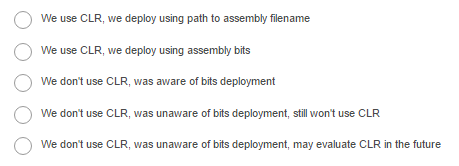
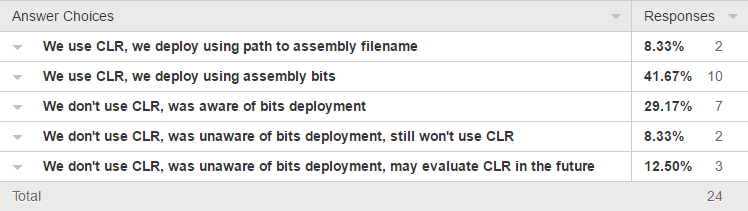
So what’s your experience? My mistaken assumptions kept me from evaluating CLR properly. I wonder if anyone is in the same position I was in and I wonder if this accounts for the low adoption in general of CLR in SQL Server. Answer this survey, Which option best describes you?
I recently learned that when combining multiple operators in a SQL expression, AND has a higher precedence than OR but & has the same precedence as |. I expected the precedence rules for the logical operators to be consistent with the bitwise operators.
Even Stephen Sondheim seemed to struggle with this.
I have a book on my shelf called Practical C Programming published by O’Reilly (the cow book) by Steve Oualline. I still love it today because although I don’t code in C any longer, the book remains a great example of good technical writing.
That book has some relevance to SQL today. Instead of memorizing the full list of operators and their precedence, Steve gives a practical subset:
You’ve heard the advice “write what you know”. I’ve applied that advice to my choice of topic. For the past nine years, I’ve worked for D2L, a fast growing company facing a higher volume of database activity year after year.
We built a system that has handled a peak load of over 50,000 transactions per second. And that’s without using In-Memory OLTP yet. Much of the talk will include lessons we’ve learned and things I wish we knew earlier.
Earlier this week I asked people to help me out prioritizing a list of issues. I was surprised by the number of people who participated. I think I missed an opportunity to crowd-source a large part of my job by including my real issues.
Results
Thanks for participating. After the results started coming in, I realized that my question was a bit ambiguous. Does first priority mean tackle an issue first? Or does a higher numbered issue mean a higher priority? I clarified the question and took that into account for entries that picked sproc naming conventions as top priority.
The results were cool. I expected a variety of answers but I found that most people’s priorities lined up pretty nicely.
For example, even though I wrote a list of issues all with different severity, there were three issues that stood out as most critical: Corrupted databases, a SQL injection vulnerability and No automated backups. Keeping statistics up to date seemed to be the most important non-critical issue.
But there is one issue that I thought had a lot of variety, index fragmentation. I personally placed this one second last. I got a friend to take the survey and I got to hear him explain his choices. He wanted to tackle index fragmentation early because it’s so easily fixable. “It’s low hanging fruit right? Just fix it and move on.”
My friend also pointed out that this technique would work well as an interview technique. Putting priorities in an order is important but even better is that it invites so much discussion about the reasons behind the order.
Speaking of which, go check out Chuck Rummel’s submission. He wins the prize for most thorough comment on my blog.
My Priorities
Here they are:
Corrupted database – serving data is what databases are supposed to do
No automated backups – protect that data from disasters
A SQL injection vulnerability – protect the data from unauthorized users
Stale statistics – serve data efficiently
Cursors – a common cause of performance issues, but I’d want to be reactive
GUID identifiers – meh
NOLOCK hints – meh
Developers use a mix of parameterized SQL and stored procedures – It’s not a performance concern for me
“One thing at a time / And that done well / Is a very good thing / As any can tell”
But life isn’t always that easy is it? I spend a lot of my workday juggling priorities. And I want to compare what I think to others. So I wrote a survey which explores the importance people place on different SQL Server issues. It’s easy to say avoid redundant indexes. But does it follow that it’s more important to clean up redundant indexes before rewriting cursors?
The List
Prioritize this list from greatest concern to least. So if an item appears above another item, then you would typically tackle that issue first.
Corrupted database
A SQL injection vulnerability
Stale statistics
Fragmented indexes
Developers use a mix of parameterized SQL and stored procedures