Part Two: Look at Blocked Process Reports Collected With Extended Events
Part Three
I just met a friend at a SQL Saturday who let me know that he recognizes my name because it was attached to a project I wrote five years ago. The “Blocked Process Report Viewer”. I was impressed. I’m glad to know that it’s still used. So I decided to update it for 2016.
I’ve extended the Blocked Process Report Viewer to look at blocked process reports that were collected with extended events session.
The viewer can consume blocked process report events captured by any extended events session as long as that session has a target of ring_buffer or event_file. For example, if you set up your extended events session the way Jeremiah Peschka did in Finding Blocked Processes and Deadlocks using SQL Server Extended Events. Then you would use the viewer like this:
exec sp_blocked_process_report_viewer
@Source ='blocked_process', -- the name that Jeremiah gave to his xe session
@Type ='XESESSION';
exec sp_blocked_process_report_viewer
    @Source = 'blocked_process', -- the name that Jeremiah gave to his xe session
    @Type = 'XESESSION';
which gives you something like
The value of the blocked process report viewer is that it organizes all the blocked processes into “episodes”. Each episode has a lead blocker which is the process in the front of the traffic jam. Look at that process closely.
Feedback
Let me know how it goes. Tell me if there are any errors or performance issues. I’m especially interested in the performance of the viewer when given extended events sessions that use ring_buffer targets.
Takeaway: When assessing concurrency, performance testing is the primary way to ensure that a system can handle enough load concurrently. Monitoring blocked process reports does not give enough warning to anticipate blocking issues.
Logical Contention
Capacity planning is difficult for DBAs who expect growth. Will there be enough CPU, Memory or I/O to serve the anticipated load? One category falls outside those three, logical contention.
Logical contention is a problem where excessive blocking causes throughput to suffer. It would be great to get advanced warning. One essential strategy is to make use of the blocked process report. The problem is that blocked process reports are an alarm metric, not a guage metric. In other words, the blocked process report can indicate when there is a problem, but it is poor at giving advanced notice.
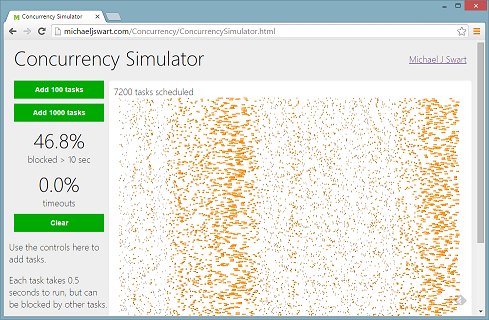
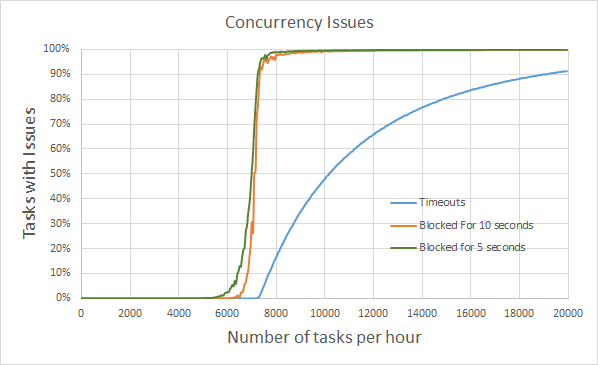
It simulates how well a server can handle tasks that use pessimistic locking (tasks that cannot be run in parallel because they block eachother). It’s amazing to see how nice things seem at 6000 tasks per hour and how quickly things can go wrong by 7000 tasks per hour. Unfortunately this scenario is too familiar. Episodes of excessive blocking tend to be either nonexistent or very painful with no in-between.
Graphically that looks like this:
You’ll notice that even at a five second threshold, the blocked process report gives us little warning. Blocked process reports don’t warn of approaching trouble, they indicate that trouble is here.
How Useful Are Blocked Process Reports Then?
Continue monitoring blocked processes. Knowing that you’ve got concurrency issues is preferable to not knowing. Just keep in mind that it can’t replace performance testing.
Other animations and interactive media by Michael J Swart
Yesterday I had my mind changed about the best way to do concurrency. I describe several methods in Mythbusting: Concurrent Update/Insert Solutions. My preferred method is to increase the isolation level and fine tune locks.
At least that was my preference. I recently changed my approach to use a method that gbn suggested in the comments. He describes his method as the “TRY CATCH JFDI pattern”. Normally I avoid solutions like that. There’s a rule of thumb that says developers should not rely on catching errors or exceptions for control flow. But I broke that rule of thumb yesterday.
By the way, I love the gbn’s description for the pattern “JFDI”. It reminds me of Shia Labeouf’s motivational video.
Okay, I’ll tell you the story.
The Original Defect
So there’s this table. It’s defined something like:
CREATE TABLE dbo.AccountDetails
(
  Email NVARCHAR(400) NOT NULL
    CONSTRAINT PK_AccountDetails PRIMARY KEY (Email),
  Created DATETIME NOT NULL
    CONSTRAINT DF_AccountDetails_Created DEFAULT GETUTCDATE(),
  Etc NVARCHAR(MAX)
)
And there’s a procedure defined something like:
CREATEPROCEDURE dbo.s_GetAccountDetails_CreateIfMissing(
@Email NVARCHAR(400),
@Etc NVARCHAR(MAX))ASDECLARE @Created DATETIME;
DECLARE @EtcDetails NVARCHAR(MAX);
SETTRANSACTIONISOLATIONLEVEL SERIALIZABLE
SET XACT_ABORT ONBEGINTRANSELECT
@Created = Created,
@EtcDetails = Etc
FROM dbo.AccountDetailsWHERE Email = @Email
IF @Created ISNULLBEGINSET @Created =GETUTCDATE();
SET @EtcDetails = @Etc;
INSERTINTO dbo.AccountDetails(Email, Created, Etc)VALUES(@Email, @Created, @EtcDetails);
ENDCOMMITSELECT @Email as Email, @Created as Created, @EtcDetails as Etc
CREATE PROCEDURE dbo.s_GetAccountDetails_CreateIfMissing
(
  @Email NVARCHAR(400),
  @Etc NVARCHAR(MAX)
)
AS

  DECLARE @Created DATETIME;
  DECLARE @EtcDetails NVARCHAR(MAX);

  SET TRANSACTION ISOLATION LEVEL SERIALIZABLE
  SET XACT_ABORT ON
  BEGIN TRAN

    SELECT
      @Created = Created,
      @EtcDetails = Etc
    FROM dbo.AccountDetails
    WHERE Email = @Email

    IF @Created IS NULL
    BEGIN
      SET @Created = GETUTCDATE();
      SET @EtcDetails = @Etc;
      INSERT INTO dbo.AccountDetails (Email, Created, Etc)
      VALUES (@Email, @Created, @EtcDetails);
    END

  COMMIT

  SELECT @Email as Email, @Created as Created, @EtcDetails as Etc
Applications executing this procedure were deadlocking with each other. If you’re keen, try to figure out why before reading ahead. It’s pretty close to the problem described in the Mythbusting post. Specifically this was method 3: increased isolation level.
Initial Fix
So I decided to fine tune locks. I added an UPDLOCK hint:
CREATEPROCEDURE dbo.s_GetAccountDetails_CreateIfMissing(
@Email NVARCHAR(400),
@Etc NVARCHAR(MAX))ASDECLARE @Created DATETIME;
DECLARE @EtcDetails NVARCHAR(MAX);
SETTRANSACTIONISOLATIONLEVEL SERIALIZABLE
SET XACT_ABORT ONBEGINTRANSELECT
@Created = Created,
@EtcDetails = Etc
FROM dbo.AccountDetailsWITH(UPDLOCK)WHERE Email = @Email
IF @Created ISNULLBEGINSET @Created =GETUTCDATE();
SET @EtcDetails = @Etc;
INSERTINTO dbo.AccountDetails(Email, Created, Etc)VALUES(@Email, @Created, @EtcDetails);
ENDCOMMITSELECT @Email as Email, @Created as Created, @EtcDetails as Etc
CREATE PROCEDURE dbo.s_GetAccountDetails_CreateIfMissing
(
  @Email NVARCHAR(400),
  @Etc NVARCHAR(MAX)
)
AS

  DECLARE @Created DATETIME;
  DECLARE @EtcDetails NVARCHAR(MAX);

  SET TRANSACTION ISOLATION LEVEL SERIALIZABLE
  SET XACT_ABORT ON
  BEGIN TRAN

    SELECT
      @Created = Created,
      @EtcDetails = Etc
    FROM dbo.AccountDetails WITH (UPDLOCK)    WHERE Email = @Email

    IF @Created IS NULL
    BEGIN
      SET @Created = GETUTCDATE();
      SET @EtcDetails = @Etc;
      INSERT INTO dbo.AccountDetails (Email, Created, Etc)
      VALUES (@Email, @Created, @EtcDetails);
    END

  COMMIT

  SELECT @Email as Email, @Created as Created, @EtcDetails as Etc
Bail Early If Possible
Okay, so this solution works. It’s concurrent and it performs just fine. I realized though that I can improve this further by avoiding the transaction and locks. Basically select the row and if it exists, bail early:
CREATEPROCEDURE dbo.s_GetAccountDetails_CreateIfMissing(
@Email NVARCHAR(400),
@Etc NVARCHAR(MAX))ASDECLARE @Created DATETIME;
DECLARE @EtcDetails NVARCHAR(MAX);
SELECT @Created = Created, @EtcDetails = EtcFROM dbo.AccountDetailsWHERE Email = @Email;IF(@Created ISNOTNULL)BEGINSELECT @Email as Email, @Created as Created, @EtcDetails as Etc;RETURN;ENDSETTRANSACTIONISOLATIONLEVEL SERIALIZABLE
SET XACT_ABORT ONBEGINTRANSELECT
@Created = Created,
@EtcDetails = Etc
FROM dbo.AccountDetailsWITH(UPDLOCK)WHERE Email = @Email;
IF @Created ISNULLBEGINSET @Created =GETUTCDATE();
SET @EtcDetails = @Etc;
INSERTINTO dbo.AccountDetails(Email, Created, Etc)VALUES(@Email, @Created, @EtcDetails);
ENDCOMMITSELECT @Email as Email, @Created as Created, @EtcDetails as Etc;
CREATE PROCEDURE dbo.s_GetAccountDetails_CreateIfMissing
(
  @Email NVARCHAR(400),
  @Etc NVARCHAR(MAX)
)
AS

  DECLARE @Created DATETIME;
  DECLARE @EtcDetails NVARCHAR(MAX);

  SELECT    @Created = Created,    @EtcDetails = Etc  FROM dbo.AccountDetails  WHERE Email = @Email;   IF (@Created IS NOT NULL)  BEGIN    SELECT @Email as Email, @Created as Created, @EtcDetails as Etc;    RETURN;  END
  SET TRANSACTION ISOLATION LEVEL SERIALIZABLE
  SET XACT_ABORT ON
  BEGIN TRAN

    SELECT
      @Created = Created,
      @EtcDetails = Etc
    FROM dbo.AccountDetails WITH (UPDLOCK)
    WHERE Email = @Email;

    IF @Created IS NULL
    BEGIN
      SET @Created = GETUTCDATE();
      SET @EtcDetails = @Etc;
      INSERT INTO dbo.AccountDetails (Email, Created, Etc)
      VALUES (@Email, @Created, @EtcDetails);
    END

  COMMIT

  SELECT @Email as Email, @Created as Created, @EtcDetails as Etc;
Take A Step Back
Okay, this is getting out of hand. The query shouldn’t have to be this complicated.
Luckily I work with a guy named Chris. He’s amazing at what he does. He questions everything without being a nitpicker (there’s a difference). He read through the Mythbusters post and followed all the links in the comments. He asked whether gbn’s JFDI pattern wasn’t better here. So I implemented it just to see what that looked like:
CREATE PROCEDURE dbo.s_GetAccountDetails_CreateIfMissing
(
  @Email NVARCHAR(400),
  @Etc NVARCHAR(MAX)
)
AS
  BEGIN TRY
    INSERT INTO dbo.AccountDetails Email, Etc
    SELECT @Email, @Etc
    WHERE NOT EXISTS
      ( SELECT * FROM dbo.AccountDetails WHERE Email = @Email );
  END TRY
  BEGIN CATCH
    -- ignore duplicate key errors, throw the rest.
    IF ERROR_NUMBER() NOT IN (2601, 2627) THROW;
  END CATCH

  SELECT Email, Created, Etc
  FROM dbo.AccountDetails
  WHERE Email = @Email;
Look at how much better that looks! No elevated transaction isolation levels. No query hints. The procedure itself is half as long as it used to be. The SQL is so much simpler and for that reason, I prefer this approach. I am happy in this case to use error handling for control flow.
So I checked in the change and updated my pull request. Chris’s last comment before he approved the pull request was “Looks good. Ugly pragmatism FTW.”
As many people will point out, you can’t depend on the order of results without using the ORDER BY clause. So it’s easy to say “Simple! Don’t write code that expects unsorted data to be sorted”. But it’s very difficult to be careful everywhere all the time.
Remember that this is an application problem and is not a SQL problem. We only get into trouble when applications (or people) expect results to be sorted when they’re not. So unless you have a tiny application, or a huge amount of discipline, it’s likely that there is some part of your application that assumes sorted results when it shouldn’t.
Here’s a method I used that attempts to identify such areas, exposing those assumptions. It involves reversing indexes.
If you don’t ask for results to be ordered they may still appear to be ordered. SQL Server will return results in a way that’s convenient and this is often in some index order. So if the indexes are reversed, then the idea is that what’s convenient for SQL Server will be reversed.
Which results are ordered on purpose and which are ordered by luck?
It’s impossible to tell. But after the indexes are reversed:
It’s now apparent.
Reverse the Indexes On A Dev Box
First use this powershell script to generate some SQL. It’s a script adapted from a Stackoverflow answer by Ben Thul “How to script primary key constraints”
Open up the create_indexes.sql script in an editor and swap ASC for DESC and vice versa
Create the reversed indexes
Recreate the foreign keys
That’s it! Now unsorted results will be returned in a format convenient to SQL Server which should be opposite to the original order.
Test
Remember how these ORDER BY assumptions are human or application problems? It’s time to bring them into this process. Test your applications/reports manually, or if you’re fortunate enough to have them, run your automated tests.
I’m one of the fortunate ones. I have access to a suite of automated tests that includes thousands of integration tests. In my case, roughly one percent of them failed after this experiment. Colleagues reactions were varied. They ranged from “That many?” to “That few?”
This experiment cannot identify all ordering assumptions, but it has a good chance at identifying many.
Fix
First let me give some advice on how not to fix this. Don’t begin by indiscriminately sprinkling ORDER BY clauses throughout all your queries. I found the best approach is to handle each problem on a case-by-case basis.
Here are some approaches:
Fix the test For automated tests, sometimes the test itself assumed an order. This is an easy case to deal with.
And don’t forget to double-check the report or UI element that uses the same query. There’s a good chance the UI is making the same assumption as the test.
Order results in the app If you’re using C#, try using Linq’s Enumerable.OrderBy. And if you’re using some other language or reporting framework, you should be able to sort there too.
Order in SQL If necessary order your results using SQL with the ORDER BY clause.
Remember that functions – including those found in default constraints – are not executed simultaneously. This can sneak up on you whenever you have multiple function calls in a single statement or multiple default constraints in a single table.
I recently found a flaky unit test that involved datetime columns. And as Martin Fowler says“Few things are more non-deterministic than a call to the system clock.”
But the cause can be subtle. Two columns with the same default of SYSDATETIME can have different values in the same row. To demonstrate, consider this example.
USE tempdb
GO
-- Create a tableCREATETABLE #Account
(
AccountId BIGINTNOTNULLIDENTITYCONSTRAINT PK_Account PRIMARYKEY,
AccountDeets NVARCHAR(100),
Created DATETIME2 NOTNULLCONSTRAINT DF_Account_Created DEFAULT SYSDATETIME(),
LastModified DATETIME2 NOTNULLCONSTRAINT DF_Account_LastModified DEFAULT SYSDATETIME())
GO
USE tempdb
GO
-- Create a table
CREATE TABLE #Account
(
  AccountId BIGINT NOT NULL IDENTITY
    CONSTRAINT PK_Account PRIMARY KEY,
  AccountDeets NVARCHAR(100),
  Created DATETIME2 NOT NULL
    CONSTRAINT DF_Account_Created DEFAULT SYSDATETIME(),
  LastModified DATETIME2 NOT NULL
    CONSTRAINT DF_Account_LastModified DEFAULT SYSDATETIME()
)
GO
Now create a procedure that inserts a single row into the table.
-- Create a procedureCREATEPROCEDURE #CreateAccount
@AccountDeets NVARCHAR(100)ASINSERT #Account (AccountDeets)VALUES(@AccountDeets);
RETURNSELECTSCOPE_IDENTITY();
GO
-- Create a procedure
CREATE PROCEDURE #CreateAccount
  @AccountDeets NVARCHAR(100)
AS

INSERT #Account (AccountDeets)
VALUES (@AccountDeets);

RETURN SELECT SCOPE_IDENTITY();
GO
Insert rows by executing the procedure several times and look for differences between the two datetime columns.
SETNOCOUNTON;
--Create 10000 rows in #Accountdeclare @i int=0;
while(@i <10000)beginexec #CreateAccount N'details';
set @i+=1;
endselect Created, LastModified
from #Account
where Created <> LastModified;
SET NOCOUNT ON;

--Create 10000 rows in #Account
declare @i int = 0;

while (@i < 10000)
begin
   exec #CreateAccount N'details';
   set @i+=1;
end

select Created, LastModified
from #Account
where Created <> LastModified;
This gives something like:
Created
LastModified
2016-01-18 09:18:15.271
2016-01-18 09:18:15.272
2016-01-18 09:18:15.380
2016-01-18 09:18:15.381
2016-01-18 09:18:15.387
2016-01-18 09:18:15.388
2016-01-18 09:18:15.480
2016-01-18 09:18:15.481
If I want to depend on these values being exactly the same, I can’t count on the default values. The procedure should look like this:
I want to use extended events to store recent deadlock graphs. And I want to create an asynchronous file target instead of using the existing system_health session. I don’t like the system_health target for a couple reasons. It’s too slow to query and it rolls over too quickly and it disappears after server restarts.
So I searched the web for a solution and when I couldn’t find one, I wrote my own solution, I tested it and I decided to blog about it.
Guess what? Apparently I “reinvented the wheel”. The extended events session I created is equivalent to one that Jeremiah Peschka wrote two years ago in Finding Blocked Processes and Deadlocks using SQL Server Extended Events. The embarrassing thing is that in Jeremiah’s article, he references a tool I wrote. And the first comment was written by yours truly.
So go read Jeremiah’s article, it’s really well written. What follows is my solution. The only difference is that mine only focuses on deadlocks. Jeremiah’s focuses on both deadlocks and blocked processes.
Create The Session
Here’s the session that I use. It
has five rollover files so that a couple server restarts don’t lose any recent deadlock graphs
uses an asynchronous_file_target which I prefer over the ring buffer,
and it cleans itself up over time. I don’t need a maintenance job to remove ancient data
declare @filenamePattern sysname;

SELECT @filenamePattern = REPLACE( CAST(field.value AS sysname), '.xel', '*xel' )
FROM sys.server_event_sessions AS [session]
JOIN sys.server_event_session_targets AS [target]
  ON [session].event_session_id = [target].event_session_id
JOIN sys.server_event_session_fields AS field
  ON field.event_session_id = [target].event_session_id
  AND field.object_id = [target].target_id
WHERE
    field.name = 'filename'
    and [session].name= N'capture_deadlocks'

SELECT deadlockData.*
FROM sys.fn_xe_file_target_read_file ( @filenamePattern, null, null, null)
    as event_file_value
CROSS APPLY ( SELECT CAST(event_file_value.[event_data] as xml) )
    as event_file_value_xml ([xml])
CROSS APPLY (
    SELECT
        event_file_value_xml.[xml].value('(event/data/value/deadlock/process-list/process/@spid)[1]', 'int') as first_process_spid,
        event_file_value_xml.[xml].value('(event/@name)[1]', 'varchar(100)') as eventName,
        event_file_value_xml.[xml].value('(event/@timestamp)[1]', 'datetime') as eventDate,
        event_file_value_xml.[xml].query('//event/data/value/deadlock') as deadlock
  ) as deadlockData
WHERE deadlockData.eventName = 'xml_deadlock_report'
ORDER BY eventDate DESC
The dmv dm_exec_query_stats doesn’t track stats for OPEN CURSOR statements. This is a problem because the OPEN statement is the one that “runs” your query and if you rely on these stats to monitor performance, then cursor performance is hidden from you.
Cursors have a bad reputation, probably well-deserved. When I see a cursor, I see someone trying to use SQL as a programming language. It’s not what SQL is good at and there’s often a better way.
The pragmatist in me doesn’t care too much. If a cursor is performing well and not causing too much trouble, then fixing will not be a priority. But my monitoring solution doesn’t show me how expensive those cursors are! I realize I have no idea what my cursors are doing or how expensive they are.
Cursor Statements
Developers use a number of SQL Statements when writing cursors: DECLARE, OPEN and FETCH. Performance-wise, the DECLARE CURSOR statement takes no time. The OPEN statement runs the query and puts the results in a temporary table. And the FETCH statement reads the next row from the table.
If a cursor’s query is untuned, it’s the OPEN statement that consumes the most resources.
Example
The OPEN statement is missing from sys.dm_exec_query_stats. I want to demonstrate that. Run the following on a dev box.
-- fresh start:DBCC FREEPROCCACHE
SETSTATISTICS IO ONSETNOCOUNTON;
GO
-- declare a cursor with an arbitrary query that reads a little bitDECLARE @ChecksumValue int;
print'declare cursor:'DECLARE FiveRows CURSORLOCAL FAST_FORWARD FORSELECTTOP5CHECKSUM(*)FROM INFORMATION_SCHEMA.COLUMNSORDERBYCHECKSUM(*)-- this statement actually runs the query that was just declaredprint'open cursor:'OPEN FiveRows
-- fetch the five rows one at a timeDECLARE @i INT=0;
WHILE( @i <5)BEGINprint'fetch cursor:'FETCHNEXTFROM FiveRows INTO @ChecksumValue
SET @i +=1;
ENDCLOSE FiveRows
DEALLOCATE FiveRows;
GO
-- Now look at dm_exec_query_text to see what's in thereSELECT
qs.query_hashas QueryHash,
qs.total_logical_reads+ total_logical_writes as TotalIO,
qs.execution_countas Executions,
SUBSTRING(
st.[text],
qs.statement_start_offset/2,
(qs.statement_end_offset- qs.statement_start_offset)/2)as SQLText
FROM sys.dm_exec_query_stats qs
OUTER APPLY sys.dm_exec_sql_text(qs.[sql_handle]) st
ORDERBY qs.total_logical_reads+ total_logical_writes DESCOPTION(RECOMPILE)
-- fresh start:
DBCC FREEPROCCACHE
SET STATISTICS IO ON
SET NOCOUNT ON;
GO

-- declare a cursor with an arbitrary query that reads a little bit
DECLARE @ChecksumValue int;

print 'declare cursor:'
DECLARE FiveRows CURSOR LOCAL FAST_FORWARD FOR
  SELECT TOP 5 CHECKSUM(*)
  FROM INFORMATION_SCHEMA.COLUMNS
  ORDER BY CHECKSUM(*)

-- this statement actually runs the query that was just declared
print 'open cursor:'
OPEN FiveRows

-- fetch the five rows one at a time
DECLARE @i INT = 0;
WHILE( @i < 5 )
BEGIN
    print 'fetch cursor:'
    FETCH NEXT FROM FiveRows INTO @ChecksumValue

    SET @i += 1;
END

CLOSE FiveRows
DEALLOCATE FiveRows;

GO

-- Now look at dm_exec_query_text to see what's in there
SELECT
    qs.query_hash as QueryHash,
    qs.total_logical_reads + total_logical_writes as TotalIO,
    qs.execution_count as Executions,
    SUBSTRING(
        st.[text],
        qs.statement_start_offset / 2,
        (qs.statement_end_offset - qs.statement_start_offset) / 2
        ) as SQLText
FROM sys.dm_exec_query_stats qs
OUTER APPLY sys.dm_exec_sql_text(qs.[sql_handle]) st
ORDER BY qs.total_logical_reads + total_logical_writes DESC
OPTION (RECOMPILE)
The results of that last query show that the OPEN statement is missing from dm_exec_query_stats:
If your cursors are defined inside a procedure, you can inspect dm_exec_procedure_stats. This is not an option when cursors are run as ad-hoc SQL (outside a procedure). Remember that you’ll only get the performance numbers for the entire execution of the procedure. This view doesn’t tell you which statements inside the procedures are expensive.
There’s good news if your monitoring solution is based on extended events or SQL Trace. You’ll be able to monitor cursors correctly.
If you plan to use Query Store, the new feature in SQL Server 2016, then you’ll be able to see statistics for the OPEN query. Query Store doesn’t store statistics for the DECLARE statement. But that’s acceptable because DECLARE statement don’t use any resources.
Summary
Use the following to keep everything straight.
DECLARE CURSOR
OPEN CURSOR
FETCH CURSOR
dm_exec_query_stats
(queryhash = 0x0)
dm_exec_procedure_stats (if run as sproc)
(aggregated)
SQL Trace (e.g. Profiler)
SET STATISTICS IO ON
Show Plan
*
Query Store (2016)
*
* This is acceptable because we don’t care about the performance of DECLARE statements.
Some years ago, a friend of mine told me I should check out the company he worked for. There was a position that was focused solely on SQL Server. At the time I didn’t think of myself as a database developer, I was a software developer with a knack for SQL. But I applied and it wasn’t long before I signed on.
It’s been over eight years and I still work for D2L, a vendor best known for its Learning Management System educational software.
I get to show up to a different job every day. The variety is amazing. Officially though I’ve only had positions with four distinct teams.
Job 1: In House Consultant
When I started at D2L my position was Senior Software Developer, but really I just wanted to be know as the database guy. The first couple years were about learning SQL Server and building reputation. A number of things helped with my reputation at D2L.
A friend of mine, Richard, left D2L leaving a sort of gap behind. Richard was known by many as the developer to talk to for answers. After he left, people began wondering who to talk to and I saw that was an opportunity for me. I tried to fill those shoes, at least for database issues.
Firefighting. Unfortunately, putting out a fire is more visible than preventing one in the first place. But I had enough opportunities to do both.
Eventually I felt some sort of obligation to give back to the database community and so I started this blog. The act of blogging can actually help clarify fuzzy ideas.
As D2L grew, so did the separation of duties. DBAs do DBA work and developers develop. But as a vendor, developers retain a lot of the control and responsibilities typically associated with DBAs. For example, at D2L, developers are responsible for indexing a table properly. It’s part of the product. We also have a large say in deployment, performance, scalability and concurrency.
So I had several years of fantastic on-the-job training facing new scalability challenges gradually. And as time went on, I worked on more preventative and proactive efforts.
Job 2: Business Intelligence
Then I chose to work with an analytics team. Everyone was talking about “Big Data” which was the new buzzword and I was excited about the opportunity to learn how to do it right.
It was a project based in part on Kimball’s approach to data warehousing. I worked with a great team and faced a number of challenges.
My reputation as the database guy still meant that I was getting asked to tackle problems on other teams. But I didn’t see them as interruptions. Eventually those “distractions” just showed me that I missed the world of relational data. So a year later, I changed jobs again.
Job 3: Project Argon*
So I joined a team called Argon. Our job was to overhaul the way we deliver and deploy our software. It was exciting and we enjoyed a lot of successes. One friend Scott MacLellan writes a lot more about what we did on his own blog. For example “Deploys Becoming Boring”
For my part I had fun writing
A tool that asserted schema alignment for any given database for some expected version of our product.
A tool that could efficiently cascade deletes along defined foreign keys in batches (giving up atomicity for that privilege).
I still found myself working as an internal consultant. Still helping out with production issues and still having a blast doing it.
*Fun fact, Argon is the third project in my career with a noble gas for a codename, the other two being Neon and Xenon
Job 4: Samurai Team
Then at the end of 2015 I changed jobs again. This is where it gets good. All that internal consulting I’ve been doing? That’s my full-time job now.
A couple months ago I joined a brand new team with an initial mandate to “make our product stable”. We’re given the autonomy to determine what that means and how best to carry it out. I’m focused on the database side of that and I’m having a great time.
It’s still mainly technical work, but anything that increases software stability is in scope.
If internal training is needed, we can provide that. That’s in scope.
If increased Devops is needed (blurring the lines or increasing collaboration between devs and DBAs) we do that too.
What’s fun and what’s effective don’t often overlap, but at the moment they do.
Continued Blog Writing!
And I get to write and draw about it as I have been for over five years! Speaking of which, I got some news January 1st:
You’re going to see more content coming out of this site. Most of my posts are technical and they’re based on SQL lessons learned in a very busy OLTP SQL Server environment. I do my best to make each one accessible for everyone without shying away from tricky topics.
If the posts come too frequently, you’re going to be tempted to “mark all as read”. But I think most readers will easily be able to keep up with one post a week.
In 2016, you can count on a blog post every Wednesday. But how do you want to get them?
Via Twitter
If you found my site via twitter, consider subscribing if you want to keep up with this site.
Via RSS
If you’ve already subscribed to the RSS feed, you’re going to continue to get them as you always have, but the world seems to be moving away from RSS.
Via email (new!)
And if you want to get these posts in your inbox, I’ve set up a mailing list. There’s a link at the top of my web site for that. (The mailing list is new, I set it up with tips from Kendra Little).
Continued Illustrations
Those familiar with this site know that I like to draw. It’s fun to combine that hobby with the blog. And I’m going to continue to include illustrations when I can.
Now Using SVG
One change is that I’m going to start including the photos as svg files instead of png. Basically I’m switching from raster to vector illustrations. The file sizes are slightly larger, but they’re still measured in KB. If you do have trouble looking at an illustration, let me know (include device and browser version).
Have fun zooming! If you do, you get to see lots of detail (while I get to notice the flaws).
Talking About Parameter Sniffing
I wrote a talk on parameter sniffing called “Something Stinks: Avoiding Parameter Sniffing Issues & Writing Consistently Fast SQL”.
I gave the talk to work colleagues and I’m really happy with how it went. One No-SQL colleague even told me afterward “I miss relational data.”
You get to see it if you come to Toronto next Tuesday (January 12, 2016) where I’ll be giving the talk for the user group there. Register here.
Or you get to see it if you come to Cleveland for their SQL Saturday (February 6, 2016). Register for that here.
Microsoft’s docs for XACT_ABORT are pretty clear. The setting determines whether “SQL Server automatically rolls back the current transaction when a statement raises an error”.
And in nearly every scenario I can think of that uses a transaction, this automatic rollback is the desired behavior. The problem is that it’s not the default behavior. And this leads to Dan Guzman’s advice where he strongly recommends that SET XACT_ABORT ON be included “in all stored procedures with explicit transactions unless you have a specific reason to do otherwise.”
What Could Go Wrong?
When a statement inside a transaction fails (for whatever reason) and XACT_ABORT is set to off, then…
That transaction is abandoned.
Any locks taken during that transaction are still held.
Even if you close the connection from the application, .NET’s connection pooling will keep that connection alive and the transaction on SQL Server stays open.
Fortunately, if someone reuses the same database connection from the connection pool, the old transaction will be rolled back.
Unfortunately developers can’t count on that happening immediately.
Abandoned transactions can cause excessive blocking leading to a concurrency traffic jam.
Also, abandoned transactions can interfere with downstream solutions. Specifically ones that depend on the transaction log. Transaction logs can grow indefinitely. Replication solutions can suffer. If RCSI is enabled, the version store can get out of hand.
Some (or all) of those things happened to us last week.
Steps To Take
Here are some things you can do:
Do you have abandoned transactions right now?
It’s not too hard to identify these abandoned transactions:
-- do you have abandoned transactions?select p.spid, s.textas last_sql
from sys.sysprocesses p
cross apply sys.dm_exec_sql_text(p.sql_handle) s
where p.status='sleeping'and p.open_tran>0
-- do you have abandoned transactions?
select p.spid, s.text as last_sql
from sys.sysprocesses p
cross apply sys.dm_exec_sql_text(p.sql_handle) s
where p.status = 'sleeping'
and p.open_tran > 0
Also if you use sp_whoisactive, you can identify these processes as those with a sleeping status and at least one open transaction. But there’s a trick I use to identify these quickly. The sql_text value in the output of sp_whoisactive will typically begin with CREATE PROCEDURE. When I see that, I know it’s time to check whether this connection is sleeping or not.
SET XACT_ABORT ON
Follow Dan Guzman’s advice to include SET XACT_ABORT ON in all stored procedures with explicit transactions.
You can actually find the procedures in your database that need a closer look
-- find procedures that could suffer from abandoned transactionsSELECT*FROM sys.procedureswhere OBJECT_DEFINITION(object_id)like'%BEGIN TRAN%'and OBJECT_DEFINITION(object_id)notlike'%XACT_ABORT%'orderby name
-- find procedures that could suffer from abandoned transactions
SELECT *
FROM sys.procedures
where OBJECT_DEFINITION(object_id) like '%BEGIN TRAN%'
and OBJECT_DEFINITION(object_id) not like '%XACT_ABORT%'
order by name
Set XACT_ABORT ON server-wide
If you choose, you can decide to set the default value for all connections to your server. You can do that using Management Studio:
Or via a script:
-- turn the server's xact_abort default ondeclare @user_options_value bigint;
select @user_options_value =cast(valueasbigint)from sys.configurationswhere name ='user options';
set @user_options_value = @user_options_value | 0x4000;
execsp_configure N'user options', @user_options_value;
RECONFIGUREWITH OVERRIDE;
-- (if necessary) turn the server's xact_abort default offdeclare @user_options_value bigint;
select @user_options_value =cast(valueasbigint)from sys.configurationswhere name ='user options';
set @user_options_value = @user_options_value & 0x3fff;
execsp_configure N'user options', @user_options_value;
RECONFIGUREWITH OVERRIDE;
-- turn the server's xact_abort default on
declare @user_options_value bigint;
select @user_options_value = cast(value as bigint)
from sys.configurations
where name = 'user options';
set @user_options_value = @user_options_value | 0x4000;
exec sp_configure N'user options', @user_options_value;
RECONFIGURE WITH OVERRIDE;

-- (if necessary) turn the server's xact_abort default off
declare @user_options_value bigint;
select @user_options_value = cast(value as bigint)
from sys.configurations
where name = 'user options';
set @user_options_value = @user_options_value & 0x3fff;
exec sp_configure N'user options', @user_options_value;
RECONFIGURE WITH OVERRIDE;
Code Review
I love code reviews. They’re more than just a tool for improving quality. They’re learning opportunities and teaching opportunities for all involved.
Last week, I invited readers to have a look at a procedure in a post called Code Review This Procedure. I was looking for anyone to suggest turning on XACT_ABORT as a best practice. It’s a best practice where I work, but things like this slip through. We should have caught this not just during testing, but during development. It’s obvious with hindsight. But I wanted to determine how obvious it was without that hindsight. I guess it was pretty subtle, the XACT_ABORT was not mentioned once. That’s either because the setting is not often used by most developers, or because it is easily overlooked.
But here are some other thoughts that readers had:
Concurrency
Many people pointed at concurrency and transaction isolation levels as a problem. It turns out that concurrency is very hard to do right and nearly impossible to verify by inspection. In fact one of my favorite blog posts is about getting concurrency right. It’s called Mythbusting: Concurrent Update/Insert Solutions. The lesson here is just try it.
Cody Konior (blog) submitted my favorite comment. Cody writes “I often can’t disentangle what the actual impact of various isolation levels would be so I go a different route; which is to create a quick and dirty load test”. I can’t determine concurrency solely by inspection either, which is why I never try. Cody determined that after hammering this procedure, it never failed.
He’s entirely right. Concurrency is done correctly here. Ironically, most of the fixes suggested in other people’s code reviews actually introduced concurrency issues like deadlocks or primary key violations.
People also suggested that blocking would become excessive. It turns out that throughput does not suffer either. My testing framework still managed to process 25,000 batches per second on my desktop without error.
Validating inputs
Some people pointed out that if NULL values or other incorrect values were passed in, then a foreign key violation could be thrown. And they suggested that the procedure should validate the inputs. But what then? If there’s a problem, then there are two choices. Choice one, raise no error and exit quietly which is not ideal. Or choice 2, raise a new error which is not a significant improvement over the existing implementation.
Avoiding the transaction altogether
It is possible to rewrite this procedure without using an explicit transaction. Without the explicit transaction, there’s no chance of abandoning it. And no chance of encountering the trouble that goes with abandoned transactions. But it’s still necessary to worry about concurrency. Solutions that use single statements like MERGE or INSERT...WHERE NOT EXISTS still need SERIALIZABLE and UPDLOCK.
Error handling
I think Aaron Mathison (blog) nailed it: I’m just going to quote his review entirely:
Since your EVENT_TICKETS table has required foreign keys (evidenced by NOT NULL on all columns with foreign key references) the proc should be validating that the input parameter values exist in the foreign key tables before trying to insert into EVENT_TICKETS. If it doesn’t find any one of them it should throw an error and gracefully rollback the transaction and return from the proc.
The way it’s designed currently I think you could get an error on inserting to EVENT_TICKETS that would fail the proc and leave the transaction open.