Michael J. Swart

February 13, 2014

Troubleshooting Concurrency – A Demo

Filed under: Miscelleaneous SQL,SQLServerPedia Syndication,Technical Articles — Michael J. Swart @ 10:00 am

Testing Concurrency

So you’ve read about how I generate concurrent activity by calling s_DoSomething super often. And you’ve even seen examples of how I define s_DoSomething. Now, you can watch me put all that stuff in action in this screencast.

Then download demo scripts and other files by clicking TroubleshootingConcurrency.zip and then Ctrl+S to save.

Click play and follow along.

The Transcript:

Intro

Hey everyone,
So I’ve posted a couple articles about ways to troubleshoot concurrency problems.
Now I want to demo what that looks like in action.
So what I’m going to do, I’m going to take a common concurrency problem.
In this case, I’m going to tackle the dreaded deadlock and I’m going to investigate the problem and I want to show you the actions that I take so you can see what I’m doing.
And I’ll be using my concurrency generator to help me test a solution that I come up with.
Ready? Here we go

Identify Deadlock To Troubleshoot

So now what I’m gonna do is I’m going to be troubleshooting a deadlock or a set of deadlocks.
And just to set up the scenario a bit, I would normally attack this problem if I’m handed a set of deadlocks to troubleshoot.
In this case <let’s look in here> what I have is a set of deadlock graphs.
Each graph is a file which contains a whole bunch of information about an instance of a deadlock that SQL Server detected and dealt with.
Lets take a look at one.
I’m going to open up in SQL Server Management Studio and first thing you notice is that there are four ovals and four rectangles.
The ovals are processes and the rectangles are resources.
The ovals are fighting over access to the resources and they happen to be fighting in a circle so they get deadlocked.
No one can do anything.
Everyone’s waiting on everybody else.
And you can actually see that SQL Server detected and chose this process as the deadlock victim.
All right, now that’s four processes.
Because I happen to know that each one of these deadlock graphs indicates the same problem that I’m trying to troubleshoot, I’m going to pick a deadlock graph that’s actually smaller.
I’m going to pick graph 112 and open it.
Yeah, I can deal with this.
This one only has two processes fighting over two resources.
This process owns an exclusive lock on this key lock.
I like to think of key locks as a row, just mentally.
And this one owns an exclusive lock on this row up here.
But they’re both waiting for the other guy to release that so they can get a shared lock on it.
Now shared locks and exclusive locks are mutually exclusive.
They are incompatible and so that’s why we wait.
So let’s look at the specifics.
This resource is a key lock which means it’s a row in the table MyPeople and that table’s in the schema Person which is in the database Adventureworks.
In particular it’s got an exclusive lock on a row in an index called pk_Person_MyPeople.
Because of the naming convention, I happen to know this is a primary key.
And it looks like this resource is the same kind of row, or the same kind of key lock.
And the processes, what do we know about this?
Not much. It’s running a stored procedure inside database 9 which is Adventureworks and the ObjectId of the procedure is given there.
I don’t know much else about that yet.
I do know that this process was running the same procedure.
Great, so I think now it’s time to look a little bit closer at this deadlock.

Find Root Cause

So the way I dig deeper into these deadlock graphs is by opening up these files in an xml editor.
It turns out that these deadlock graphs are simply defined as xml.
So you can open this up in notepad or your favorite xml editor.
I’m going to use Visual Studio, because that’s what I like to use.
There it is. Right away, you notice that it’s got the same information.
There’s the processes, but it’s got a lot more details.
So before we knew that this procedure…
Now we know that not only is this procedure called Adventureworks.dbo.s_Person_MyPeople_Delete, but that it was running that query when it deadlocked.
We also know that the other procedure was running the same thing s_Person_MyPeople_Delete.
I want to find out more about this procedure because it was the thing that was deadlocking.
So I’m going to copy. That’s in the clipboard now. I’m going to use Management Studio to be able to do that.
So (sp_helptext and results-to-text, f5) there’s the definition, because we’re connected to Adventureworks.
It’s a very simple statement. DELETE Person.MyPeople WHERE BusinessEntityId = @BusinessEntityId.
Now it’s very unusual for a procedure this small to participate in a deadlock.
Especially when Person.MyPeople …
Let’s look at this (results to grid alt+f1)
Okay, there’s the indexes… especially… this table has a clustered unique index on BusinessEntityId.
So I know that something else is going on here.
Maybe there’s a trigger
Or maybe there’s an indexed view on Person.MyPeople that needs to be updated every time there’s a modification.
Or maybe there’s a foreign key that needs to be enforced.
Something has to explain why after a modification, it continues to want to read other different rows in the same table.
In order to find out more, I’m actually going to look at the execution plan.
So (let’s copy paste and let’s see) I’m going to highlight that and display estimated execution plan.
Alright there we go, this gives me a lot more information.
Here are the things I notice.
There’s a missing index warning of course.
It looks like my unindexed foreign key theory is looking better.
Cause look, there’s the delete.
It goes into the table spool, the rows that are about to be deleted.
It comes out there and it looks … for each row, it makes sure that it scans the table in order to find … let’s see … Mentorid.
It’s looking for Mentorid.
It wants to assert that there are no rows where Mentorid is pointing to BusinessEntityId.
So my guess is that looking at the missing index details… sure enough it wants an index on MentorId.
It’s pretty clear to me that this table needs to enforce… (results-to-grid, alt+f1)
It needs to enforce this foreign key fk_MyPeople_MyPeople where MentorId references BusinessEntityId.
So it’s a foreign key to itself and it needs to scan the whole table in order to enforce that foreign key.
That’s looking like my root cause and I believe that adding the missing index that’s suggested here will help solve my deadlock problem.
But how do we know for sure? That’s next.

Verify Solution With Concurrency Generator

Okay, where are we?
We looked a little at this procedure s_person_MyPeople_delete and in particular, this query, this delete statement that was giving us some deadlock problems.
And we have a pretty good idea of its root cause.
Basically, this statement needed to scan Person.MyPeople in order to enforce a foreign key, a self referencing foreign key.
And it’s that reason that it’s participating in deadlocks.
So it’s my theory that if we have an index on MentorId that’s suggested in these missing index details.
If we create that index, it will not only speed up this query, but it will help concurrency and avoid deadlocks and that’s the solution I’m recommending.
But before I can say that I nailed this problem, I need to reproduce it and see that my fix solves the problem.
And I can do that using my load generator that I’ve been talking about in my blog lately.
First I want to define an s_DoSomething in tempdb. Let’s create
(use tempdb)
And I’m just going to modify an example from my blog.
And I’m going to alter a procedure s_DoSomething
Now I only care about an integer parameter right?
Because the stored procedure I care about only has the one parameter.
Let’s change it. There that looks pretty good.
But I actually want to modify that value.
In order to do that let’s look at Person.MyPeople
I’m going to look at the range of values. (max(businessentityid) and max(mentorid))
Let’s see how that does.
That’s interesting, so the largest MentorId is 10388.
So i want my integer value to be at least that and the range is that … so that range.
Okay, so just to avoid off by one errors, I’m going to call that nine and I’m going to shrink that range a bit.
So that sounds good. Let’s create it.
Oh, it doesn’t exist yet. There we go. That sounds good.
Now that s_dosomething is defined, I want to call it a lot of times concurrently.
This is done with the utility that I have.
This is the concurrency launcher and you can look at the definition of it, which is in my blog.
And after it’s compiled, I’m going to launch it.
And we wait a little while, and oh look there’s a deadlock and as things start blocking up, I expect a few more.
More blocking, more deadlocks, more, more, yeah, there we go.
Okay, I would say that we reproduced the problem.
I’m going to cancel that.
Let’s launch it again, just to make sure.
Deadlock, deadlock, deadlock deadlock, ahh, very good. Isn’t that great?
I can reproduce this problem at will.
Let’s see if my theory is sound.
My theory is that if I create this index (call it ix_myindex) name it something better later. (Tada)
My theory is that once that’s created, I should no longer see any concurrency problems.
Let’s launch it again.
I’m hoping to see nothing,
It’s looking pretty good.
Wow, It completed.
So It completed which tells me that it has executed a procedure 500000 times.
All concurrently 50 at a time without a single deadlock.
That is encouraging news.
So now I would feel comfortable recommending this index as a solution to the set of deadlocks that I was troubleshooting.

Lemme explain… No there’s no time, Lemme Sum Up

So in conclusion, that’s an example of how I use my utility.
I find it useful enough that I’ve added a shortcut to my windows taskbar.
That gives me one-click concurrent database activity.
It helps me look closer at issues where processes suffer from unlucky timing or other problems that are hard to reproduce because of fussy concurrency conditions.
I hope you found this useful.

Cheers.

January 30, 2014

Building Concurrency Tests

Testing Concurrency

So last week, I explained different ways to generate concurrent activity. I have my own favorites, but you may have your own. So pick your favorite method; whichever method you picked, it will help you call the procedure s_DoSomething super-often.

Now comes the task of defining the procedure s_DoSomething. It can be whatever you like depending on what functionality you want to test or exercise. I want to demonstrate some patterns that I follow when I define that procedure. Those patterns all start with …

the Basic Definition

To test the concurrency of a single procedure just call it:

use tempdb
GO
 
CREATE PROCEDURE dbo.s_DoSomething AS
 
EXEC Adventureworks2012.dbo.uspGetManagerEmployees 14;

Of course, I could have changed the framework to call my procedure directly but I don’t out of habit. I always leave s_DoSomething in tempdb hard-coded in the framework.

With Arbitrary Parameter Values

Often the procedures I want to test are defined with parameters. If variety is important, but the parameter values are not, then that’s when the random tricks come in:

ALTER PROCEDURE dbo.s_DoSomething AS
 
DECLARE @someString nvarchar(100) = cast(newid() as nvarchar(100));
DECLARE @someInt int = RAND() * 100;
DECLARE @someDate datetime = dateadd(MINUTE, RAND() * 10000, getdate());
DECLARE @someLongerString nvarchar(1000) = REPLICATE(@someString,20);
 
EXEC Adventureworks2012.dbo.usp_ProcWithParameters
	@someString, @someInt, @someDate, @someLongerString;

With Less Arbitrary Parameter Values

Check out this next example. Pulling a value from the target database is often preferable to calling the procedure with a random integer value.

ALTER PROCEDURE dbo.s_DoSomething AS
 
DECLARE @BusinessEntityId int;
 
SELECT TOP 1 @BusinessEntityId = BusinessEntityID 
FROM AdventureWorks2012.HumanResources.Employee
ORDER BY newid();
 
EXEC AdventureWorks2012.dbo.uspGetEmployeeManagers @BusinessEntityId;

Calling More Than One Procedure

It’s as simple as calling one after the other. But sometimes I want the frequency of the calls “weighted”.

For example, I want to have a DELETE, INSERT and UPDATE statements called 10% of the time each. The remaining 70% of the time I want to call a SELECT statement. Then I have something like:

ALTER PROCEDURE dbo.s_DoSomething AS
 
declare @r int = RAND() * 10;
 
IF (@r = 0)
  -- delete 10% of the time
  DELETE AdventureWorks2012.Person.BusinessEntity
  WHERE BusinessEntityID = CAST(RAND()*1000 as INT);
 
IF (@r = 1)
  -- insert 10% of the time
  INSERT AdventureWorks2012.Person.BusinessEntity (rowguid)
  VALUES (newid());
 
IF (@r = 2)
  -- update 10% of the time
  UPDATE AdventureWorks2012.Person.BusinessEntity
  SET rowguid = newid()
  WHERE BusinessEntityID = CAST(RAND()*1000 as INT);
 
IF (@r > 2)
  -- select the rest of the time
  SELECT BusinessEntityId, rowguid, ModifiedDate
  FROM AdventureWorks2012.Person.BusinessEntity
  WHERE BusinessEntityID = CAST(RAND()*1000 as INT);

Counting Errors Concurrently

I want to track (server side) how often s_DoSomething fails. But I don’t want tracking to be a concurrency bottleneck itself. Here’s a cool trick for that:
First define these procedures:

create procedure dbo.s_IFailed as
go
 
create procedure dbo.s_IPassed as
go
 
alter procedure dbo.s_DoSomething as
 
begin try
    declare @i int = rand() * 10;
    select @i = 1 / @i -- might divide by 0!
    exec dbo.s_IPassed;
end try
begin catch
    exec dbo.s_IFailed;
end catch

This lets me use DMVs to monitor the success rate because I can check the execution count of my dummy procedures. For example,

exec sp_recompile 'dbo.s_IFailed'; -- reset counts from other tests.
exec sp_recompile 'dbo.s_IPassed';
go
 
/* run concurrent test here, or...*/
set nocount on; 
exec dbo.s_DoSomething;
go 10000
 
select object_name(object_id), execution_count 
from sys.dm_exec_procedure_stats
where object_name(object_id) in ('s_IFailed','s_IPassed')
/*
--         count
s_IPassed   9031
s_IFailed    969
*/

This relies on the DMV sys.dm_exec_procedure_stats which was introduced in 2008. It’s like a cheap do-it-yourself, performance counter.

Next

Next week I want to show a demo. I want to show this technique in action. I’ll be troubleshooting a common concurrency problem, the deadlock.

January 23, 2014

Generating Concurrent Activity

Filed under: Miscelleaneous SQL,SQL Scripts,SQLServerPedia Syndication,Technical Articles — Michael J. Swart @ 10:21 am
Testing Concurrency

I’ve discovered that DBAs use different methods to accomplish what amounts to the same thing: Generating concurrent activity on a server. I want to explore a number of methods I’ve seen. For each method, I want to call one particular procedure, many times at once, and often… Oh, and for free.

Why are we doing this?

  • For Testing: The whole point is to generate concurrent activity on the server. Testing with this kind of activity is one of the only ways to avoid resource contention issues.
  • For Demos: Concurrency issues are so common and so varied, that it’s not surprising how often we see demos that depend on this kind of generated database activity.
  • For Troubleshooting: This is my favorite reason. A concurrency issue can’t be fixed well unless it can be reproduced reliably on some test environment. That’s why the methods below have a spot on my troubleshooting toolbelt.

The whole idea is to get many workers active on SQL Server at once.

The exocomps were smart enough to exit on their own

For each method below, look out for the place where I specify these “parameters”

  • Number of virtual workers (50 in my example)
  • Number of iterations (for instance 10,000)
  • Connection string
  • Procedure to execute (s_DoSomething in my case)

One other thing to watch for is the overhead that this tool puts on the machine. Ideally, the method is suitable to run this from the same test environment that the SQL Server sits on. So I want my method to be fairly lightweight. This means that it’s best to handle iterations on SQL Server which cuts down on overhead associated with opening connections. So in most cases, instead of

exec dbo.s_DoSomething

I have

declare @i int = 0; while (@i < 10000) begin exec dbo.s_DoSomething; set @i+= 1; end

Notepad + DOS Method

I adapted this method from a clever trick I saw once. It was Paul Randal giving a demo on tempdb contention.  You can find a video of that demo by visiting this newsletter.
It’s a simple idea. You have two batch files, the first is called Run.bat:

echo off
sqlcmd -S MYSERVER\MYINSTANCE -E -Q "set nocount on; declare @i int = 0; while (@i < 10000) begin exec tempdb.dbo.s_DoSomething; set @i+= 1; end" > NUL
exit

and the second is called Run50.bat:

start run.bat
start run.bat
start run.bat
start run.bat
start run.bat
start run.bat
start run.bat
start run.bat
start run.bat
start run.bat
start run.bat
start run.bat
start run.bat
start run.bat
start run.bat
start run.bat
start run.bat
start run.bat
start run.bat
start run.bat
start run.bat
start run.bat
start run.bat
start run.bat
start run.bat
start run.bat
start run.bat
start run.bat
start run.bat
start run.bat
start run.bat
start run.bat
start run.bat
start run.bat
start run.bat
start run.bat
start run.bat
start run.bat
start run.bat
start run.bat
start run.bat
start run.bat
start run.bat
start run.bat
start run.bat
start run.bat
start run.bat
start run.bat
start run.bat
start run.bat

Click Run50.bat and boom: instant parallel activity. Now it is a little sloppy – it opens up 50 command windows – but it does the trick pretty nicely.

Using PowerShell

We should be able to do this in one line right? Yep. Adapted from a post from Kendra Little I came up with this:

foreach($worker in 1..50) `
{ `
  Start-Job `
    -ScriptBlock `
      { `
        Import-Module sqlps; `
        Invoke-Sqlcmd `
          -Query "set nocount on; declare @i int = 0; while (@i < 10000) begin exec tempdb.dbo.s_DoSomething; set @i+= 1; end" `
          -ServerInstance "MYSERVER\MYINSTANCE" `
          | Out-Null `
      } `
}

Except that I don’t think I got it quite right. Whatever I changed makes this method unsuitable.

The script schedules a job 50 times, but it takes about a minute just to schedule them all. Once they’re scheduled, the jobs take time to start and not enough of them work in parallel to generate the needed concurrent activity so I give this method a “skip”. If you’re really comfortable with powershell, maybe you can get this to work faster. If you can, let me know.

C#

This is my preferred method. It started out as the program I used to test upsert concurrency at https://michaeljswart.com/go/upsert but a friend at work showed me that .net 4.5 has some nifty new asynchronous methods that make it look nicer, perform faster and weigh lighter.

using System;
using System.Linq;
using System.Data.SqlClient;
using System.Threading.Tasks;
 
namespace AConsoleApplication {
    class Program {
 
        static void Main( string[] args ) {
 
            var cs = new SqlConnectionStringBuilder();
            cs.DataSource = @"MYSERVER\MYINSTANCE";
            cs.InitialCatalog = "tempdb";
            cs.IntegratedSecurity = true;
            cs.AsynchronousProcessing = true;
 
            string connectionString = cs.ToString();
 
            Task[] tasks = Enumerable.Range( 0, 50 )
                .Select( i => RunCommand( connectionString ) )
                .ToArray();
 
            Task.WaitAll( tasks );
        }
 
        private static async Task RunCommand(
                string connectionString
            ) {
 
            string sql = @"s_DoSomething";
 
            SqlConnection conn = new SqlConnection( connectionString );
            conn.Open();
 
            SqlCommand cmd = new SqlCommand( sql, conn );
            cmd.CommandType = System.Data.CommandType.StoredProcedure;
 
            for( int i = 0; i < 10000; i++ ) {
                try {
                    await cmd.ExecuteNonQueryAsync();    
                } catch( Exception ex ) {
                    Console.WriteLine( ex.Message );
                }
            }
        }
    }
}

HammerDB

HammerDB (originally HammerOra) is a free utility that allows users to run benchmarks against various environments. Although it was originally built for running benchmarks on Oracle, the utility now works on Windows and for SQL Server (hence the name change). I was first introduced to the utility via Kendra Little (again):

Follow these links to learn how to use the tool for its typical function, running benchmarks. Then, once you know how to do that, it’s a quick step to repurpose the tool for your own concurrent activity. For example, replace HammerDB’s generated script with this one:

#!/usr/local/bin/tclsh8.6
package require tclodbc 2.5.1
database connect odbc "DRIVER=SQL Server Native Client 11.0;SERVER=MYSERVER\\MYINSTANCE;PORT=1433;TRUSTED_CONNECTION=YES";
odbc "set nocount on; declare @i int = 0; while (@i < 10000) begin exec tempdb.dbo.s_DoSomething; set @i+= 1; end"
odbc disconnect

It’s steady and lightweight and works really well.

SQLQueryStress

SQL Query Stress is a tool written by Adam Machanic that you can download and install for free.

SQLQueryStress

It’s fairly idiot proof and avoids a lot of the complexity of the other methods. For my own purposes, I want the utility to be lightweight. So I …

  • remember to turn off “Collect I/O Statistics”
  • remember to turn off “Collect Time Statistics”
  • Set “Number of iterations” to one.
  • Iterate in the query window, i.e. modify the query to call s_DoSomething 10,000 times.

My Ranking

Concurrent Activity Method Stars Notes
C# console app ★★★★½ It performs fastest and uses the least resources. Also, because I’m biased, it gets a small bump by not suffering from NIH issues.
HammerDB ★★★ Very fast (2nd fastest), but the interface is clumsy and modifications need tclsh experience <yuck> It’s best to use this for its intended purpose, as a benchmark tool.
Notepad and DOS ★★★ Quick and dirty and really fast. However, it’s still pretty clumsy. Interrupting a test part way through is difficult.
Powershell ★½ Yuck. I couldn’t get two runs that looked the same and it was near impossible to sort powershell cpu and memory pressure from SQL Server pressure.
SQLQueryStress ★★★★ It does the job well. It was a little difficult to interrupt a test. It also takes care to make it a lightweight framework.

Next Week

I’ll show some typical ways I define s_DoSomething.

January 6, 2014

SQL Simplicity Methods

Filed under: Miscelleaneous SQL,SQLServerPedia Syndication,Technical Articles — Michael J. Swart @ 9:00 am

Takeaway: Keep your database queries simple. Simple for you, simple for others and simple for SQL Server.

This isn’t a controversial topic. It’s widely accepted that simplicity is a virtue. That’s the message, I hope to give some methods and motivation.

*mwah*

Write Simple SQL For Yourself

Revisit old code from time to time and write code that you won’t mind revisiting.

All SQL Developers are translators. We translate English descriptions of what we want into SQL. Simpler queries mean less mental energy is required when “translating” these requirements into SQL. It also goes the other way. If I were write some SQL and then revisit it a year later, then I have to translate backwards in order to understand the query’s “intent”.

What? you never revisit old code? Whether it’s code or blog articles, when I look back at what I wrote two short years ago, I’m often not happy with what I read. I sometimes cringe a bit at what I’ve written and will often update old blog posts that need it. SQL is no exception. But reviewing old writing is a useful exercise. Joan Didion, a favorite author of mine, points out “We are well advised to keep on nodding terms with the people we used to be.”

Write Simple SQL For Others

Try organizing complicated queries using CTEs. It helps others understand them.

Simpler SQL doesn’t need to be shorter SQL. Jeremiah Peschka pointed me at a blog post by Selena Deckelmann How I Write Queries Using PLSQL: CTEs
Selena describes (better than I can) how useful CTEs can be when developing SQL. The CTEs provide a way to construct “a set of understandable ‘paragraphs’ of SQL” which can be used to “explain the logic of the query with others”.

Now that is how you do self-documenting code with SQL. When written with CTEs, your SQL will be much clearer than when you use subqueries. But don’t take my word for it. Check out a brilliant example in Brad Schulz’s “Playing Poker With SQL“. In the blog post he develops a single query which reports the results of a 10 hand poker game. Here’s an abbreviated version of his final query:

with DeckOfCards as
(. . .)
,ShuffleAndDeal as
(. . .)
,HandEvaluation1 as
(. . .)
. . .
,HandEvaluation7 as
(. . .)
select PlayerID
      ,Hand=Card1+' '+Card2+' '+Card3+' '+Card4+' '+Card5
      ,HandDescript
from HandEvaluation7
pivot (max(CardName) for CardSeqName in (Card1,Card2,Card3,Card4,Card5)) P
order by PlayerRanking
/*
PlayerID  Hand            HandDescript
--------  --------------- ---------------
       3  2♠ 7♠ 8♠ 9♠ 10♠ Flush
       1  5♥ 5♣ 5♠ 6♣ K♣  Three of a Kind
       5  2♥ 2♦ 6♥ K♠ K♦  Two Pair
       4  6♠ 10♦ Q♠ Q♥ K♥ Two of a Kind
       6  4♦ 7♣ 7♦ 8♥ J♦  Two of a Kind
       2  2♣ 3♣ 3♠ 9♥ J♣  Two of a Kind
       9  5♦ 9♦ J♥ Q♦ A♦  Nothing
       7  3♥ 4♣ 6♦ 10♥ A♠ Nothing
       8  3♦ 4♥ 8♣ 9♣ A♣  Nothing
      10  4♠ 8♦ 10♣ J♠ Q♣ Nothing
*/

In his post, Brad develops his query incrementally using CTEs. It accomplishes something very complicated, but it seems simple. I use it as a model for how to organize complex queries (when I must).

Write Simple SQL For SQL Server

Shorter SQL performs better. Consider breaking larger queries up into smaller chunks.

Why?

  • Fewer joins means the optimizer has fewer query plans to evaluate. And that means superior (or even optimal) plans.
  • Larger query trees can mean less effective cardinality estimates. With less effective estimates, inferior plans can be chosen resulting in poor performance behaviors like excessive CPU, excessive IO or tempdb spills.

A better and more in depth explanation by Paul White here in an answer to a SqlPerformance.com question.

Read his tips. They’re very well explained. After his explanation, he mentions a strategy to deal with complex queries. He writes “My usual approach is to break the query into manageable parts, storing reasonably-sized intermediate results in #temporary tables.” I want to show an example demonstrating how something like that could work.

I use a query I made up against Adventureworks2012 which, for blogging purposes, we call complicated:

USE Adventureworks2012
SELECT 
    p.BusinessEntityID
    ,p.FirstName
    ,p.LastName
    ,e.JobTitle  
    ,pp.PhoneNumber
    ,pnt.Name AS PhoneNumberType
    ,a.AddressLine1
    ,a.AddressLine2
    ,a.City
    ,sp.Name AS StateProvinceName 
    ,a.PostalCode
    ,cr.Name AS CountryRegionName 
    ,cust.Purchases
    ,sale.Sales as SalesCount
FROM Person.Person p
LEFT JOIN HumanResources.Employee e
    ON p.BusinessEntityID = e.BusinessEntityID 
LEFT JOIN Person.BusinessEntityAddress bea 
    JOIN Person.[Address] a 
        ON a.AddressID = bea.AddressID
    JOIN Person.StateProvince sp 
        ON sp.StateProvinceID = a.StateProvinceID
    JOIN Person.CountryRegion cr 
        ON cr.CountryRegionCode = sp.CountryRegionCode
    ON bea.BusinessEntityID = p.BusinessEntityID 
LEFT JOIN Person.PersonPhone pp
    JOIN Person.PhoneNumberType pnt
        ON pp.PhoneNumberTypeID = pnt.PhoneNumberTypeID
    ON pp.BusinessEntityID = p.BusinessEntityID
LEFT JOIN 
    (
        SELECT COUNT(1), c.PersonID
        FROM Sales.SalesOrderHeader soh
        JOIN Sales.Customer c
            ON c.CustomerID = soh.CustomerID
        GROUP BY c.PersonID
    ) as cust(Purchases, PersonID)
    ON p.BusinessEntityID = cust.PersonID
LEFT JOIN 
    (
        SELECT COUNT(1), SalesPersonID
        FROM Sales.SalesOrderHeader
        GROUP BY SalesPersonID
    ) as sale(Sales, PersonId)
    ON p.BusinessEntityID = sale.PersonId
WHERE p.FirstName = 'Michael'

Most people’s intuition is that a single query is preferable. But just like Paul White, I have found that performance can sometimes be improved when the work is split into many queries. Here’s an example of what that might look like:

use AdventureWorks2012
 
CREATE TABLE #Results (
    BusinessEntityID int,
    FirstName nvarchar(50),
    LastName nvarchar(50),
    JobTitle nvarchar(50),
    PhoneNumber nvarchar(25),
    PhoneNumberType nvarchar(50),
    AddressLine1 nvarchar(60),
    AddressLine2 nvarchar(60),
    City nvarchar(30),
    StateProvinceName nvarchar(50),
    PostalCode nvarchar(15),
    CountryRegionName nvarchar(50),
    Purchases int,
    SalesCount int 
);
 
INSERT #Results (BusinessEntityID, FirstName, LastName)
SELECT BusinessEntityID, FirstName, LastName
FROM Person.Person
WHERE FirstName = 'Michael';
 
UPDATE #Results
SET JobTitle = e.JobTitle
FROM #Results r
JOIN HumanResources.Employee e
    on r.BusinessEntityID = e.BusinessEntityID;
 
UPDATE #Results
SET AddressLine1 = a.AddressLine1,
    AddressLine2 = a.AddressLine2,
    City = a.City,
    StateProvinceName = sp.Name,
    PostalCode = a.PostalCode,
    CountryRegionName = cr.Name
FROM #Results r
JOIN Person.BusinessEntityAddress bea 
    ON bea.BusinessEntityID = r.BusinessEntityID 
JOIN Person.[Address] a 
    ON a.AddressID = bea.AddressID
JOIN Person.StateProvince sp 
    ON sp.StateProvinceID = a.StateProvinceID
JOIN Person.CountryRegion cr 
    ON cr.CountryRegionCode = sp.CountryRegionCode;
 
UPDATE #Results
SET PhoneNumber = pp.PhoneNumber,
    PhoneNumberType = pnt.Name
FROM #Results r
JOIN Person.PersonPhone pp
    ON pp.BusinessEntityID = r.BusinessEntityID
JOIN Person.PhoneNumberType pnt
    ON pp.PhoneNumberTypeID = pnt.PhoneNumberTypeID;
 
WITH cust (Purchases, PersonID) AS
(
    SELECT COUNT(1), c.PersonID
    FROM Sales.SalesOrderHeader soh
    JOIN Sales.Customer c
        ON c.CustomerID = soh.CustomerID
    GROUP BY c.PersonID
)
UPDATE #Results
SET Purchases=cust.Purchases
FROM #Results r
JOIN cust
    on cust.PersonID = r.BusinessEntityID;
 
WITH sale (SalesCount, PersonId) AS
(
    SELECT COUNT(1), soh.SalesPersonID
    FROM Sales.SalesOrderHeader soh
    GROUP BY soh.SalesPersonID
)
UPDATE #Results
SET SalesCount=sale.SalesCount
FROM #Results r
JOIN sale
    ON sale.PersonId = r.BusinessEntityID;
 
SELECT * FROM #Results;

When is this technique appropriate?

I like to use this performance technique before I consider query hints, (but after other simpler improvements like indexing). Even so, this technique is not always appropriate. I’ve seen it work best on complicated queries (How do you know when they’re complicated?). And I’ve seen this work best against large datasets (processing millions of rows for example).  Complicated queries have a higher risk of generating poor query plans. But breaking these huge queries into smaller parts addresses this problem. 

In my example, I’ve split the original query into seven. That was just for illustration. Maybe better is splitting your monster query into only three queries. Always test.

Empirical evidence tells me that simpler SQL performs better. I’ve split up complicated queries and often they become much easier to maintain but almost as often I’ve never needed to!

Really?

I’ve added a few comments below that qualify some of the things I’ve said here.

December 10, 2013

“Make Sure That You Really Love Doing It”

Filed under: Miscelleaneous SQL — Michael J. Swart @ 5:00 am

John Sansom asked me to give one piece of advice to aspiring DBAs. I spent a lot of time thinking about what would be the best single piece of advice I could offer. Before I could settle on an answer, I came across something written by Robin Williams. I thought it was perfect. So I’m going to hijack his advice and use it to answer John.

robinwilliams

Robin Williams was giving this advice to an aspiring actor during a recent AMA (ask-me-anything) on Reddit. I like this piece of advice for everyone in general and for actors specifically. I think it’s appropriate for actors because I understand show business can be such a fickle industry. It’s so important to love acting because the career can be – and will be – tough.

It reminds me of another more local saying. Not every kid can make the NHL.  Just as it is in show-biz, it’s very difficult to “make it to the top”. If you can make it to the NHL, you’re one of the fortunate ones. It’s seems to be such an exclusive vocation.

But the I.T. field is different in an interesting way. I was recently talking to a friend at work. “What are the chances of my daughter becoming Prime Minister. I figure they’re about one in thirty million.” My friend pointed out that not every Canadian tries to become Prime Minister, or even a politician. So the odds of someone trying to become Prime Minister and succeeding are significantly better. And here’s where the I.T. field is different. Anyone who wants to become a DBA becomes a DBA. Anyone who wants to become a rockstar DBA becomes a rockstar DBA. There’s no real secret. Talent helps. Hard work helps more. But mostly it’s putting in time. Putting in time is easier said than done. It’s putting in time and the commitment that goes with that.

So I believe Robin Williams’ advice still applies to you aspiring DBAs. If you love this field it makes the work fascinating. You start finding that problems become puzzles. All of a sudden, you’re not studying, you’re satisfying curiosity. This field provides a great scope for creativity (for the creative) and great scope for community (for you social creatures).

Remember

Like I mentioned, if you dedicate your career to the pursuit of becoming Prime Minister, your odds of succeeding become much much better than one in thirty million. On the other hand, for those of us who never even try, the odds are zero. So as an aspiring DBA, there will be plenty of opportunities for you to demonstrate that you want this, that you’re one of the few that want it badly enough. Learn about Randy Pausch’s Brick Walls

Now maybe you don’t love the field. Maybe your DBA job is simply a means to an end. Maybe your DBA job enables you spend time at what you do love. That’s fine. It just means that you need to have a strong work-ethic. The time commitment takes a bit more discipline.

You’ve chosen a great field. It will pay back what you put into it.

This post is just one part of a SQL Server community project by John Sansom. Download the free ebook DBA Jumpstart which contains more advice from other DBAs.

October 30, 2013

“You’ve got access, but I’m not sure why”

Filed under: Miscelleaneous SQL,SQLServerPedia Syndication,Technical Articles — Michael J. Swart @ 9:00 am

Takeaway: Use “xp_logininfo” when curious about how and why someone has access to a database.

I had this I.M. conversation with a colleague at work yesterday.

Me: What was that server name again?
Stephen: It was SQL001
Me: Thanks I’m in.
Stephen: eyeballing security… I don’t see you on that list so if you do actually have access I’m confused

To be honest, I didn’t know why I had access either. Normally, to examine access, I look at security logins and look for users or groups that might match my own credentials. I do that here in SQL Server Management Studio’s Object Explorer:

Looking At Logins

The way I used to look at logins

In this case it’s not immediately obvious why I have access and what level of access I have.

Enter xp_logininfo

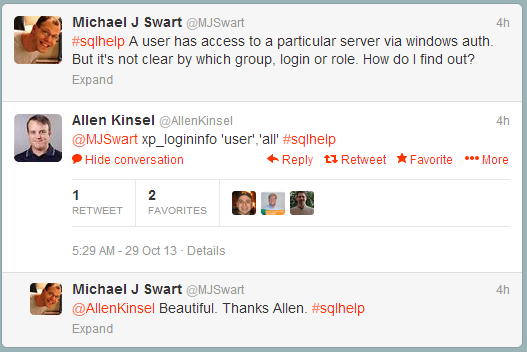
So I had this exchange with Allen Kinsel (@AllenKinsel) (via #sqlhelp on twitter):

Allen Kinsel saves the day

xp_logininfo works beautifully for what I wanted to do.

It’s a command that’s too obscure. I think xp_loginfo should be more widely known (hence this blog post). And when I run:

exec xp_logininfo 'MYDOMAIN\mswart', 'all'

I get:

account name type privilege mapped login name permission path
MYDOMAIN\mswart user user MYDOMAIN\mswart MYDOMAIN\SupportGroup
MYDOMAIN\mswart user admin MYDOMAIN\mswart BUILTIN\Administrators

This tells me exactly what kind of access I have and why. In this case, it looks like I have access for two reasons. First, I have access because I belong to the support group and the other reason is because I’m part of the “BUILTIN/Administrators” group. This is so much better than eyeballing a list of logins.

xp_logininfo: It’s worth remembering.

September 13, 2013

Without ORDER BY, You Can’t Depend On the Order of Results

Filed under: Miscelleaneous SQL,SQLServerPedia Syndication,Tongue In Cheek — Michael J. Swart @ 10:25 am

The title says it all. In a SQL Query, you can’t depend on the order that rows are returned without using the ORDER BY clause.

Years ago, this was one of the first lessons I learned about SQL. Without using ORDER BY I was assuming a particular order for returned rows and things went fine for a while. Then it simply “broke”: the results came back in an unexpected order. We quickly fixed the problem, but the client wanted to know what happened. They asked “What changed?” and the best answer that I could come up with is that our luck ran out. We were never entitled to assume an order to that particular set of results.

That’s all I wanted to say. Hmm… That makes for a short blog post eh?

It bears repeating and so why not. I’m going to re-explain myself. But this time I’ll do it as other bloggers you may or may not follow.

SQL Blog Impressions:

As Brent Ozar

The other day when I got back from walking my dog, I opened my Surface (my Surface Pro, not my Surface RT) and surfed the forums. Someone was wondering about the order of query results that didn’t use an ORDER BY clause. BWAAAAH! You can’t do that. After I cleaned the coffee off my monitor, I replied tactfully that you can’t depend on the order here. If you need to order your results, you need to use the ORDER BY clause. Better yet, sort the records in the app. App server CPU is way cheaper than SQL Server CPU. Sign up here for next Tuesday’s webcast about this very topic.

[Ed: It was inevitable, Brent tackles that question here]

As Pinal Dave

Kind sir or madam, allow me to welcome you to my humble website where I blog about my SQL Server journey and share with you what I’ve learned. You searched the web for SQL Server answers and clicked on the first link. That’s what brought you here and it’s my sincerest wish that I can help you out with your problem today.
Today I’m exploring the ordering of results when the ORDER BY clause is not used. Let us see what happens:

<One succinct explanation and example later…>

In conclusion, it is a mistake to believe that there is an order to results when the ORDER BY clause is not used.

[Ed: Pinal Dave is so prolific, I shouldn’t have been surprised to find out that he has in fact blogged before on this very topic!]

As Aaron Bertrand

The ANSI-SQL standard specifies ORDER BY as the only way to sort rows in a query. Without the ORDER BY clause, the rows may be returned in any way that SQL Server sees fit. It’s such an important fact, that I believe Microsoft should dedicate at least 50 per cent of the SQL Server Management Studio splash screen for the purpose of warning you. I’ve created a connect item for it so please go and vote.

Excuse me… I have to go, Microsoft just released a new cumulative update for SQL Server.

As Paul White

Examine a query without an ORDER BY clause; the order of the resulting rows is non-deterministic even though it may seem otherwise. We can tell because the input tree for a query with an ORDER BY clause contains the logical operators LogOp_OrderByCOL or LogOp_OrderByQCOL. The optimizer will then take steps to ensure the correct sort order. It will take advantage of existing indexes. Alternatively, the optimizer can choose to use a sort operator if needed.
Without the ORDER BY statement, the optimizer won’t enforce the order and so the order of returned rows can not be determined. It’s unwise to look at the execution plan and make a guess, your query plan could change at any time. And on top of that, the query optimizer algorithms can change at any version, SP or CU.

As Karen Lopez

Yesterday afternoon I was tweeting about data, Barbies and astronauts, and data about Barbie astronauts. It occurred to me that I really should be focusing on the conference session I was at. Especially since I was only half way through presenting it.
I was at my favourite conference centre and an attendee had just asked whether queries without ORDER BY clauses came back ordered by the Primary Key or the Clustered Key? It was an odd question to get during a talk about data modelling. I explained that the answer is neither: Without an ORDER BY clause, no order is guaranteed. Love your data people! And the order it comes in!
Hey, if you’re in Toronto next month

could you feed my cats?

As Paul Randal

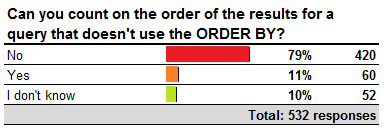
Last week I asked you whether you could depend on the results of a query without an ORDER BY clause.

PollResults

I’m encouraged that the “No” answer was most prevalent because that is the correct answer. It’s not data corruption, it’s the way that SQL Server works and it has since at least SQL Server 2005 when I worked on the team. So remember the ORDER BY clause if you need to depend on the order (and don’t forget to run DBCC CHECKDB afterwards).

August 15, 2013

A Tuning Technique For Parallel Queries

Filed under: Miscelleaneous SQL,SQLServerPedia Syndication,Technical Articles — Michael J. Swart @ 12:00 pm

Takeaway: I describe a technique I use to tune parallel queries. I tune the serial version of the query using MAXDOP 1. It’s a simpler query plan. Faster understanding leads to faster solutions.

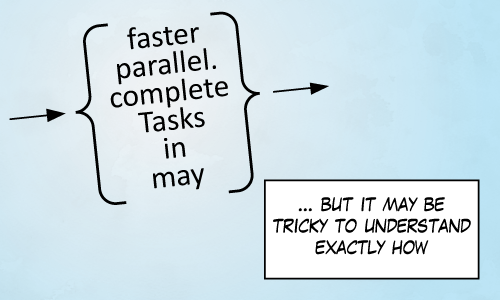
In a parallel universe, I'm blogging about cartography and projection mapping.

How better to explain than by example!

The Example

For this example, I use AdventureWorks2012 and I beef up the sales order tables using Jonathan Kehayias’s script Enlarging the AdventureWorks Sample Databases. For my example, I want to know which salesperson sold the most red items in their last ten orders (looking at orders with at least one red item).

My first crack at the query gives me this:

SELECT P.FirstName, P.LastName, SUM(OrderQty) Items
FROM Person.Person P
CROSS APPLY (
    SELECT TOP 10 SUM(OrderQty) as OrderQty, H.SalesOrderID
    FROM Sales.SalesOrderDetailEnlarged D
    JOIN Sales.SalesOrderHeaderEnlarged H
        ON D.SalesOrderID = H.SalesOrderID
    JOIN Production.Product Pr
        ON D.ProductID = Pr.ProductID
    WHERE H.SalesPersonID = P.BusinessEntityID
        AND Pr.Color = 'red'
    GROUP BY H.SalesOrderID, H.ShipDate
    ORDER BY H.ShipDate DESC
) AS LastTenOrdersWithRedItems
GROUP BY P.BusinessEntityID, P.FirstName, P.LastName
ORDER BY SUM(OrderQty) DESC

Great! That query gives me the Adventureworks salespeople and the number of red items they’ve sold in their last ten orders. But the execution time was a bit slow and so I decide to tune the query. The query plan looks like this:
The query plan for the previous query

There’s a couple things that jump out at me right away: Some of the thick lines tell me that there’s a lot of data getting processed. There’s also a warning that tells me that tempdb was used for a sorting operation. And in general, I notice that there are a lot of operators here including parallelism operators.

So now I’m going to try to look at a serial query plan for the same query. I have to tell SQL Server that the maximum degree of parallelism it should consider is one thread. That’s done with the MAXDOP query hint like this:

SELECT P.FirstName, P.LastName, SUM(OrderQty) Items
FROM Person.Person P
CROSS APPLY (
    SELECT TOP 10 SUM(OrderQty) as OrderQty, H.SalesOrderID
    FROM Sales.SalesOrderDetailEnlarged D
    JOIN Sales.SalesOrderHeaderEnlarged H
        ON D.SalesOrderID = H.SalesOrderID
    JOIN Production.Product Pr
         ON D.ProductID = Pr.ProductID
    WHERE H.SalesPersonID = P.BusinessEntityID
        AND Pr.Color = 'red'
    GROUP BY H.SalesOrderID, H.ShipDate
    ORDER BY H.ShipDate DESC
) AS LastTenOrders
GROUP BY P.BusinessEntityID, P.FirstName, P.LastName
ORDER BY SUM(OrderQty) DESC
OPTION (MAXDOP 1) -- this line has been added

The hint is in there, but it’s not meant to be a permanent thing. I put it in there in order to look at the serial version of the query plan. Sure enough, it looks simpler and it’s easier to examine:

The query plan for the previous query

The information is still the same, but to me it’s a little clearer where the problem is. I see that SalesOrderHeader is scanned completely and then spooled (one iteration per person) and then sorted by date. I also see that there’s a lot of data coming from Person.Person.

So in this case, I may decide to add an index on SalesOrderHeader(SalesPersonId, ShipDate) like this:

CREATE INDEX IX_SalesOrderHeaderEnlarged_SalesPersonShipDate 
    ON Sales.SalesOrderHeaderEnlarged(SalesPersonId ASC, ShipDate DESC)

A Bonus Optimization
There’s another optimization I’d like to consider. Notice that all 19,972 rows in the Person.Person table are scanned. Well I can do better than that. I can join Person.Person to HumanResources.Employee because I know that all salespeople are employees. The join acts as a filter and it really cuts down on processing. The query now looks like:

SELECT P.FirstName, P.LastName, SUM(OrderQty) Items
FROM Person.Person P
JOIN HumanResources.Employee E
    ON P.BusinessEntityID = E.BusinessEntityID
CROSS APPLY (
    SELECT TOP 10 SUM(OrderQty) as OrderQty, H.SalesOrderID
    FROM Sales.SalesOrderDetailEnlarged D
    JOIN Sales.SalesOrderHeaderEnlarged H
        ON D.SalesOrderID = H.SalesOrderID
    JOIN Production.Product Pr
        ON D.ProductID = Pr.ProductID
    WHERE H.SalesPersonID = P.BusinessEntityID
        AND Pr.Color = 'red'
    GROUP BY H.SalesOrderID, H.ShipDate
    ORDER BY H.ShipDate DESC
) AS LastTenOrders
GROUP BY P.BusinessEntityID, P.FirstName, P.LastName
ORDER BY SUM(OrderQty) DESC

With the new index, this query performs about as well as we can hope. The new plan now looks like this:

The query plan for the previous query

Why this Works For Me

Adding MAXDOP 1 is a quick way to give me a serial version of the query plan and the serial version of the plan is simpler. This trick saves me time. Or it has often enough that it’s worthwhile to try.

Another reason this works for me is because the queries I write and maintain are often required to run sub-second. You might be in the same boat if you write your queries for high volume OLTP systems. This usually means that there’s a high standard for query performance. Acceptably tuned queries are fast enough that SQL Server will rarely decide to consider parallel query plans. And that means that it’s tempting to look for parallelism to find candidates for poorly tuned queries.

Okay, Here Come The Caveats

  • Reading the title, some will assume that I’m claiming a parallel query plan is a bad query plan. Absolutely not. Queries that are executed with parallel plans are queries that do a lot of work. That’s not bad in itself. Sometimes queries need to do a lot of work. The question that should be asked is whether these queries are doing too much work.
  • I’m not claiming MAXDOP 1 is a tuning technique in itself. It’s just a trick I use to look at a query from a different point of view. If your query is a thousand times faster after adding MAXDOP 1 and you don’t know why, then you’re not done yet.
  • Parallel execution plans are not dull or useless! They’re fascinating! I’ve learned that the mental effort spent following a Paul White post on parallelism always pays off.

July 29, 2013

Lessons From Sherlock Holmes

Filed under: Miscelleaneous SQL,SQLServerPedia Syndication,Tongue In Cheek — Michael J. Swart @ 11:41 pm

Last year, I wrote the article Lessons From Geordi Laforge and I had a ton of fun doing it. So I’m writing a bit of a follow-up article for another fictional hero of mine, Sherlock Holmes. It’s a fun post for the summer.

When I looked at Laforge’s character, he was a model for a competent engineer. Now when I look at Sherlock Holmes, it isn’t about engineering. It’s about troubleshooting. So the lessons below aren’t strictly about SQL Server, but about troubleshooting in general.

BBC's Sherlock and John Watson

Sherlock Holmes, the famous detective can tell how good a Chinese restaurant is by its door handle. I’m certainly not that good. But I notice that there are a lot of parallels between what he does and what I do when I’m troubleshooting. I may never be a consulting detective, but a consulting troubleshooter? Maybe.

Read on! I quote some favorite lines from Sir Arthur Conan Doyle. Then I talk about how each line applies to me, or at least me when I’m wearing my troubleshooting hat.

Here we go! Enjoy the quotes:

“Eliminate all other factors, and the one which remains must be the truth”

Eliminating causes! Great! I think of this as narrowing down the possible causes.

It’s super helpful to be able to say, “The problem we’re dealing with lies somewhere in this sproc”, or “The problem lies with contention in this area.”

Most people put this into practice subconsciously. Try to think about what you do. When you’re alerted to a database performance issue, do you check sp_whoisactive first? Or do you go straight to sys.dm_os_wait_stats? Both will give quick information that lets you eliminate a whole host of causes. But which do you check first? There’s no right answer. Experience with your environment may give you a good idea about what’s more likely to be useful.

If you’re new to some environment, you can’t go wrong with Kendra Little’s checklist

“An outside eye, a second opinion. It’s very useful to me. Really!”

Okay, this one isn’t from Sir Arthur, it’s a line straight from BBC’s Sherlock so it counts.

I agree with the message here. It is useful to get a second set of eyes on a problem, especially if you’ve gotten stuck. Experience has taught me that you should ask for help earlier than later. And sometimes the simple act of explaining a problem brings new understanding!

And that’s your bonus Sherlock Holmes quote “Nothing clears up a case so much as stating it to another person.”

“It is the unofficial force, the Baker Street Irregulars”

Sherlock Holmes has a team of street kids who have really good access to information in London. He pays them for clues and they can often canvass London a lot better than the police can.

So how about me? Who do I turn to when I need outside help? It’s #sqlhelp and stackoverflow (or dba.stackexchange) to the rescue. Those are still the best forums for SQL Server issues. And I’ve said it before; here’s my post about three problem solving resources that make you look like a genius.

“It was easier to know it than to explain why I know it.”

I know what it’s like to understand something completely but not be able to explain it easily. So I kind of know what Sherlock Holmes is getting at here. For me, I think it’s true for two reasons actually.

The first reason is that I’m not that eloquent, but I’m getting better. I think of my own thought processes as visual rather than verbal. So I sometimes think of my writing as a translation of my thoughts and ideas into English.

The second reason is that with practice, the brain takes shortcuts to understanding. Good chess players can look at a game in progress and just see good moves. And so some other SQL Server experts can look at query plans and assess the important information quickly. I’d like to think I’m getting there.

“It is a capital mistake to theorize before you have all the evidence. It biases the judgment.”

I couldn’t have said it better. This is one of the few Sherlock Holmes quotes that gives advice I agree with and explains exactly why that advice is good. We actually see other inspectors in Sherlock mysteries that develop their own (often incorrect) pet theories. These inspectors are often reluctant to give their theories up even when they are shown to be wrong.

At a place I used to work I’ve been burned by making this mistake. Someone asked for a root cause analysis of a problem that wasn’t understood yet. And I said “Well, I really don’t know yet. The reason might be higher use of [some new feature], but I have to check”. The next day I’m misquoted in someone’s email as “Michael says it’s [that new feature]”.

“Mediocrity knows nothing higher than itself, but talent instantly recognizes genius.”

Woo hoo! I guess I’ve got talent, because to be honest, I know tons of people higher than myself. The people I hold in high esteem matches Tom Larock’s rankings pretty closely.

Some anti-quotes

“Data! Data! Data! I can’t make bricks without clay.”

Who talks like that? Even a hundred years ago, and even in England, it’s hard to imagine. I like the sentiment, but it doesn’t sound right to me. The prose is off for some reason I can’t explain.

“You know a conjurer gets no credit when once he has explained his trick.”

The only reason Sherlock Holmes delays explaining himself is because otherwise the story would be over too soon. The plot’s tension would be resolved too early. Me, I’ll explain my “tricks” to everyone and anyone who will listen. I guess someone might avoid transparency for appearances sake. I don’t play that game. Or I don’t think I do, at least not consciously.

Your Turn

Do you have any Sherlock Holmes moments? Give me your best one.


July 3, 2013

It Took Me Ages To Figure This One Out: A Puzzle

Filed under: Miscelleaneous SQL,SQL Scripts,Technical Articles — Michael J. Swart @ 12:00 pm

Takeaway: I tackled a problem recently and I present a version of the problem here as a challenge. The challenge is to figure out why a query and a stored procedure return different results even though the procedure is defined using the same query.

If no one cracks this one, I’ll leave the answer in the comments in a couple days.

Too Easy

The Setup

Okay, I use AdventureWorks2012 here. I define a table data type IDList and a stored procedure s_GetCustomerProductPurchases:

use Adventureworks2012
go
 
create type IDList as TABLE(id int);
go
 
CREATE PROCEDURE dbo.s_GetCustomerProductPurchases 
	@CustomerIds IDList READONLY,
	@ProductIds IDList READONLY,
	@SearchString NVARCHAR(1000)
AS
SET NOCOUNT ON 
 
DECLARE @ResultList TABLE ( 
	ProductId INT, 
	ProductName Name 
	);
 
insert @ResultList (ProductId, ProductName)
select distinct TOP (2000) p.ProductID, p.Name
from sales.salesorderdetail sod
join sales.salesorderheader soh 
    on soh.SalesOrderID = sod.SalesOrderID
join Production.Product p
    on p.ProductID = sod.ProductID
join Sales.Customer c
    on c.CustomerID = soh.CustomerID
join @CustomerIds CIds
    on CIds.id = c.CustomerID
join @ProductIds PIds
	on PIds.id = p.ProductID
where p.Name like '%' + @SearchString + '%'
	and soh.[Status] = 5
 
IF	@@ROWCOUNT = 0 
	SELECT	0 ProductId, 'No Matching Products' ProductName
ELSE 
	SELECT	 ProductId, ProductName
	FROM	 @ResultList 
	ORDER BY ProductId

Executing the Query

Next lets run a query against Adventureworks2012. We define some variables that are used as filters in a query. This query populates a temporary results table and then we select from it:

DECLARE 
	@ProductIds IDList,
	@CustomerIds IDList,
	@SearchString Name = 'Red';
insert @ProductIds (id) VALUES (707), (717), (727)
insert @CustomerIds (id) VALUES (11000), (11103), (11201)
 
SET NOCOUNT ON 
 
DECLARE @ResultList TABLE ( 
	ProductId INT, 
	ProductName Name 
	);
 
insert @ResultList (ProductId, ProductName)
select distinct TOP (2000) p.ProductId, p.Name
from sales.salesorderdetail sod
join sales.salesorderheader soh 
    on soh.SalesOrderID = sod.SalesOrderID
join Production.Product p
    on p.ProductID = sod.ProductID
join Sales.Customer c
    on c.CustomerID = soh.CustomerID
join @CustomerIds CIds
    on CIds.id = c.CustomerID
join @ProductIds PIds
	on PIds.id = p.ProductID
where p.Name like '%' + @SearchString + '%'
	and soh.[Status] = 5
 
IF	@@ROWCOUNT = 0 
	SELECT	0 ProductId, 'No Matching Products' ProductName
ELSE 
	SELECT	 ProductId, ProductName
	FROM	 @ResultList 
	ORDER BY ProductId

These are the results I get:

ProductId ProductName
707 Sport-100 Helmet, Red

Executing the Procedure

Now run the procedure which contains the exact same query:

DECLARE 
	@ProductIds IDList,
	@CustomerIds IDList,
	@SearchString Name = 'Red';
insert @ProductIds (id) VALUES (707), (717), (727)
insert @CustomerIds (id) VALUES (11000), (11103), (11201)
 
exec dbo.s_GetCustomerProductPurchases @ProductIds, @CustomerIds, @SearchString

The results we get now look like:

ProductId ProductName
0 No Matching Products

So Why Are These Results Different?

That’s what I want you to figure out. Try to crack this one before looking at the comments.

SQL Fiddle

Have you used SQL Fiddle yet? It’s a site that allows SQL developers to set up different scenarios for use in online discussions. So if you don’t have Adventureworks2012 handy, I’ve setup up two SQLFiddles here and here. Your job then is to follow these two links and explain why the results are different.

« Newer PostsOlder Posts »

Powered by WordPress