


This is an update to my post last week Partitioning a Huge Table where I talk about taking an existing table and making it partitioned.
My largest complaint in that post was that it was difficult to do online because rebuilding a clustered index on a huge table required reading or writing a lot of data.
Also if I wanted to take advantage of partition switching, it was still tricky because it required adding a check constraint which also took a long amount of time.
Was there any way to adopt partitioned tables for huge tables without incurring a size-of-data operation? I invited people to leave their ideas in the comments. A reader who calls himself mmiike delivered.
Here’s a link to his comment where he says:
you can avoid the CHECK constraint nonsense entirely if you create the initial partition function empty – i.e. with no values
…
since a partition function with no boundaries assigns everything to partition 1, there is no check constraint required in source or target tables.
He goes on to describe a way to get your “foot in the door” by switching the data into a partitioned table that uses a partition function with no boundaries, i.e. one partition. Then make use of ALTER PARTITION FUNCTION ... SPLIT RANGE... to add the extra partitions.
Visualized
I think of the process this way:
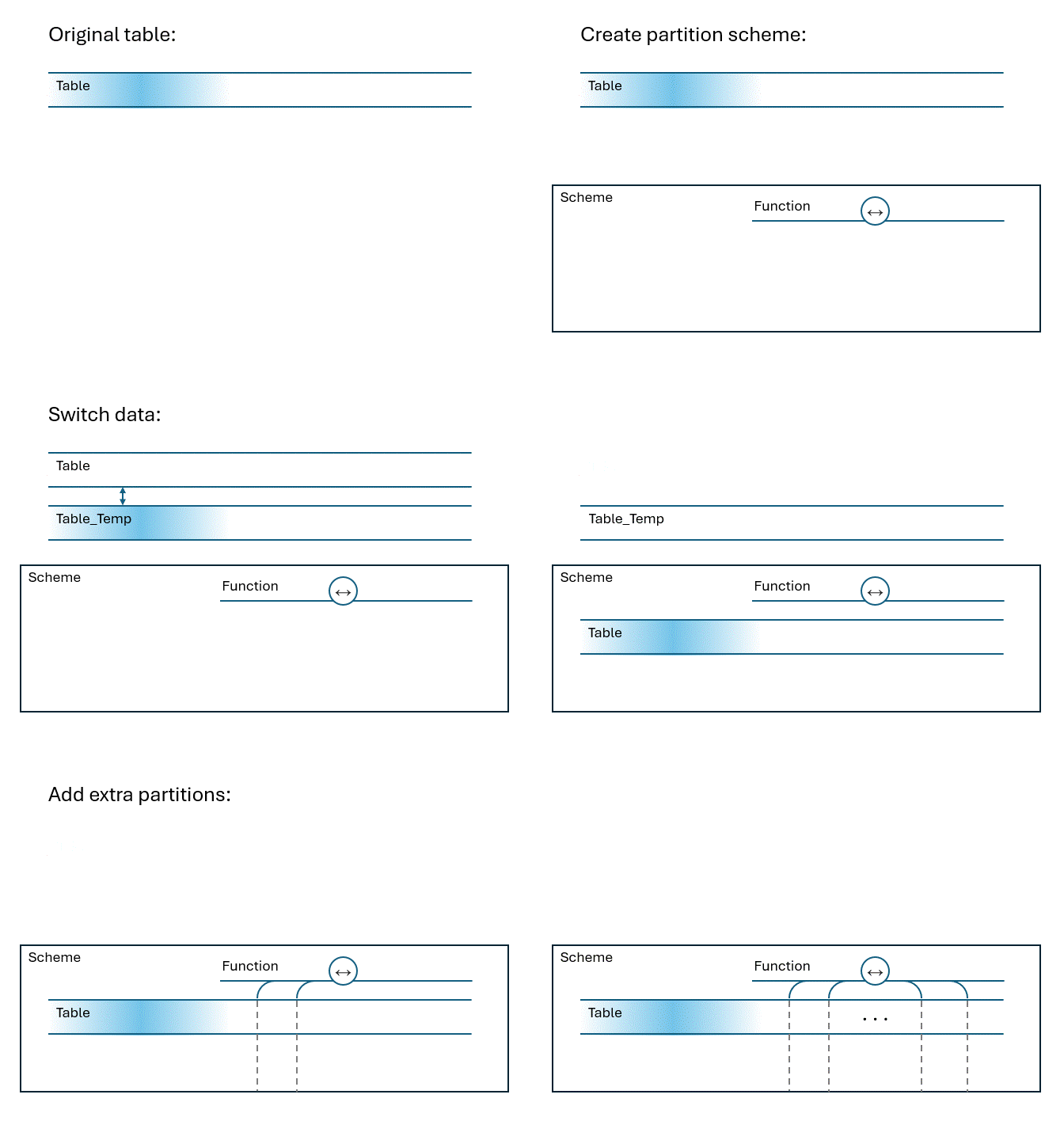
Code example
I checked out his idea and he’s absolutely right:
Setup the example:
DROP TABLE IF EXISTS dbo.HumongousTable DROP TABLE IF EXISTS dbo.HumongousTable_Temp IF EXISTS (SELECT * FROM sys.partition_schemes WHERE name = 'PS_MonthlySlidingWindow') BEGIN EXEC sp_executesql N'DROP PARTITION SCHEME PS_MonthlySlidingWindow'; EXEC sp_executesql N'DROP PARTITION FUNCTION PF_MonthlySlidingWindow'; END GO CREATE TABLE dbo.HumongousTable /* Non-partitioned */ ( Id INT NOT NULL IDENTITY, Name NVARCHAR(100) NOT NULL, Description NVARCHAR(500) NULL, LogDate DATETIME2 NOT NULL, CONSTRAINT PK_HumungousTable UNIQUE CLUSTERED (LogDate, Id), ); INSERT dbo.HumongousTable(Name, Description, LogDate) SELECT CAST(text AS NVARCHAR(100)), CAST(text AS NVARCHAR(500)), GETUTCDATE() FROM sys.messages UPDATE dbo.HumongousTable SET LogDate = dateadd(second, id * -1, logdate); GO |
The fast part
This part takes zero seconds and does no size-of-data scans:
/* Create the partition function */ CREATE PARTITION FUNCTION PF_MonthlySlidingWindow (DATETIME2) AS RANGE RIGHT FOR VALUES ( /* no partition boundaries to start with */ ); /* Create the partition scheme */ CREATE PARTITION SCHEME PS_MonthlySlidingWindow AS PARTITION PF_MonthlySlidingWindow ALL TO ([PRIMARY]); /* create an empty non-partitioned table matching HumongousTable_Temp exactly */ CREATE TABLE dbo.HumongousTable_Temp /* Non-partitioned */ ( Id INT NOT NULL IDENTITY, Name NVARCHAR(100) NOT NULL, Description NVARCHAR(500) NULL, LogDate DATETIME2 NOT NULL, CONSTRAINT PK_HumungousTable_Temp UNIQUE CLUSTERED (LogDate, Id), ); /* stash the current data, switch is metadata only */ ALTER TABLE dbo.HumongousTable SWITCH TO dbo.HumongousTable_Temp; /* rebuild (the now empty) PK_HumungousTable on the partition scheme */ CREATE UNIQUE CLUSTERED INDEX PK_HumungousTable ON dbo.HumongousTable(LogDate, Id) WITH ( DROP_EXISTING = ON ) ON PS_MonthlySlidingWindow(LogDate); /* switch data back, still fast */ ALTER TABLE HumongousTable_Temp SWITCH TO HumongousTable PARTITION 1 IF NOT EXISTS (SELECT * FROM dbo.HumongousTable_Temp) BEGIN DROP TABLE IF EXISTS dbo.HumongousTable_Temp END DECLARE @Month DATETIME2 = DATEFROMPARTS(YEAR(GETDATE()), MONTH(GETDATE()), 1); WHILE @Month < '20300101' /* or whenever you plan to retire ;-) */ BEGIN SET @Month = DATEADD(MONTH, 1, @Month); ALTER PARTITION FUNCTION PF_MonthlySlidingWindow() SPLIT RANGE (@Month) ALTER PARTITION SCHEME PS_MonthlySlidingWindow NEXT USED [PRIMARY] END /* About 42 new partitions: */ SELECT COUNT(*) as NumberOfPartitions FROM sys.partitions WHERE object_id = OBJECT_ID('dbo.HumongousTable') |
A great comment
I love this kind of update. I got a comment on my blog that helped me learn something new that I couldn’t get out of a Google search or DBA.StackExchange or from AI.
At the moment, my blog remains relevant. At least a little bit. At the very least, it helped me learn how to spell humongous properly. 😀
As a corollary, we can reverse this and use it to create a trusted check constraint quickly.
Update to this Update [Aug 6, 2026]
I just wanted to be clear about what this blog post is about,
It’s not just about partitioning a table with zero downtime. I wanted something stronger. Not just zero downtime, but zero time.
The approach from mmiike basically solves a very very particular problem. That problem is:
Given we have a table whose clustered index matches a desired partition column, can we then partition the table in 0 seconds with no copying, or scanning.
If your situation is different, then this approach is not applicable.

[…] Update! Aug. 4, 2026 Don’t miss the comments below, or my follow up post Partitioning a Huge Table Quickly […]
Pingback by Partitioning a Huge Table | Michael J. Swart Michael J. Swart — August 4, 2026 @ 3:03 pm
THAT IS GENIUS. I immediately wanna go try that.
And if mmiike is who I think he is, he is one of the smartest (and simultaneously most humble) SQL Server people I know, right up there with Erik Darling.
Comment by Brent Ozar — August 4, 2026 @ 5:07 pm
Dear Michael,
thank you for writing this blog post about a “workaround” for partitioning a huge table.
There is ONE point which concerns me and – as far as I’ve seen in the field – is not “default” in the big tables I’ve seen: The clustered index on the source table!
The example is expecting a clustered index like we need it – later – for partitioning.
I’ve never seen the big tables with this kind of clustered index.
Mostly I’ve seen CI on [id] but not on [partitionkey], [id].
When you rebuild the clustered index it takes a huge amount of time and only Enterprise can deal with an index rebuild ONLINE.
If the customer really don’t want to see a “downtime” the idea won’t work, right?
I’m missing something?
However – cool idea and thank you for this great blog post!
Best from Germany, Uwe
Comment by Uwe Ricken — August 5, 2026 @ 3:50 am
Hi Uwe,
You’re right, if the existing clustered index is not aligned with the column used for partitioning, then this technique doesn’t work.
The example does rely on the clustered index having the same leading column being the same as the partitioning column.
I’ve found it helpful to look at the requirements more closely. If “partitioning every month” is the requirement, then maybe we can still do something. For example, in the case of identity columns, I would actually, consider partitioning by id. And have a schedule for the first of the month that splits the ids based on the current identity value.
If the clustered index has it’s leading column as a guid or something, then I think our hopes for easy partitioning go away.
The point of this post was that when the clustered index and the partition column are aligned, there’s a reasonable hope that we can adopt table partitioning without a size-of-data operation.
Comment by Michael J. Swart — August 5, 2026 @ 9:22 am
Hey Michael!
An interesting technique for sure. But there’s one thing I don’t understand. And I’ll say up front that I didn’t run the code, I just looked at it.
After the double partition switch, the large table is partitioned but with just a single partition, and no CHECK constraints – unless I’m overlooking something. So when you do the first partition split, you split a non-empty partition. That can’t be a metadata only operation since SQL Server has to check, for each row, whether it should stay in the old partition or move to the new one. So you still get this (size of data) operation.
Since in reality all rows remain in the old partition, the remaining splits are all on empty partitions and hence fast. But as I see it, that first split WILL scan the entire table.
Am I missing something?
Comment by Hugo Kornelis — August 5, 2026 @ 7:13 am
Hi Hugo,
The process makes use of the index so it doesn’t need to read every row, it just looks for rows above the threshold using the index. When it doesn’t find any, it moves no rows into the new empty partition.
It’s not a metadata only operation, but it’s not a size of data operation either and that’s the important part.
Comment by Michael J. Swart — August 5, 2026 @ 8:00 am
[…] Michael J. Swart provides an update: […]
Pingback by Partitioning Very Large Tables Quickly – Curated SQL — August 5, 2026 @ 8:00 am
Very nice, thank you Michael.
Comment by Ronald — August 6, 2026 @ 8:10 am
Genius, Genius, Genius
Comment by Uche Okoye — August 10, 2026 @ 2:11 pm
I used other approach to achieve the same – no downtime and instantly (or almost instantly). I created required Partition Function and Schema (in our case we partition “the_log_table” – the data has been appended to that table from one end and never changes – the perfect candidate for partitioning), then created a new table “old_table_name_Partitioned”, based on Partition Schema, and … drumroll … renamed the current(non_partitioned_table) to “old_table_name_Archive” and “old_table_name_Partitioned” to “old_table_name” – so I did a swap during our maintenance slot. I have the old data and new data is going to come in partitioned way. I will truncate “Archive” after 2 years, I will truncate the oldest partition and will add a new partitions on the fly as needed for partitioned table (SQL Server Agent job). I negotiated with Business that we will keep 1 year of the Data.
(some stats: table has ~2.5 billion rows (with ~10 columns: most of them are varchar(100), but one is varchar(max) and ~0.7 TB)
I decided to go partitioning way – to be able to FREE some space without crashing our AG (use Truncate table Partition (), instead of DELETE)
PS: Maybe, someone will find it useful
Best regards, sincerely yours, Zlobnyfar.
Comment by ZlobnyFar — August 12, 2026 @ 1:09 pm