


Aaron Bertrand wants you to consider using partitioned tables and the sliding window pattern to help archive old data.
That’s a great idea. In fact, I’d like to do that at my own job. I have a truly humungous log table (Terabytes) and its clustered index is already on CreatedDate so it’s a good candidate for this pattern.
The table
This is the definition of a table. Imagine it already has oodles of rows in it:
CREATE TABLE dbo.HumungousTable_NP /* Non-partitioned */ ( Id INT NOT NULL, Name NVARCHAR(100) NOT NULL, [Desc] NVARCHAR(500) NULL, LogDate DATETIME2 NOT NULL, CONSTRAINT PK_HumungousTable UNIQUE CLUSTERED (LogDate, Id), ); |
Create a partition scheme and rebuild the table
The simplest way to partition the table is to create the partition function, the partition scheme and then rebuild the table on the partition scheme like this:
/* Create the partition function */ CREATE PARTITION FUNCTION PF_MonthlySlidingWindow (DATETIME2) AS RANGE RIGHT FOR VALUES ( '20260801', /* the first partition boundary is in the near future */ '20260901', '20261001', '20261101', '20261201', '20270101' /* etc */ ); /* Create the partition scheme */ CREATE PARTITION SCHEME PS_MonthlySlidingWindow AS PARTITION PF_MonthlySlidingWindow ALL TO ([PRIMARY]); /* Rebuild the table */ CREATE UNIQUE CLUSTERED INDEX PK_HumungousTable ON dbo.HumungousTable_NP(LogDate, Id) WITH ( DROP_EXISTING = ON, ONLINE = ON ) ON PS_MonthlySlidingWindow(LogDate); |
That takes too long
There’s a problem with this. That table is truly humungous and it requires a ton of disk to complete successfully.
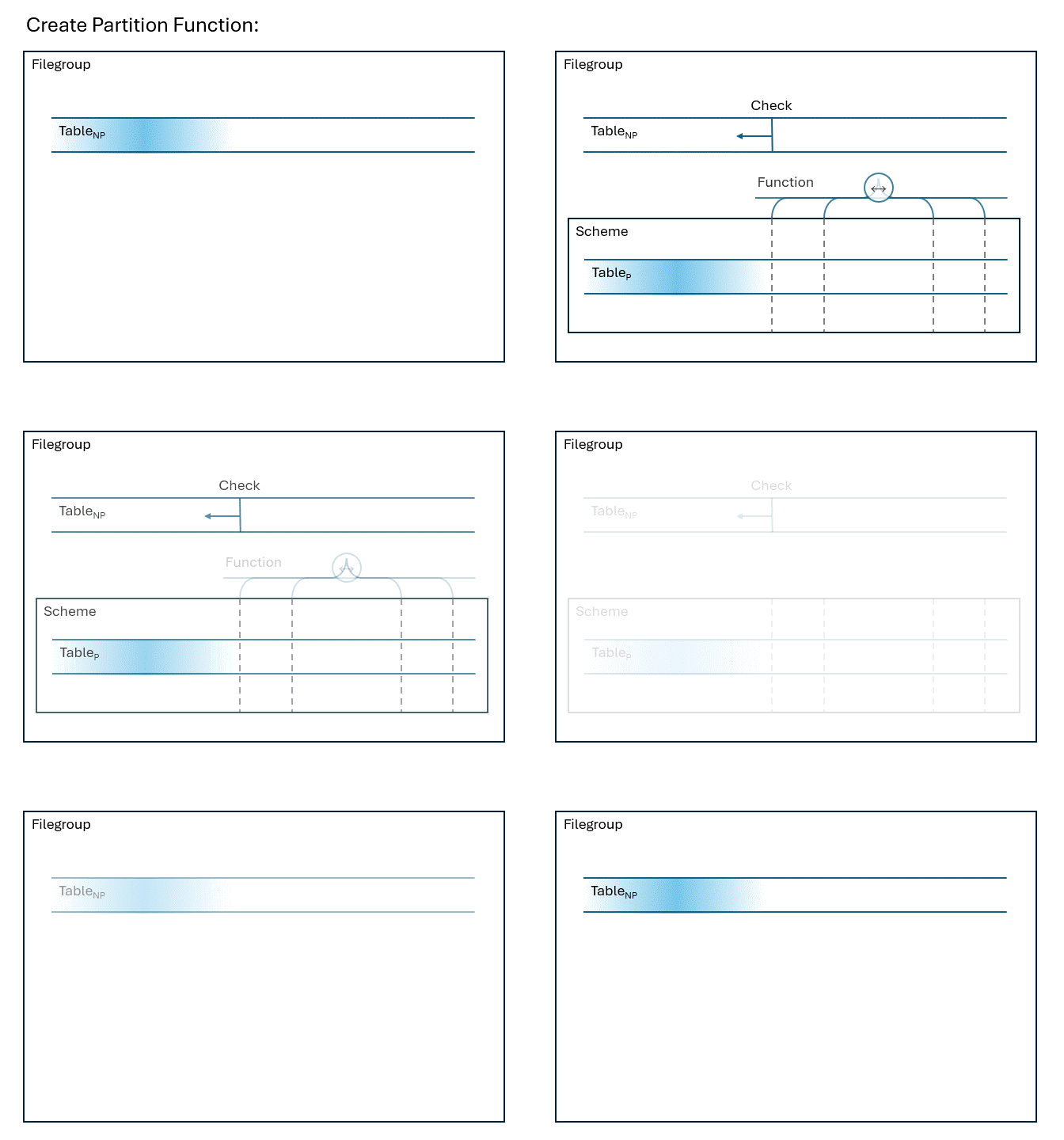
But I think there’s an opportunity somehow. I don’t mind if I put the entire table into the first window, I only want to adopt this sliding window strategy going forward. So maybe I can use partition switching to get where I want to be. Instead of rebuilding the table, I can:
- Create an empty partitioned table
- Add a check constraint to the original table
- Switch the data
- Drop the original table and rename the new table
The code looks the same as above, but I replace the ALTER with something like this:
/* Create the empty partitioned table */ CREATE TABLE dbo.HumungousTable_P ( Id INT NOT NULL, Name NVARCHAR(100) NOT NULL, [Desc] NVARCHAR(500) NULL, LogDate DATETIME2 NOT NULL, CONSTRAINT PK_HumungousTable_P UNIQUE CLUSTERED (LogDate, Id) ) ON PS_MonthlySlidingWindow (LogDate); /* Add the check constraint */ ALTER TABLE dbo.HumungousTable_NP ADD CONSTRAINT CK_HumungousTable_NP CHECK (LogDate < '20260101'); /* Switch */ ALTER TABLE dbo.HumungousTable_NP SWITCH TO dbo.HumungousTable_P PARTITION 1; /* Clean up */ DROP TABLE dbo.HumungousTable_NP; EXEC sp_rename 'dbo.HumungousTable_P', 'HumungousTable_NP'; |
When I think about this step, it looks like this:
That still takes too long
Update! Aug. 4, 2026 Don’t miss the comments below, or my follow up post Partitioning a Huge Table Quickly
The only problem is that adding the CHECK constraint is not online. SQL Server could make use of the available index to speed things up, but it doesn’t.
Also, if I add WITH NOCHECK when creating the constraint, it means that the constraint is enabled, but not trusted and the partition switch will fail.
Thanks Paul White for that info. Paul also points out that DBCC CHECKCONSTRAINTS is fast in this case, yet sadly does not unset the is_not_trusted when the constraint’s integrity is verified.
I asked about how to make this scenario faster a couple years ago on DBA.StackExchange: How do I add a trusted check constraint quickly.
I’m still looking for answers, or alternative solutions. If you’ve got them, leave them in the comments. If this is truly an easy fix that Microsoft hasn’t gotten around to yet, then you could add your vote on their feedback site: Use existing indexes when creating a new CHECK constraint

Partition switching may be part of the solution. If you copy the data out of the table into a series of new/staging tables based on date range, then create a new table with the partition scheme on it and your check, then switch the date range tables in as new partitions that may work better. IIRC, partition switching is nearly instant. Love to hear if that helps or if I’ve missed something important.
Comment by Drew — July 29, 2026 @ 1:23 pm
Hi Drew,
I think you missed something important.
Unfortunately copying the data is a size-of-data operation which I want to avoid.
Besides, if I was going to copy the whole table, I might as well copy straight into the partitioned table.
To be more clear. The problem isn’t with partition switching. That’s instantaneous. The problem I was writing about is how to prepare the data so that partition switching is possible. In my case I didn’t like the full scan of a table needed to add the check constraint. With your suggestion we trade the full scan for a full copy of the data so the expensive part is still expensive.
Comment by Michael J. Swart — July 29, 2026 @ 5:47 pm
you can avoid the CHECK constraint nonsense entirely if you create the initial partition function empty – i.e. with no values:
CREATE PARTITION FUNCTION PF_MonthlySlidingWindow (DATETIME2) AS RANGE RIGHT FOR VALUES () /* yes, you can do this */
since a partition function with no boundaries assigns everything to partition 1, there is no check constraint required in source or target tables.
then:
—-
1. create an empty NON-partitioned table (HumungousTable_Temp) which matches HumungousTable exactly.
2. ALTER TABLE HumungousTable SWITCH TO HumungousTable_Temp /* stash the current data; switch is metadata only */
3. CREATE UNIQUE CLUSTERED INDEX PK_HumungousTable ON dbo.HumungousTable(LogDate, Id)WITH ( DROP_EXISTING = ON, ONLINE = ON ) ON PS_MonthlySlidingWindow(LogDate); /* very fast since table is empty */
4. ALTER TABLE HumungousTable_Temp SWITCH TO HumungousTable PARTITION 1 /* no check required since everything is in partition 1 in both source target */
5. DROP TABLE HumungousTable_Temp /* after verifying it’s actually empty (i.e. has been switched) and HumongousTable looks as expected */
—-
the above 5 steps are extremely quick regardless of data size and can be done within an explicity transaction with try/catch logic, etc. so that everything happens in one go or not at all.
you can then use
ALTER PARTITION FUNCTION PF_MonthlySlidingWindow Split Range (SomeDateFurtherInTheFutureThanAnyCurrentRow)
to define your next (empty) partition – data will NOT move (i.e. it will be quick, even with HumongousTable on the scheme) because you’ve defined things as range RIGHT.
Note: after you run that first SPLIT, you’ll have to explicitly redeclare the NEXT USED filegroup for the scheme every time you want to add a new partition. nbd, this is a quick operation.
so you can iteratively run:
ALTER PARTITION SCHEME PS_MonthlySlidingWindow NEXT USED [Primary] /* or whatever you actually want */
ALTER PARTITION FUNCTION PF_MonthlySlidingWindow Split Range (SomeDateFurtherInTheFutureThanAnyCurrentBoundary)
to pre-allocate empty future partitions.
Comment by mmiike — August 3, 2026 @ 4:50 pm
mmiike, that is truly amazing.
The idea is to not rely on a check while switching, but to get it into a “partitioned” table (with the single partition) as a quick first step and make use of
ALTER PARTITION FUNCTION PF_MonthlySlidingWindow SPLIT RANGEwhich actually does use the index.I plan to write this up on my blog, I’ll credit you with your handle “mmiike” unless you want to be a little less anonymous 🙂
Thanks again
Comment by Michael J. Swart — August 4, 2026 @ 9:39 am
[…] is an update to my post last week Partitioning a Huge Table where I talk about taking an existing table and making it […]
Pingback by Partitioning a Huge Table Quickly | Michael J. Swart Michael J. Swart — August 4, 2026 @ 2:59 pm