Michael J. Swart

August 17, 2010

Microsoft Connect From Our Point of View

Filed under: SQLServerPedia Syndication,Technical Articles — Tags: , — Michael J. Swart @ 12:00 pm

I first heard about Microsoft Connect in early 2008. I was at a conference and a speaker from Microsoft touted the benefits of the site. It’s a site that allows users to submit feedback on Microsoft Products (which include SQL Server of course). We were told that every issue on the site was taken very seriously and that stale or unhandled issues get escalated and are treated like a big deal. I remember feeling excited at having this direct line to Microsoft’s product teams.

Today Buck Woody (of Microsoft) posted another article pushing connect.microsoft.com. He’s had other posts on this topic before and thinks it’s a great thing.

Connect as Seen By Microsoft

And it is a great thing especially for Microsoft. They get great feedback:

  • They get bug reports which help improve quality of the released product tremendously.
  • They get suggestions which go into new features of the product. It helps get a sense of what users are really hoping to see.

Connect as Seen By Users

And it’s a great for users because we know we have a say in the product.

Except when we don’t.

There are too many issues where the submitter doesn’t know what Microsoft’s plans are with the issue.

Maybe here’s a reason. They’re hasn’t been a change to the database engine or Management Studio since 2008. And it looks like we’re about a year away from the next one. So any suggested features or fixes submitted for that time are still pending.

And that’s fine, but it means that Microsoft’s only feedback to us is inside the issue itself. Often an issue will have little or no feedback (349116, 361832) and then our perception that we have a direct line to Microsoft disappears.

But those are two isolated cases right? Yes and No. In one of my very first blog posts two years ago How useful is connect.microsoft.com, I took an arbitrary sample of issues. Today, two years later, I look at the same sample*, and I see that 41% still have an “active” status. I’ll repeat what I said in that post:

“If MS had a better track record than that, connect.microsoft.com would be seen as a real place to be heard. That would encourage even more feedback.”

It’s Not a Perfect System

Buck Woody says:

No, it’s not a perfect system, but it’s more than I’ve seen at most software vendors I deal with.

I agree with that. It is a lot better than other software vendors. Oracle is definitely behind in this respect. As far as I can tell their only feedback is their regular support desk. But all that means is that Microsoft is the leader in the race in which no one else seems to be running. And Microsoft could do even better.

What I’d Like to See Done

I don’t want to downplay the good work that Microsoft has done. When we’re told that “Microsoft really does look at these issues” I tend to believe it. I am confident that the SQL Server product teams are putting these features and fixes into the product as we speak**.

But Microsoft should tell us about it. Update the stale/active issues. Mark it as “not reproducible” or “we’ll consider it” or even “won’t fix” you won’t hurt our feelings. In fact we’ll feel better because we’ll feel listened to.

* The sample I took was issues submitted on the 1st and 2nd of May in 2008.

** Some evidence of product fixes via Todd McDermid.

July 29, 2010

Tricks with User Settable Perfmon Counters

Filed under: SQLServerPedia Syndication,Technical Articles — Tags: , — Michael J. Swart @ 3:52 pm

So there’s this underrated SQL Server feature called User Settable Counters and they help SQL Server developers create our own custom perfmon counters.

You use them by using syntax like the following:

EXEC sp_user_counter1 @newvalue

This updates a counter than can be tracked using windows performance monitor etc…

Trick 1

Unfortunately this is not a counter that can be incremented. You have to know the new value to set. It would be great if we had stored procedures  like sp_increment_counterX so that we could simply increment the existing value of the counter by any given value. Well ask and you shall receive!

USE master
GO
 
CREATE PROCEDURE sp_increment_counter1
	@value INT
AS
 
	DECLARE @newValue INT
	SELECT @newValue = @value + cntr_value
	FROM sys.dm_os_performance_counters
	WHERE instance_name = 'User counter 1'
	and [object_name] like '%User Settable%'
	and counter_name = 'Query'
 
	EXEC sp_user_counter1 @newValue
GO

I like this stored procedure because it’s very light weight:

  • The cpu/IO/memory is negligible. Update Feb 8, 2011: Woah! On a performance test, this sproc is seen to take a lot of cpu!
  • It doesn’t take or hold any significant locks.

Trick 2

If you have a lot of spare time, you can the commands sp_user_counter combined with WAITFOR to make some pretty pictures of your favorite skyline!

Toronto Skyline

Like the Toronto Skyline

Based on this this photo from BriYYZ (at Flickr):

Toronto skyline

Toronto skyline

July 22, 2010

Worst error message ever…

Filed under: SQLServerPedia Syndication,Technical Articles — Michael J. Swart @ 1:14 pm

Many of you are familiar with the following error message:

.Net SqlClient Data Provider: Msg 233, Level 20, State 0, Line 0
A transport-level error has occurred when sending the request to the
server. (provider: Shared Memory Provider, error: 0 – No process is on
the other end of the pipe.)

The reason it’s a sucky error message is that it doesn’t do a good job of explaining what happened and it doesn’t suggest any actions to take.

Here’s what happened: You used to have an open connection to a server but you don’t any more. It was closed or killed from the server side. Maybe the server rebooted (or failed-over to another cluster node). You’re talking into one tin can, but nobody’s on the tin can on the other end of the string.

Annoying, but not a problem… open a new connection and try again. If you see this error message from inside SQL Server Management Studio, just hit F5 again (or Alt-X or Ctrl-E depending on preference).

Aaron Bertrand opened this connect issue which indicates that in a future version, Management Studio will retry automatically.

July 12, 2010

Learning Objectives vs. SQL Server

Filed under: SQLServerPedia Syndication,Technical Articles — Tags: , , , — Michael J. Swart @ 9:00 pm

T-SQL Tuesday 008Takeaway: Choose learning activities that increase understanding and not just knowledge.

So It’s T-SQL Tuesday time again. This month it’s hosted by Robert Davis and the topic is Learning. It’s a topic of particular interest to me. I work in a field that writes software for education and now I’m writing about education on software. Here are the ways I learn (BTW, The methods are ordered from shallowest to deepest in terms of understanding)

Knowledge: (Ability to Remember)

  • Attending Conference Sessions
  • Watching webinars
  • Reading (BOL/Books/Blogs/Magazines)

Comprehension: (Ability to Understand)

All of the above… plus:

  • Getting help from StackOverflow and #sqlhelp
  • Conference Sessions (Q&A time). I mentioned conference sessions above, but here, I’m calling out the Q&A time.
  • User Group Discussions

Application: (Ability to Use)

All of the above… plus:

  • Troubleshooting: The best knowledge and understanding comes from troubleshooting, especially in crisis situations. This hard-fought knowledge doesn’t get forgotten.
  • Exploring a new feature installed on a machine.
  • Talking to consultants or mentors: Don’t underestimate this. I often felt like the SQL Server clinic (drop-in consulting provided by Microsoft’s CSS team) at the pass summit were underused.
  • Hands-on Labs.
  • Receiving code reviews.

Analysis: (Ability to Evaluate/Create)

With enough experience, you reach Nirvana*. You’ll know you’ve arrived if you can:

  • Answer questions from StackOverflow and #sqlhelp
  • Conduct code reviews
  • Give Talks/Sessions/Workshops on a topic

* Nirvana comes from Seattle. Coincidence?

But why should you care?

It’s useful to know which methods are most effective. Some lessons we could take from above is that it’s more effective to learn by doing than to attend training. Which kind of makes sense. Being thrown in the deep-end is often more effective swimming instruction than to read about swimming.

And as SQL Server professionals we’ve already got a leg up on academia! Our motivations for learning are often more immediate and pressing than “gotta study for the final”.

It’s my hope that by recognizing what kind of learning objectives you could achieve with each approach, you can make better choices about learning like:

  • Starting in support is an awesome way to shorten the learning curve.
  • The Q&A part of sessions stick in my head more than any other (especially if I asked the question).
  • Have management studio open (or BIDS or whatever) when reading blog articles. Believe me when reading Brad Shulz‘s blog, his examples sink in a lot better this way.
  • When way out of your depth. Consider hiring a consultant: It’s fixed cost, you get your problem solved, and you can learn something too.

June 29, 2010

Did You Just Ask Me What I Did This Weekend?

Filed under: SQLServerPedia Syndication — Tags: , , , — Michael J. Swart @ 4:30 pm

Before I answer that question, let me first respond to a different question:

“Michael, Could you show us an image that tells us how much you’ve written, while simultaneously reminding us what-state-of-the-art graphics was like in the early nineties?”

Why certainly!

100th Blog Post

100th Blog Post

I’ll wait ’til the applause dies down

No seriously. Thank you people. We’ll be here all night if you don’t stop clapping.

Thanks again …  (love you too)

<ahem>

So what did I do this weekend?

Road Trip to SQL Saturday 42!

I hopped in my car and drove down to Columbus Ohio to attend SQL Saturday #42. It was a 7 hour drive not counting border-crossings and totally worth it. I already talked about my expectations and motivation in a previous post and I was not disappointed.  (Google maps route for the trip).

Walking in the Door

The minute I walked in I was welcomed by name by Dave Schutz (@DaveSchutz). I actually met Dave Schutz last year. Not through twitter or through blogs or by any other social network. I met Dave on a bus from the airport in Seattle last November on the way to the PASS summit. A very cool kick-off to that week.

Dave actually helped organize SQL Saturday in Columbus Ohio. From what I understand he was a very busy guy. I wish I could have chatted with him a bit more.

Waiting for the Talks to Begin

While waiting for talks to begin I talked with a lot of people and I eavesdropped on others. I found it interesting that (without fail) conversations went from awkward smalltalk to awesomeness the second the topic got around to any topic that was remotely technical. A sociologist might have something to say about that.

Sessions

Matt Hester started off with the keynote. He’s an evangelist for Microsoft and he talked about the Microsoft’s relationship with the cloud. But it didn’t feel like a commercial at all. A lot of it felt like a Discovery Channel show. (Did you know Microsoft designs data centers without roofs?)

Dave Rodabaugh was up next. I attended two sessions with this guy. He talked about Business Intelligence and how to do it right. He’s an extremely competent speaker and it’s obvious that he knows his stuff. One interesting fact I learned was that Gartner claims that half of Business Intelligence projects fail. BI is hard to do right.

What I liked best about Dave’s speaking style is that he doesn’t sit on the fence about anything. He gives hard rules to follow and his answers don’t contain “it depends”. But he also tells us that he breaks his own rules. In fact I got the impression that he’s broken all of them at one point or another. But he gives this warning about breaking those rules: “You can create your own recipes after you’ve learned to cook”.

Louis Davidson (@DrSql) then talked about Database Design Patterns. He blogged about that talk from his own point of view. Louis did a great job with this talk and I got to ask him some technical questions afterwards.

Jeremiah Peschka (@peschkaj) talked about Free Performance Boosts. He also blogged about that talk from his own point of view. In his article he wonders why this talk was so well attended. I think it’s a combination of two things. The title promises a sort of get-rich-quick deal. And the content of the talk actually delivered on that. There was absolutely no filler in that talk. It was all useful. A couple of the tips I already knew, but it was still nice to have that knowledge affirmed.

Skipping a Session: I skipped the last session to continue conversations. (protip: don’t feel guilty about this!)

Suggestions for SQL Saturday in General

  • There’s the problem of people signing up and not attending. It causes problems for planners and wait-list attendees (i.e. me). I’m not sure how many people decline to sign up because a Sql-Saturday is “full” but one is too many. Solutions? I’m not sure… overbooking maybe?
  • Lunch time sessions. I know that having a vendor session in the cafeteria is good for vendors. But it really cuts down on networking time. (I need to find a better word than “networking” it seems too much like marketing). I put this down to price-of-admission.
  • If a speaker doesn’t show up. Don’t panic. It’s not the end of the world to have three sessions in a time-slot versus four. From an attendee point of view, it’s not too much different. It was fortunate that people were willing and able to fill in.

Columbus, Ohio in General

The people were so so so friendly. I wanted to bring them all back with me to Canada. I get this impression from my small sample size consisting of SQL Saturday attendees, zoo employees and Ohio restaurant staff. Speaking of which: A huge thanks to the morning staff at Bob Evans on Olentangy River Road. They were extra friendly and helpful.

One Regret

I wish I brought my SQL Server Deep Dives book in order to have two more authors sign them, (@DrSql and @SqlRunr)

June 22, 2010

Getting to the Rootiest Cause.

Filed under: SQLServerPedia Syndication,Technical Articles — Tags: — Michael J. Swart @ 5:00 am

Well it’s self-evaluation time at work and there’s a lot of writing and professional development talk floating around. One of the terms that gets used extremely often is “Root Cause Analysis”. Everyone talks about it and everyone believes they’re on the same page. I’m going to give my take.

First listen to this conversation with a toddler and a parent on the topic of bedtime…

Toddler: Why can’t you read more?
Parent: Because it’s bedtime.
Toddler: Why?
Parent: Because you need your sleep.
Toddler: Why?
Parent: Otherwise you get cranky tomorrow morning.
Toddler: Why?
etc., etc., etc….

@JoeWebb follows the advice of “asking ‘why’ at least 5 times before you begin thinking about a solution.” By asking why enough times, we try to get to the rootiest cause of the problem.

The trick is finding the reasons to each “why” and knowing when to stop asking “why”. This is a human problem and each situation is different. I don’t think there are any rules of thumb or flowchart here that will work for every situation (including the 5 why’s) . But I can offer a few things I’ve learned through experience.

There May Be More Than One “Because” to a “Why”

There is often more than one answer to a why and we shouldn’t let one reason stop us from looking at other reasons:

Why did the app crash?
Because there was no foreign key relationship between ObjectTable and ContainerTable.
Why?
Because the design wasn’t reviewed.
etc…

What’s missing here is maybe some other reasons like: “Because QA didn’t catch it” Or “Because the app is sending data it shouldn’t”

Don’t Kid Yourself

Richard Feynman gave an amazing commencement address in 1974 called Cargo Cult Science. It’s a great read and I recommend it to anyone who has 10 minutes to spare.

In it he uses the term to negatively describe certain schools of thought that appear to be doing science, by following the same methods but are missing something fundamental. Feynman says we can avoid cargo cult science by adhering to a kind of “utter honesty” or “scientific integrity”.

Now I think the exact same thing applies to IT and in particular to toubleshooting problems. The danger being that we settle on a root cause without enough data. Or we might make an unwarranted assumption that after a fix gets rolled out, that the problem will not re-occur. It sounds like a no-brainer, but in reality the danger is real, especially when egos are at stake.

The sad thing is that people (including myself, sometimes especially myself) who are kidding themselves don’t know they’re kidding themselves.

It’s Not Turtles All the Way Down

Like the toddler playing the why game, it’s easy to keep playing forever. But at some point you have to stop. It’s not turtles all the way down. The trick is knowing when to stop.

Common sense rules here, I think can stop asking why when the problem switches out of the technical domain or your business domain. If you get to a cause like the following, you can probably stop:

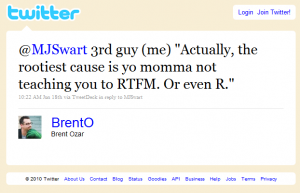
the rootiest cause

the rootiest cause

-Thanks to @MikeSQL for suggesting I turn this topic into a blog post.

June 21, 2010

How I plan to spend my weekend.

Filed under: SQLServerPedia Syndication — Michael J. Swart @ 12:54 pm

So on Friday after work, I’m going to hop in my car and do a run for the border. Google maps tells me that after about seven hours, I’ll be arriving in Columbus, Ohio. Bright and early next morning, I’m heading to SQL Saturday #42 and I have to say I’m pretty excited.

The PASS summit last year was amazing. I described it as a crowd of a thousand or more Michael Swarts. And all they want to talk about is Sql Server. It was like drinking from a firehose of Sql Server information and after three or four days you’re still thirsty!

Unfortunately, a repeat trip to Seattle is not in the cards for Michael Swart in 2010 (incidentally, I die a little when someone like Kimberly Tripp says, “So I’ll see you at PASS?” and I have to say “Not this year”) But I’m addicted to SQL Server User talks (by users for users). And schmoozing with DB professionals.

I’ve already picked out my courses (still tentative)

You see that spare up there? I might save that session to do some yapping or blogging. But it will no doubt still be SQL Server related.

Sunday will be touristy stuff and back home to (hopefully) apply what I’ve learned starting Monday.

So, If you’ve signed up for SQL Saturday #42 in Columbus, then seek me out and introduce yourself  (or leave a comment here, I’ll seek you out).  Cheers!

June 17, 2010

A Method For Testing Database Design

Filed under: SQLServerPedia Syndication,Technical Articles — Tags: , — Michael J. Swart @ 8:00 am

So for testing, DBAs have their SQLIO, performance monitor and a host of other monitoring tools. It helps them gauge how well hardware and networks are holding up.

And also for testing, us Database Developers have SQL Server DMVs, Server Traces other tools. It helps gauge how often and how hard hitting queries are. Pointing to missing indexes, stats, or maybe a query or sproc in need of a rewrite.

But how do Database Designers test their designs out? I think I’ve come up with something that I’ve found useful. It tests one DB design rule of thumb that I’ve always gone by.

The DB-Design Rule of Thumb

Databases should only store data that follows your business rules.

Well duh! But what I mean to say is that a database should not be allowed to store data that doesn’t follow business rules right? In other words you should never overhear anyone say “That bug is due to bad data in the database.”

It’s that rule-of-thumb that I’m I want to test here.

So here’s what you do:

  • Find your favorite database test data generator
  • Point it at your favorite development database. (Operational tables only, skip the static data tables).
  • Load that database with as much data as you can.
  • Use the app (in my case a web site)
  • Debug the crazy stuff but (and here’s the crazy part) as db design bugs!

Don’t think of these bugs as problems on your way to a nice test database. They’re opportunities to improve your database design! Let me explain it the way the kids do on the internet:

Fact! These photos weren't taken for this post.

Realizing the glass is half full.

The crazy stuff is really helpful in pointing out what your database will allow but shouldn’t allow. The stuff that can be debugged usually falls under two categories:

  1. Actual application exceptions.
  2. App behavior that makes you go hmmm*

Bonus:
This method actually works best on applications that have been around a while. I tried this method out on a large old application (considered very mature in terms of software age) and in the first ten minutes I found a missing foreign key and two missing constraints and a large number of columns that should not allow nulls.

Bonus #2:
This isn’t SQL Server specific, but works for any well normalized (or nearly normalized)  RDBMS.

Caveat:
First of all. Everyone should know that I consider myself more of a database developer. I’m competent at database design, but I’m kind of wading into territory normally occupied by Louis Davidson (Twitter|Blog) or Karen Lopez (Twitter|Blog).  If either of them weigh in here, or anywhere for that matter, listen to them.

Cheers, Let me know if you found any of this useful at all. I’d like to see what mileage others get.

* — BTW, anyone else miss the nineties yet?

June 3, 2010

Keeping Track Of Root Nodes in a Hierarchy

Filed under: SQLServerPedia Syndication,Technical Articles — Tags: , , — Michael J. Swart @ 2:53 pm

Takeaway: I explain an interesting problem I encountered. I explain how I maintain data for a table that stores hierarchy info. The problem might not be relevant to you dear reader, but the technique might.

The Problem

So say that you’re keeping track of a hierarchy in a particular table and to make queries faster, you’ve decided to store the a key to the root level node as a column in each row.

Constraints: For whatever reason, the data in this column is untrustworthy and it’s our job to fix it! It’s a huge table, most of the data is okay, and we’d like to fix everything without blocking too much of the table.

Table Description

  • You’re keeping track of a hierarchies in a table using a foreign key to itself
  • Parent nodes are indicated using a ParentId column (see table below):
  • Root nodes are indicated when ParentId is NULL.
  • BaseObjectId indicates the root node of hiearchies (i.e. this equals ObjectId when ParentObjectId is NULL)
  • You’re using SQL 2005 and you can’t use 2008’s new hierarchy data type (or you don’t want to).

The Table Diagram would look something like this:

Hierarchy Example

Hierarchy Example

And the code to create this table would look like:

CREATE TABLE HierarchyExample (
	ObjectId int NOT NULL IDENTITY(1,1),
	ParentObjectId int NULL,
	BaseObjectId int NULL,
	OtherDataGoesHere nvarchar(max) NOT NULL,
	CONSTRAINT PK_HierarchyExample
		PRIMARY KEY (ObjectId),
	CONSTRAINT FK_HierarchyExample
		FOREIGN KEY (ParentObjectId)
		REFERENCES HierarchyExample (ObjectId)
)

Example: You might store this kind of data useful if you were really interested in finding the head or root node of the hierarchy. Like with vampires:

Vampire Hierarchy

Vampire Hierarchy

A Solution

The query:

declare @rc int;
declare @batch int;
select @rc = 1, @batch = 1000;
 
while @rc > 0
begin
      UPDATE TOP (@batch) HE
      SET BaseObjectId  = HE_Parent.BaseObjectId
      FROM HierarchyExample HE
      JOIN HierarchyExample AS HE_Parent
		ON HE.ParentObjectId = HE_Parent.ObjectId
      WHERE HE.BaseObjectId <> HE_Parent.BaseObjectId;
 
      SET @rc = @@ROWCOUNT
end

This script updates the BaseObjectId a thousand rows at a time which keeps the query relatively quick so it doesn’t hold on to locks too long (at least not x-locks). It also handles hierarchies with multiple levels.

Index for Efficiency: The best indexes for this table are the obvious nonclustered covering ones and really turn this query into something fast (using a merge join no less!):

  • HierarchyExample(ParentObjectId, BaseObjectId, ObjectId)
  • HierarchyExample(ObjectId) Include (BaseObjectId)

The original solution I tried used recursive CTEs where the performance  was less than ideal.

What now?

This is the kind of thing I like working on and I thought I’d share. So what about you? What kind of interesting T-SQL challenges have you come across recently?  Leave something in the comments or blog about it and post back here.

May 10, 2010

Disowning Your Relatives

Filed under: SQL Scripts,SQLServerPedia Syndication,Technical Articles — Michael J. Swart @ 5:05 pm

Say that you’re a table, and you don’t want to refer to any parents or children using foreign keys (and vice versa).

There’s a script for that:

--drop fks coming in and out
DECLARE  @sql NVARCHAR (max)
SET @sql = '' 
SELECT @sql = @sql + N'ALTER TABLE ' + OBJECT_NAME(parent_object_id) +  N' DROP CONSTRAINT ' + name + N'; '
FROM sys.foreign_keys
WHERE 'TableName' IN (
    OBJECT_NAME(parent_object_id),
    OBJECT_NAME(referenced_object_id)
)
EXEC sp_executesql @sql

Just remember to replace “TableName” with the name of the table.

Disclaimer: Take care guys!

« Newer PostsOlder Posts »

Powered by WordPress