So last week I talked about all the different ways that Microsoft uses the word scans when in SQL Server. I got together a quick reference guide that describes scans terminology in terms of the SQL Server performance counters (because those counters were granular and trustworthy). But I didn’t really go into as much detail as I could have when I dealt with query plans. Or as Rob Farley prefers execution plans
Showplan Operators That Read From Tables
So here are the execution plan operators that access data from tables. I give a short description of each operator and I explain how that affect the performance counters (Full/Range/Probe). I won’t explain what each one means, I’ll let others do that. But if you know a bit about internals, the icons are actually quite well designed.
Table Scan(Showplan Operator Documentation)
This operator corresponds with the Full Scans/sec performance counter. I actually don’t encounter table scans very often and that’s mostly because most of the tables I deal with have clustered indexes defined. You’ll only ever see table scans on heaps.
Clustered Index Scan(Showplan Operator Documentation)
This operator corresponds with the Full Scans/sec performance counter. This is your run-of-the-mill full scan on a clustered index. Notice the brackets in the showplan icon. Those brackets are supposed to indicate a clustered index. Contrast this with the nonclustered index scan:
Nonclustered Index Scan(Showplan Operator Documentation)
This operator corresponds with the Full Scans/sec performance counter. And this is a full scan of a nonclustered index. You’d probably see this if the nonclustered index contains all the columns to select. It’s easier to scan because it’s a narrower index than the clustered index.
Clustered Index Seek(Showplan Operator Documentation)
This operator corresponds with the Probe Scans/sec performance counter when the clustered index is unique (as with a primary key) and the “seek predicate” includes the key columns needed to return at most one record. But if that’s not the case, then this operator will count towards the performance counter Range Scans/sec.
Nonclustered Index Seek(Showplan Operator Documentation)
Exactly like its Clustered Index counterpart, this operator corresponds with the Probe Scans/sec performance counter when SQL Server can determine that when it looks up the requested row it is sure to get at most one row (i.e. the index is unique etc…) Otherwise it counts towards the performance counter Range Scans/sec.
Key Lookup(Showplan Operator Documentation)
This operator is also known as a bookmark lookup operator. It always counts towards the Probe Scans/sec performance counter. It’s interesting that even though it gets a single record at a time, this operator is often seen as a symptom of poor performance. That’s because the number of executions can get big. Many executions can kill the performance of the query. If you focus on the performance counters, you’ll notice that each of these executions will count towards the Probe Scans performance counter.
RID Lookup(Showplan Operator Documentation)
Just like the key lookup, this lookup counts towards the Probe Scans/sec performance counter. I’ve written about this operator before in an article called Get Rid of RID Lookups.
Takeaway: There are a number of ways Microsoft lets you measure database scans. But Microsoft doesn’t use the word “scan” consistently. I sort through them all here.
I want to tell you about the investigation that led to this blog post. As part of a SQL Risk Assessment Program, we found an issue that identified a high number of full scans versus index searches. It seemed natural to start digging into where these scans were occurring.
The starting point was the report I received. It mentioned the Full Scans/sec performance counter. I needed to find out where these scans were occurring. But looking closer at the various places scans are reported in SQL Server, I quickly realized that I wasn’t comparing apples and oranges. And there are a lot of places Microsoft reports scans. Here are the ones that I care about:
Performance Counters: (Access Methods) Full Scans Explained as “Number of unrestricted full scans. These can either be base table or full index scans.”
Performance Counters: (Access Methods) Range Scans Explained as “Number of qualified range scans through indexes.”
Performance Counters: (Access Methods) Probe Scans Explained as “Number of probe scans per second that are used to find at most one single qualified row in an index or base table directly.”
Scan:Started Event As seen in profiler for example. Books online says this event “occurs when a table or index scan is started.”
Scan:Stopped Event The (supposed) counterpart of the Scan:Started event.
Various Execution Plan Operators Table Scans, Index Scans or Seeks
Scan Count as reported with SET STATISTICS IO. Documented as “Number of index or table scans performed.”
sys.dm_db_index_usage_stats (user_scans) Simply documented as “Number of scans by user queries.”
Before trusting these numbers, I had to find out exactly what they measured. And surprisingly – or maybe not – Microsoft doesn’t use the word scan in the same way for each place it’s reported above.
Demo Time
I’m going to show you a modified set of scripts that I used in my digging. You can skip the demo if you like, but it’s interesting. First the setup:
use tempdb
createtable clusteredtable (
id intnotnullprimarykey, -- this becomes the clustered index
filler char(500)default'hey',
doubleId intnotnull);
createnonclusteredindex ix_ct
on clusteredtable(doubleId)
include (filler);
insert clusteredtable (id, doubleId)selecttop(50)
ROW_NUMBER()OVER(ORDERBY(SELECT1)),
2* ROW_NUMBER()OVER(ORDERBY(SELECT1))from sys.columns;
createtable heaptable
(
id intnotnull,
filler char(500)default'hey',
doubleId intnotnull);
insert heaptable (id, doubleId)selectTOP(50) ROW_NUMBER()OVER(ORDERBY(SELECT1)),
2* ROW_NUMBER()OVER(ORDERBY(SELECT1))from sys.columns
use tempdb

create table clusteredtable (
    id int not null primary key, -- this becomes the clustered index
    filler char(500) default 'hey',
    doubleId int not null
);

create nonclustered index ix_ct
    on clusteredtable(doubleId)
    include (filler);

insert clusteredtable (id, doubleId)
select top (50)
    ROW_NUMBER() OVER(ORDER BY (SELECT 1)),
    2 * ROW_NUMBER() OVER(ORDER BY (SELECT 1))
from  sys.columns;

create table heaptable
(
	id int not null,
	filler char(500) default 'hey',
	doubleId int not null
);

insert heaptable (id, doubleId)
select TOP (50) ROW_NUMBER() OVER(ORDER BY (SELECT 1)),
    2 * ROW_NUMBER() OVER(ORDER BY (SELECT 1))
from sys.columns
Full Scans on Clustered Indexes
--clustered index scanselect filler from clusteredtable orderby id;
-- still a clustered index scanselecttop10*from clusteredtable orderby id;
--two clustered index scansselect a.filler, b.fillerfrom clusteredtable a
inner merge join clusteredtable b
on a.id= b.doubleid/* A keen eye will notice:
All count towards full scans in os counters. (not probe or range)
All count toward user_scans in sys.dm_db_index_usage_stats
All figure in scan count when STATISTICS IO is set
All show up as clustered index scans operators in query plans
All generate Scan:Started events in profiler (but not Scan:Ended)
Scan:Started events also raised on statistics objects used to compile plans.
*/
--clustered index scan
select filler from clusteredtable order by id;

-- still a clustered index scan
select top 10 * from clusteredtable order by id;

--two clustered index scans
select a.filler, b.filler
from clusteredtable a
inner merge join clusteredtable b
on a.id = b.doubleid

/* A keen eye will notice:
All count towards full scans in os counters. (not probe or range)
All count toward user_scans in sys.dm_db_index_usage_stats
All figure in scan count when STATISTICS IO is set
All show up as clustered index scans operators in query plans
All generate Scan:Started events in profiler (but not Scan:Ended)
Scan:Started events also raised on statistics objects used to compile plans.
*/
Scans on a Heap
--table scanselect filler from heaptable;
-- still a table scanselecttop10*from heaptable ;
/* If you care to look at these two queries you'll see
Both count towards full scans in os counters. (not probe or range)
Both count toward user_scans in sys.dm_db_index_usage_stats
Both figure in scan count when STATISTICS IO is set
The query plans show both as table scans.
Both generate Scan:Started events in profiler
Both generate Scan:Ended (unlike CI scans) but *reads* is always zero here no
matter what the logical or physical reads actually are.
*/
--table scan
select filler from heaptable;

-- still a table scan
select top 10 * from heaptable ;

/* If you care to look at these two queries you'll see
Both count towards full scans in os counters. (not probe or range)
Both count toward user_scans in sys.dm_db_index_usage_stats
Both figure in scan count when STATISTICS IO is set
The query plans show both as table scans.
Both generate Scan:Started events in profiler
Both generate Scan:Ended (unlike CI scans) but *reads* is always zero here no
   matter what the logical or physical reads actually are.
*/
After full scans, we start looking at range scans. That is, scans that may return more than one row, but the index columns are filtered somehow. (Remember, this means there’s no such thing as a range scan on a heap!) Range Scans on Clustered Indexes
--clustered index seekselect filler
from clusteredtable
where id >2;
/* This query ...
Counts towards range scans and index searches in os counters. (not probe or full)
Counts toward user_seeks in sys.dm_db_index_usage_stats
Figures in scan count when STATISTICS IO is set
Is shown as a clustered index seek operation in its query plan
Generates Scan:Started events in profiler (but not Scan:Ended)
*/
--clustered index seek
select filler
from clusteredtable
where id > 2;

/* This query ...
Counts towards range scans and index searches in os counters. (not probe or full)
Counts toward user_seeks in sys.dm_db_index_usage_stats
Figures in scan count when STATISTICS IO is set
Is shown as a clustered index seek operation in its query plan
Generates Scan:Started events in profiler (but not Scan:Ended)
*/
Seeks (into unique indexes)
--seek on primary or unique keyselect filler
from clusteredtable
where id =22;
/* So check out the seek. It ...
Counts towards probe scans and index searches in os counters. (not range or full)
Counts toward user_seeks in sys.dm_db_index_usage_stats
Does not count toward scan count in set statistics io
Is shown as a clustered index seek operations in its query plan
There are no Scan:Started/Stopped events generated
*/
--seek on primary or unique key
select filler
from clusteredtable
where id = 22;

/* So check out the seek. It ...
Counts towards probe scans and index searches in os counters. (not range or full)
Counts toward user_seeks in sys.dm_db_index_usage_stats
Does not count toward scan count in set statistics io
Is shown as a clustered index seek operations in its query plan
There are no Scan:Started/Stopped events generated
*/
Things That Surprised Me Most
The performance counters are extremely trustworthy once you know their definitions. The three kinds are Probe, Range and Full. Check them out, they won’t lie to you.
Full scans don’t need to read all rows while range scans might. This is important, because during analysis, I considered multiplying the number of scans with the number of pages in the index to assess the I/O impact and ended up throwing that idea out.
Probe scans (singleton seeks) are best demonstrated using unique indexes, not necessarily clustered indexes.
Scan:Started/Stopped events are garbage… pick another measurement.
Quick Reference
Because the scans tracked in the performance counters are so trustworthy, and granular, I can use them to clarify the other places that Microsoft reports on scans:
What I Did Next
So that’s good. What I ended up doing after my investigation is going straight to the dmv sys.dm_db_index_usage_stats to find out which objects were getting scanned too much. It works out great because
these statistics are more reliable than the Scan:Started and Scan:Stopped events,
the dmv is gentler on the target system than combing through cached query plans.
and the dmv’s column user_scans indicate full scans only (not range scans) which are exactly the performance counters I was digging into.
So that’s how I got from having potentially too many full scans, to understanding exactly on which objects those scans were occurring. What I did after that is another story.
So it’s T-SQL Tuesday time again and this month it’s hosted by Jes Schultz Borland.
The topic this month is aggregation. Which is a great topic. Real T-SQL topics are my favorite kind. In the past I’ve actually written a couple of posts on the topic of aggregation which would have fit in perfectly this month:
But this month, I want to tell you about the aggregate function PRODUCT().
The PRODUCT() Aggregate Function
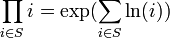
Okay, I’m pulling your leg a bit. There is no function defined in T-SQL that is called PRODUCT(). But everything is in place to let you build one without having to resort to CLR aggregate functions. All we need is to do is remember a bit of math. Remember that:
DECLARE @StartYear INT = 2005;
DECLARE @EndYear INT = 2010;

SELECT EXP(SUM(LOG(1+ (inflationRate/100.0))))
	AS ValueOfUSDollarAfterInflation
FROM (VALUES
	(2001, 2.85),
	(2002, 1.58),
	(2003, 2.28),
	(2004, 2.66),
	(2005, 3.39),
	(2006, 3.23),
	(2007, 2.85),
	(2008, 3.84),
	(2009, -0.36),
	(2010, 1.64),
	(2011, 0.99)
	) AS RATES([year], inflationRate)
WHERE [year] BETWEEN @StartYear + 1 AND @EndYear
/*
ValueOfADollarAfterInflation
----------------------------
1.11653740799858
*/
More About This Method
I don’t know the first person who came up with this trick (Most likely Napier). With a quick search, I understand that others have written about its implementation in SQL many times before. In fact, I wouldn’t be surprised if this tip comes up again this T-SQL Tuesday. But I post anyway because I like my examples and had fun writing it.
So I caught some sort of flu bug recently and that means no new blog post this week. Instead, I’m going to dig through the archives to bring something that you may have missed the first time around.
Today I’m sharing something I first posted two years ago: Something Pretty.
Something Pretty
A T-SQL script I came up with that displays the Mandelbrot set. (Tip: Hit Ctrl-T before executing)
SETNOCOUNTON;
--populate
;WITH Numbers ([row])AS(SELECTTOP100CAST(ROW_NUMBER()OVER(ORDERBY NEWID())ASFLOAT)[row]FROM sys.columns)SELECT A.rowAS x,
B.rowAS y,
0AS iter,
A.rowAS iterx,
B.rowAS itery,
'.'AS symbol
INTO #GRID
FROM Numbers A, Numbers B
WHERE B.[row]<=24
GO
-- scaleUPDATE #GRID
SET x = x *3.0/100.0-2,
y = y *2.0/24.0-1,
iterx = x *3.0/100.0-2,
itery = y *2.0/24.0-1
GO
--iterateUPDATE #GRID
SET iterx = iterx*iterx - itery*itery + x,
itery =2*iterx*itery + y,
iter = iter+1WHERE iterx*iterx+itery*itery <=2*2
GO 257UPDATE #GRID SET symbol =CHAR(64+(iter%26))WHERENOT iter =257
GO
--printWITH concatenated (y, c)AS(SELECT G2.y,
(SELECTSUBSTRING(G.symbol, 1, 1)AS[data()]FROM #GRID G WHERE G.y= G2.yFOR XML PATH('')) c
FROM(SELECTDISTINCT y FROM #GRID)AS G2
)SELECTREPLACE(c, ' ', '')FROM concatenated ORDERBY y
GO
DROPTABLE #GRID
SET NOCOUNT ON;

--populate
;WITH Numbers ([row]) AS
(
   SELECT TOP 100 CAST(ROW_NUMBER() OVER (ORDER BY NEWID()) AS FLOAT) [row]
   FROM sys.columns
)
SELECT A.row AS x,
   B.row AS y,
   0 AS iter,
   A.row AS iterx,
   B.row AS itery,
   '.' AS symbol
INTO #GRID
FROM Numbers A, Numbers B
WHERE B.[row] <= 24
GO

-- scale
UPDATE #GRID
SET x = x * 3.0 / 100.0 - 2,
   y = y * 2.0 / 24.0 - 1,
   iterx = x * 3.0 / 100.0 - 2,
   itery = y * 2.0 / 24.0 - 1
GO

--iterate
UPDATE #GRID
SET iterx = iterx*iterx - itery*itery + x,
    itery = 2*iterx*itery + y,
    iter = iter+1
WHERE iterx*iterx+itery*itery <= 2*2
GO 257

UPDATE #GRID SET symbol = CHAR(64+(iter%26)) WHERE NOT iter = 257
GO

--print
WITH concatenated (y, c) AS
(
   SELECT G2.y,
       (SELECT SUBSTRING(G.symbol, 1, 1) AS [data()] FROM #GRID G WHERE G.y = G2.y FOR XML PATH('')) c
   FROM (SELECT DISTINCT y FROM #GRID) AS G2
)
SELECT REPLACE(c, ' ', '') FROM concatenated ORDER BY y
GO

DROP TABLE #GRID
Question: For a clustered index on an identity column, is it okay to set the fill factor to 100?
Answer: Most likely, it depends on a lot of things.
Fill Factor
So today I’m talking about the FILL FACTOR setting that can be applied to indexes. Remember, Fill Factor is a percentage you can specify so that when indexes are built (or rebuilt) SQL Server leaves some free space in each data page to accommodate any new data that may come along.
If more data is added to a page which doesn’t have enough room to accommodate it, then a page split occurs – a new page is created elsewhere and roughly half the rows get written to the new page. This leaves two pages roughly half full. So the goal of setting a Fill Factor properly is to prevent these page splits (because too many page splits impacts performance).
Fill Factor of 100 on Clustered Indexes on Identity Columns
So there’s a couple places I’ve found that recommend a fill factor of 100 on indexes that begin with identity columns.
Dave Levy describes a process that includes the tip: “If the index is on an ever increasing value, like an identity column, then the fill factor is automatically 100.”
Pinal Dave gives the same advice: “If the index key column is an IDENTITY column, the key for new rows is always increasing and the index rows are logically added to the end of the index. In such a situation, you should set your FILLFACTOR to 100.”
This makes sense, if you always add rows to the end of an index, then you don’t need to save room in the middle do you? Ahh… But what about UPDATE statements? UPDATE statements can add data into the middle of an index (especially a clustered index which includes all fields). You might think that even updating a record so that it’s one byte larger than it used to be will cause a page split.
Fill Factor of 100 Still Has A Bit Of Wiggle Room
It turns out that there’s still a little bit of wiggle room. It’s very rare for pages to have zero bytes free. Even if the index was built (rebuilt) with Fill Factor 100. The reason is because data pages contain an whole number of records. If there’s space on a page, but not quite enough space for a whole record, then it’s considered full. This tiny space could in theory be used for updates that fit.
What Else to Consider
So one extra byte is rarely going to cause a page split. I would be comfortable recommending a Fill Factor of 100 for any index on an identity column. But before you trust me, there are some other things to consider:
The bit of wiggle room I mentioned above
Know your application! Most OLTP systems do far more Inserts than Updates. (Most OLAP systems do zero updates)
How many fields in the index are variable length? And how many of those get updated? Remember only variable length fields can change the size of a record. No variable length fields means an automatic Fill Factor 100.
SQL Server only pays attention to Fill Factor on Index Rebuilds (or on creation). It doesn’t maintain the fill factor space any other time. So ask yourself how often updates are applied to rows that are older than your last index rebuild. If it’s rare, then Fill Factor 100.
How’s your re-indexing strategy? If you REORGANIZE your indexes instead of REBUILD, the fill factor won’t make a difference at all (If so, better to stop reading this article and work on a comprehensive index maintenance strategy.)
Page splits don’t impact performance of seeks (just scans).
Page splits aren’t the end of the world. In terms of database health. Fragmentation is like a bad cold.
There’s probably even more things I’m missing. But you know what’s better than guessing? Measuring! Go use Dave Levy’s Fill Factor script to know exactly how Fill Factor is impacting your indexes.
Every time I see behavior from SQL Server that I don’t understand, it’s very disconcerting. But it often turns out to be a learning experience. And if I’m lucky to get to the bottom of it, the knowledge becomes one more tool in my mental utility belt. I had that experience a couple weeks ago and I want to write about it.
The thing I learned most recently is that searching inside Unicode strings (NVARCHAR strings) is a lot more cpu-intensive than searching inside single-byte strings (VARCHAR strings). By searching I mean looking for substrings. This has nothing to do with index lookups and full-text indexing is a different topic.
So here’s how I learned it: In a database I work on, we recently changed many of our database strings into unicode strings (VARCHAR to NVARCHAR) in order to support multiple languages. And we discovered that the CPU time taken by of a couple procedures shot through the roof! It was an 800% increase in CPU and this was without any significant I/O increase.
Luckily, I was able to reproduce and isolate the behavior. I show the example here. First we build a table of a million rows:
use tempdb
createtable test
(
testid bigintprimarykey,
v varchar(36),
nv nvarchar(36))
go
-- Itzik Ben Gan's trick (via Brad Schulz) to get around SQL Server's lack of a numbers tablewith
L0 as(select1as C unionallselect1)--2 rows
,L1 as(select1as C from L0 as A, L0 as B)--4 rows
,L2 as(select1as C from L1 as A, L1 as B)--16 rows
,L3 as(select1as C from L2 as A, L2 as B)--256 rows
,L4 as(select1as C from L3 as A, L3 as B)--65536 rows
,L5 as(select1as C from L4 as A, L4 as B)--4,294,967,296 rows
,Nums as(select row_number()over(orderby(select0))as N from L5)insert test
select N,
CAST(newid()asvarchar(36)),
CAST(newid()asnvarchar(36))from Nums
where N<=1000000;
go
use tempdb

create table test
(
    testid bigint primary key,
    v varchar(36),
    nv nvarchar(36)
)

go
-- Itzik Ben Gan's trick (via Brad Schulz) to get around SQL Server's lack of a numbers table
with
   L0 as (select 1 as C union all select 1)       --2 rows
  ,L1 as (select 1 as C from L0 as A, L0 as B)    --4 rows
  ,L2 as (select 1 as C from L1 as A, L1 as B)    --16 rows
  ,L3 as (select 1 as C from L2 as A, L2 as B)    --256 rows
  ,L4 as (select 1 as C from L3 as A, L3 as B)    --65536 rows
  ,L5 as (select 1 as C from L4 as A, L4 as B)    --4,294,967,296 rows
  ,Nums as (select row_number() over (order by (select 0)) as N from L5)
insert test
select N,
    CAST (newid() as varchar(36)),
    CAST (newid() as nvarchar(36))
from Nums
where N<=1000000;
go
The Queries
Now look at these two queries, The query that searches the unicode string performs eight times worse than its single-byte counterpart even though they use identical I.O.:
setstatisticstimeonsetstatistics io on-- search utf8 stringselectCOUNT(1)from test where v like'%abcd%'option(maxdop 1)-- CPU time = 797 ms, elapsed time = 791 ms.-- Table 'test'. Scan count 1, logical reads 16472,...-- search unicode stringselectCOUNT(1)from test where nv like N'%abcd%'option(maxdop 1)-- CPU time = 6828 ms, elapsed time = 6862 ms.-- Table 'test'. Scan count 1, logical reads 16472,.../*
(Aside: 36 characters isn't much of a test, but it turns out CPU usage
scales linearly on tests using larger input strings: Searching 72 character
strings take twice the CPU, 108 character strings take three times the CPU etc...)
*/
set statistics time on
set statistics io on
-- search utf8 string
select COUNT(1) from test where v like '%abcd%' option (maxdop 1)
-- CPU time = 797 ms,  elapsed time = 791 ms.
-- Table 'test'. Scan count 1, logical reads 16472,...

-- search unicode string
select COUNT(1) from test where nv like N'%abcd%' option (maxdop 1)
-- CPU time = 6828 ms,  elapsed time = 6862 ms.
-- Table 'test'. Scan count 1, logical reads 16472,...

/*
(Aside: 36 characters isn't much of a test, but it turns out CPU usage
scales linearly on tests using larger input strings: Searching 72 character
strings take twice the CPU, 108 character strings take three times the CPU etc...)
*/
But Why?
The extra CPU cannot be explained away by the wider characters. My gut feeling says that strings twice as long should not take eight times the CPU to search. My first thought was that there was an implicit conversion somewhere but that wasn’t the case.
After some stackoverflow.com help it turns out that this has something to do with the different collations. Many different strings can be compared as equal even though they have different binary representations. VARCHAR strings with different binary representations can compare as equal (e.g. ‘MICHAEL’ is equal to ‘michael’). And Unicode string comparisons have even more complicated rules than these.
So if SQL Server collations have something to do with it, then we can hope that by using a binary collation, we’ll save the extra CPU. And in fact, we see something like that:
-- search unicode string with binary collationselectCOUNT(1)from test
where nv COLLATE Latin1_General_Bin
like N'%ABCD%'option(maxdop 1)-- Table 'test'. Scan count 1, logical reads 16472, ...-- CPU time = 781 ms, elapsed time = 777 ms.
-- search unicode string with binary collation
select COUNT(1)
from test
where nv COLLATE Latin1_General_Bin
    like N'%ABCD%'
option (maxdop 1)
-- Table 'test'. Scan count 1, logical reads 16472, ...
-- CPU time = 781 ms,  elapsed time = 777 ms.
However if we use a case sensitive, accent senstive collation, we can hope for better CPU, but we’d be disappointed:
selectCOUNT(1)from test
where nv COLLATE SQL_Latin1_General_CP1_CS_AS
like N'%ABCD%'option(maxdop 1)-- CPU time = 6688 ms, elapsed time = 6702 ms.-- Table 'test'. Scan count 1, logical reads 16472, .../* similar results for all other non-binary collations */
select COUNT(1)
from test
where nv COLLATE SQL_Latin1_General_CP1_CS_AS
    like N'%ABCD%'
option (maxdop 1)
-- CPU time = 6688 ms,  elapsed time = 6702 ms.
-- Table 'test'. Scan count 1, logical reads 16472, ...
/* similar results for all other non-binary collations */
So what do we know so far?
Searching inside NVARCHAR strings is slower than searching inside VARCHAR.
Specifying different collations (i.e. case sensitivity, accent sensitivity) for NVARCHAR strings doesn’t improve performance
Binary collations are the exception. Searching inside strings using binary collations are much faster
Not Just SQL Server
It turns out that this is most likely not SQL Server’s fault. SQL Server relies on the operating system for its string methods. In particular, it probably relies on any one of these methods found in Kernel32.dll:
lstrcmpi or lstrcmp
FindNLSStringEx, FindNLSString and FindStringOrdinal
CompareStringEx, CompareString and CompareStringOrdinal
The docs for the ~Ordinal functions indicate that these functions are meant for binary (non-linguistic) string comparisons. I’d bet a lot of money that this explains the behavior we see in SQL Server. It accounts for why comparisons using binary collations are faster while comparisons using other collations are not.
Today, I describe 3rd Normal Form and give a ridiculous example of a table that breaks the rule badly. I’ve seen 3NF defined this way:
“A relation (table) R, in second normal form is in third normal form if every non-prime attribute of R is non-transitively dependent on every candidate key of R.”
That’s Wikipedia’s definition of third normal form. And they do a decent job explaining what that means. They reference E. F. Codd’s paper Further Normalization of the Data Base Relational Model 1972. But I couldn’t find a reference online and I was too busy this week to dig out my alumni card and visit the Davis Centre Library.
The House That Jack Built
Before we get into the ridiculous example, I want to talk a bit about the English nursery rhyme The House That Jack Built.
It’s a cumulative poem that starts with the line This is the house that jack built. It repeats and expands (like the songs I Know an Old Lady Who Swallowed a Fly or The Twelve Days of Christmas)
By the end of the poem we have a beautiful run-on sentence where the subject of the poem has very very little to do with the house that Jack built. Here is the rhyme:
This is the house that Jack built.
This is the malt that lay in the house that Jack built.
This is the rat that ate the malt
that lay in the house that Jack built.
… and so on until …
This is the farmer sowing his corn
That kept the cock that crowed in the morn
That waked the priest all shaven and shorn
That married the man all tattered and torn
That kissed the maiden all forlorn
That milked the cow with the crumpled horn
That tossed the dog that worried the cat
That killed the rat that ate the malt
That lay in the house that Jack built.
But the thing that makes this nursery rhyme interesting is the same thing that makes tables violate third normal form. If we think of each database row as a sentence and the subject as the primary key. This brings us to our ridiculous example.
Content Consumer Killer Worrier Tosser Milker Spouse Wedder
Content Consumer Killer Worrier Tosser Milker Spouse Wedder Waker
Content Consumer Killer Worrier Tosser Milker Spouse Wedder Waker Owner
Jack
Malt
Rat
Cat
Dog
Cow (crumpled horn)
Maiden (all forlorn)
Man (tattered and torn)
Priest (shaven and shorn)
Cock (crowed in the morn)
Farmer (sowing corn)
This table is nowhere near third normal form; it’s in a different time zone! This table is supposed to be about houses, not livestock and 16th century English people. So when you’re designing your tables remember: No run on sentences!
The Other Normal Forms
So that’s the series. I could continue with 4NF, 5NF and BCNF (and others!) but I won’t for a few reasons.
Most people who pay attention to 1NF, 2NF and 3NF almost always design databases in the other normal forms without trying.
The other normal forms are dull enough that it becomes a challenge to actually come up with a counter example that can seriously be called ridiculous
I’ve never heard of any problems encountered by anyone caused by not paying attention to the other normal forms. If you know of any, let me know!
Liked This Series?
Hey you, yeah you. The web surfer. Thanks for coming by. I’m glad you’re visiting this post. That’s what I wrote it for. If you liked this series, you may also like my series on Transaction Levels. Or maybe have a look at some of my favorite posts (or some of yours).
Now clicking the links, that’s the first step. Subscribing to my RSS feed – That’s a whole other thing. So here’s the the deal, if you put my blog into your RSS reader, I promise to write stuff worth belonging in it. Go on, subscribe.
“A table is considered 2NF if it is 1NF and if its non-prime attributes depends on the whole of every candidate key not just part of it.
It means that for tables that have multicolumn primary keys (or could), the other columns depend on all the columns in the key, not just a subset. If you follow this rule you’ll see that a field in a record will contain data that is a fact only about the record it belongs to, not others. From another point of view, I’ve seen normalization defined as removing redundant data
Things to Remember
For 2NF, you only need to look at the “non-prime attributes” or in other words the attributes that aren’t part of the primary key.
Look at these columns and ask whether they depend on the whole primary key.
Tables with a single-column primary keys are automatically in 2NF
BUT it’s not fair to make identity columns your primary keys on every table and call your job done (The definition of 2NF closes this loophole by mentioning candidate keys).
The Example
Take a look at the following table. It tracks reviews from the talent search t.v. show “American Idol”. The primary key is defined on the columns (Date, Singer, Song, Reviewer). Look at each other column and ask whether it depends on the whole key, or a subset of the key.
American Idol Reviews
Date
Singer
Song
Reviewer
Age
Show Order
Show Theme
Result
Review
Aug-21
Justin Guarini
Before Your Love
Paula Abdul
23
1
Finale
Runner-Up
Beautiful
Aug-21
Justin Guarini
Before Your Love
Randy Jackson
23
1
Finale
Runner-Up
A little pitchy dawg
Aug-21
Justin Guarini
Before Your Love
Simon Cowell
23
1
Finale
Runner-Up
Rubbish
Aug-21
Kelly Clarkson
A Moment Like This
Paula Abdul
23
2
Finale
Winner
Beautiful
Aug-21
Kelly Clarkson
A Moment Like This
Randy Jackson
23
2
Finale
Winner
A little pitchy dawg
Aug-21
Kelly Clarkson
A Moment Like This
Simon Cowell
23
2
Finale
Winner
Rubbish
Aug-21
Justin Guarini
Get Here
Paula Abdul
20
3
Finale
Runner-Up
Beautiful
Aug-21
Justin Guarini
Get Here
Randy Jackson
20
3
Finale
Runner-Up
A little pitchy dawg
Aug-21
Justin Guarini
Get Here
Simon Cowell
20
3
Finale
Runner-Up
Rubbish
Aug-21
Kelly Clarkson
Respect
Paula Abdul
23
4
Finale
Winner
Beautiful
Aug-21
Kelly Clarkson
Respect
Randy Jackson
23
4
Finale
Winner
A little pitchy dawg
Aug-21
Kelly Clarkson
Respect
Simon Cowell
23
4
Finale
Winner
Rubbish
Aug-21
Justin Guarini
A Moment Like This
Paula Abdul
23
5
Finale
Runner-Up
Beautiful
Aug-21
Justin Guarini
A Moment Like This
Randy Jackson
23
5
Finale
Runner-Up
A little pitchy dawg
Aug-21
Justin Guarini
A Moment Like This
Simon Cowell
23
5
Finale
Runner-Up
Rubbish
Aug-21
Kelly Clarkson
Before Your Love
Paula Abdul
23
6
Finale
Winner
Beautiful
Aug-21
Kelly Clarkson
Before Your Love
Randy Jackson
23
6
Finale
Winner
A little pitchy dawg
Aug-21
Kelly Clarkson
Before Your Love
Simon Cowell
23
6
Finale
Winner
Rubbish
You can see that with the exception of the column Review that all the columns in tables are not dependent on the whole key. We can pull these columns into separate tables:
Normalized:
ShowContestants
Singer
Date
Age
Result
Justin Guarini
Aug-21
23
Runner-Up
Kelly Clarkson
Aug-21
20
Winner
Performances
Date
Singer
Song
Show Order
Aug-21
Justin Guarini
Before Your Love
1
Aug-21
Kelly Clarkson
A Moment Like This
2
Aug-21
Justin Guarini
Get Here
3
Aug-21
Kelly Clarkson
Respect
4
Aug-21
Justin Guarini
A Moment Like This
5
Aug-21
Kelly Clarkson
Before Your Love
6
Shows
Date
Show Theme
Aug-21
Finale
We still have a table to hold all the reviews by the judges. Defined as:
Reviews(Date, Singer, Song, Reviewer, Review)
But it’s still a point of debate whether or not the reviews depend on the whole primary key or a subset of the key (especially based on the example).
So last week I introduced this series where I try to explore the different normal forms by breaking them in absurd ways. This time I’m talking about first normal form.
First Normal Form (1NF)
First normal form has a kind of fuzzy definition. A normalization process was mentioned by E. F. Codd in 1970 which came to be known as first normal form (Even though 1NF has been redefined and clarified a few times since) The paper is called A Relational Model of Data For Large Shared Data Banks. So in this article I’m going to deal with Codd’s description of 1NF in that paper. A database model is in 1NF if it is relational and has
“all relations are defined on simple domains”
Think of relations as tables and simple domains as column spaces that are atomic (i.e. can’t be decomposed). And so today’s ridiculously un-normalized database example is from that paper.
So having tables as values inside tables is not something that SQL Server (or any RDBMS supports) but actually the example was given to explain how to normalize (to 1NF) and to avoid hierarchical data models that were common at the time. These hierarchical data models were and are implemented by systems like IMS and other systems that look like file systems. So in 1970, something like xml might have been easier to understand than relational data models in 1NF. The example above would actually be visualized like this in xml:
But in 2005, SQL Server introduced the xml data type. And my take is that it’s good… mostly. It’s as good as long as you treat as an atomic value (i.e. non-decomposable).
We can think of an xml column as just a string column with a constraint that makes it well formed xml. And that’s not terribly different than an integer column with a constraint that enforces that values are not negative.
XML columns are perfect for software messages (like SQL Server broker messages).
And they’re great for serialized objects (like query plans).
But …
XML is the most decomposable data type I can think of and when we treat these columns as non-atomic, then the tables that contain them are not in 1NF. It’s certainly not what E. F. Codd had in mind when he designed the relational data model.
I’ve found that trouble comes when we try to query it or when we modify it in place. Because then we’re not treating the xml as atomic. And then the shortcomings of xml columns inside a database become very apparent. In SQL Server – as of 2005 – there are ways to query xml values or modify xml values such as when we use xml indexes and when we use XQuery. We find complicated code down this road and performance issues that are just as complicated.
For example:
What happens when we want to look at information inside the plan cache? Look at Finding Implicit Column Conversions In The Plan Cache by Jonathan Kehayias. It’s a good demonstration of how complicated solutions are necessary when dealing with XML inside SQL Server.
Jason Strate has a great series on XQuery (when the benefits outweigh the drawbacks) here: XQuery | Strate SQL
Do you have opinions on 1NF or the history of databases? It’s all fascinating stuff. Let me know in the comments what you think. I’ve got a bunch of ideas that can’t fit in one article and your comments might let me know what to continue writing about.
I’m presenting a small series of articles that describes database normalization. But the topic is already covered quite well by Wikipedia’s Database Normalization article. And so in this series I’m going to explain database normalization by using examples. Actually by counter-example. The goal is to come up with counter-examples that break the rules so bad that you’ll never forget the rules for each normal form.
DB Normalization is a good thing
But I’m not going to explain why. At least not in depth. That’s a topic for another day. Let me just say that SQL Server – and Oracle and DB2 and the rest – were designed to support Normalized Databases. Designing Normalized databases makes the best use of SQL Server and doing so avoids a lot of messy problems.
Before We Start…
I’m not going to jump into first normal form (1NF). That’s next article. All database schemas that are 1NF must be relational. So in this article I’m looking at information stores that aren’t relational.
I start by giving an example of an information container. It’s not a database schema, It’s not even a data model (strictly).
The Human Brain
So as an information store, the brain is not super-reliable but it has it’s place. I chose this example because if you’re not in I.T., the brain still holds a ton of information!
To the theoretical physicist, it has a lot information by virtue of the fact that it’s a physical object.
The chemist and biologist would be fascinated by the information stored in the DNA of every cell.
And of course if connected to a living body, the brain has information for everyone else, in the usual sense (just ask!)
The Relational Database Model
Getting back to databases. Specifically ones that aren’t relational.
It’s surprising that DB normalization was defined at the exact same time as the Relational Database Model (Well, not exactly the same time. They were a chapter apart in Codd’s paper A Relational Model of Data for Large Shared Data Banks 1970)
So for a schema to even be considered for first normal form, it has to be relational. And while SQL Server is called an RDBMS, it turns out to be surprisingly easy to define tables that aren’t relational. Take this example:
-- not a relational tableCREATETABLE Employee (
EmployeeNumber INTNOTNULL,
FirstName NVARCHAR(50)NOTNULL,
LastName NVARCHAR(50)NOTNULL)
-- not a relational table
CREATE TABLE Employee (
    EmployeeNumber INT NOT NULL,
    FirstName NVARCHAR (50) NOT NULL,
    LastName NVARCHAR (50) NOT NULL
)
There’s no primary key! If your tables are missing primary keys, then you’re automatically disqualified. No 1NF for you! (Incidentally the same goes for missing foreign keys.)
In the next few articles I leave the non-relational stuff behind. We’ll look at examples of relational tables (don’t worry, there’s still a lot of ridiculousness coming).