So it’s April Fool’s day later this week and instead of trying to pull something over on folks, I thought I’d just do something light-hearted. So nothing super technical this week. Just plugged in my electric pen and …
How Most DBA Romances Start
SQLololo
On Twitter Last Night
@MJSwart: I need one more SQL comic to draw. Ideas? (You give the idea, I give the drawing and the credit) @BrentO: I like to think of the Resource Governor as Colonel Sanders. 😉 @MJSwart: Done and done! Stay tuned.
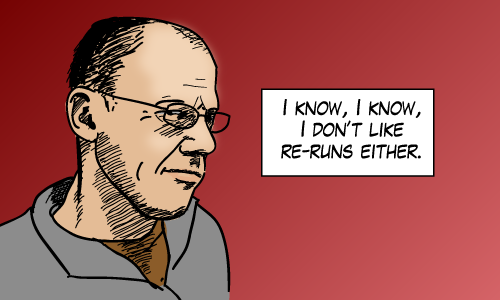
… Here you go Brent
Bonus cartoon
For a nifty bonus cartoon just press F13 (This works on most browsers).
So last week I talked about all the different ways that Microsoft uses the word scans when in SQL Server. I got together a quick reference guide that describes scans terminology in terms of the SQL Server performance counters (because those counters were granular and trustworthy). But I didn’t really go into as much detail as I could have when I dealt with query plans. Or as Rob Farley prefers execution plans
Showplan Operators That Read From Tables
So here are the execution plan operators that access data from tables. I give a short description of each operator and I explain how that affect the performance counters (Full/Range/Probe). I won’t explain what each one means, I’ll let others do that. But if you know a bit about internals, the icons are actually quite well designed.
Table Scan(Showplan Operator Documentation)
This operator corresponds with the Full Scans/sec performance counter. I actually don’t encounter table scans very often and that’s mostly because most of the tables I deal with have clustered indexes defined. You’ll only ever see table scans on heaps.
Clustered Index Scan(Showplan Operator Documentation)
This operator corresponds with the Full Scans/sec performance counter. This is your run-of-the-mill full scan on a clustered index. Notice the brackets in the showplan icon. Those brackets are supposed to indicate a clustered index. Contrast this with the nonclustered index scan:
Nonclustered Index Scan(Showplan Operator Documentation)
This operator corresponds with the Full Scans/sec performance counter. And this is a full scan of a nonclustered index. You’d probably see this if the nonclustered index contains all the columns to select. It’s easier to scan because it’s a narrower index than the clustered index.
Clustered Index Seek(Showplan Operator Documentation)
This operator corresponds with the Probe Scans/sec performance counter when the clustered index is unique (as with a primary key) and the “seek predicate” includes the key columns needed to return at most one record. But if that’s not the case, then this operator will count towards the performance counter Range Scans/sec.
Nonclustered Index Seek(Showplan Operator Documentation)
Exactly like its Clustered Index counterpart, this operator corresponds with the Probe Scans/sec performance counter when SQL Server can determine that when it looks up the requested row it is sure to get at most one row (i.e. the index is unique etc…) Otherwise it counts towards the performance counter Range Scans/sec.
Key Lookup(Showplan Operator Documentation)
This operator is also known as a bookmark lookup operator. It always counts towards the Probe Scans/sec performance counter. It’s interesting that even though it gets a single record at a time, this operator is often seen as a symptom of poor performance. That’s because the number of executions can get big. Many executions can kill the performance of the query. If you focus on the performance counters, you’ll notice that each of these executions will count towards the Probe Scans performance counter.
RID Lookup(Showplan Operator Documentation)
Just like the key lookup, this lookup counts towards the Probe Scans/sec performance counter. I’ve written about this operator before in an article called Get Rid of RID Lookups.
Takeaway: There are a number of ways Microsoft lets you measure database scans. But Microsoft doesn’t use the word “scan” consistently. I sort through them all here.
I want to tell you about the investigation that led to this blog post. As part of a SQL Risk Assessment Program, we found an issue that identified a high number of full scans versus index searches. It seemed natural to start digging into where these scans were occurring.
The starting point was the report I received. It mentioned the Full Scans/sec performance counter. I needed to find out where these scans were occurring. But looking closer at the various places scans are reported in SQL Server, I quickly realized that I wasn’t comparing apples and oranges. And there are a lot of places Microsoft reports scans. Here are the ones that I care about:
Performance Counters: (Access Methods) Full Scans Explained as “Number of unrestricted full scans. These can either be base table or full index scans.”
Performance Counters: (Access Methods) Range Scans Explained as “Number of qualified range scans through indexes.”
Performance Counters: (Access Methods) Probe Scans Explained as “Number of probe scans per second that are used to find at most one single qualified row in an index or base table directly.”
Scan:Started Event As seen in profiler for example. Books online says this event “occurs when a table or index scan is started.”
Scan:Stopped Event The (supposed) counterpart of the Scan:Started event.
Various Execution Plan Operators Table Scans, Index Scans or Seeks
Scan Count as reported with SET STATISTICS IO. Documented as “Number of index or table scans performed.”
sys.dm_db_index_usage_stats (user_scans) Simply documented as “Number of scans by user queries.”
Before trusting these numbers, I had to find out exactly what they measured. And surprisingly – or maybe not – Microsoft doesn’t use the word scan in the same way for each place it’s reported above.
Demo Time
I’m going to show you a modified set of scripts that I used in my digging. You can skip the demo if you like, but it’s interesting. First the setup:
use tempdb
createtable clusteredtable (
id intnotnullprimarykey, -- this becomes the clustered index
filler char(500)default'hey',
doubleId intnotnull);
createnonclusteredindex ix_ct
on clusteredtable(doubleId)
include (filler);
insert clusteredtable (id, doubleId)selecttop(50)
ROW_NUMBER()OVER(ORDERBY(SELECT1)),
2* ROW_NUMBER()OVER(ORDERBY(SELECT1))from sys.columns;
createtable heaptable
(
id intnotnull,
filler char(500)default'hey',
doubleId intnotnull);
insert heaptable (id, doubleId)selectTOP(50) ROW_NUMBER()OVER(ORDERBY(SELECT1)),
2* ROW_NUMBER()OVER(ORDERBY(SELECT1))from sys.columns
use tempdb

create table clusteredtable (
    id int not null primary key, -- this becomes the clustered index
    filler char(500) default 'hey',
    doubleId int not null
);

create nonclustered index ix_ct
    on clusteredtable(doubleId)
    include (filler);

insert clusteredtable (id, doubleId)
select top (50)
    ROW_NUMBER() OVER(ORDER BY (SELECT 1)),
    2 * ROW_NUMBER() OVER(ORDER BY (SELECT 1))
from  sys.columns;

create table heaptable
(
	id int not null,
	filler char(500) default 'hey',
	doubleId int not null
);

insert heaptable (id, doubleId)
select TOP (50) ROW_NUMBER() OVER(ORDER BY (SELECT 1)),
    2 * ROW_NUMBER() OVER(ORDER BY (SELECT 1))
from sys.columns
Full Scans on Clustered Indexes
--clustered index scanselect filler from clusteredtable orderby id;
-- still a clustered index scanselecttop10*from clusteredtable orderby id;
--two clustered index scansselect a.filler, b.fillerfrom clusteredtable a
inner merge join clusteredtable b
on a.id= b.doubleid/* A keen eye will notice:
All count towards full scans in os counters. (not probe or range)
All count toward user_scans in sys.dm_db_index_usage_stats
All figure in scan count when STATISTICS IO is set
All show up as clustered index scans operators in query plans
All generate Scan:Started events in profiler (but not Scan:Ended)
Scan:Started events also raised on statistics objects used to compile plans.
*/
--clustered index scan
select filler from clusteredtable order by id;

-- still a clustered index scan
select top 10 * from clusteredtable order by id;

--two clustered index scans
select a.filler, b.filler
from clusteredtable a
inner merge join clusteredtable b
on a.id = b.doubleid

/* A keen eye will notice:
All count towards full scans in os counters. (not probe or range)
All count toward user_scans in sys.dm_db_index_usage_stats
All figure in scan count when STATISTICS IO is set
All show up as clustered index scans operators in query plans
All generate Scan:Started events in profiler (but not Scan:Ended)
Scan:Started events also raised on statistics objects used to compile plans.
*/
Scans on a Heap
--table scanselect filler from heaptable;
-- still a table scanselecttop10*from heaptable ;
/* If you care to look at these two queries you'll see
Both count towards full scans in os counters. (not probe or range)
Both count toward user_scans in sys.dm_db_index_usage_stats
Both figure in scan count when STATISTICS IO is set
The query plans show both as table scans.
Both generate Scan:Started events in profiler
Both generate Scan:Ended (unlike CI scans) but *reads* is always zero here no
matter what the logical or physical reads actually are.
*/
--table scan
select filler from heaptable;

-- still a table scan
select top 10 * from heaptable ;

/* If you care to look at these two queries you'll see
Both count towards full scans in os counters. (not probe or range)
Both count toward user_scans in sys.dm_db_index_usage_stats
Both figure in scan count when STATISTICS IO is set
The query plans show both as table scans.
Both generate Scan:Started events in profiler
Both generate Scan:Ended (unlike CI scans) but *reads* is always zero here no
   matter what the logical or physical reads actually are.
*/
After full scans, we start looking at range scans. That is, scans that may return more than one row, but the index columns are filtered somehow. (Remember, this means there’s no such thing as a range scan on a heap!) Range Scans on Clustered Indexes
--clustered index seekselect filler
from clusteredtable
where id >2;
/* This query ...
Counts towards range scans and index searches in os counters. (not probe or full)
Counts toward user_seeks in sys.dm_db_index_usage_stats
Figures in scan count when STATISTICS IO is set
Is shown as a clustered index seek operation in its query plan
Generates Scan:Started events in profiler (but not Scan:Ended)
*/
--clustered index seek
select filler
from clusteredtable
where id > 2;

/* This query ...
Counts towards range scans and index searches in os counters. (not probe or full)
Counts toward user_seeks in sys.dm_db_index_usage_stats
Figures in scan count when STATISTICS IO is set
Is shown as a clustered index seek operation in its query plan
Generates Scan:Started events in profiler (but not Scan:Ended)
*/
Seeks (into unique indexes)
--seek on primary or unique keyselect filler
from clusteredtable
where id =22;
/* So check out the seek. It ...
Counts towards probe scans and index searches in os counters. (not range or full)
Counts toward user_seeks in sys.dm_db_index_usage_stats
Does not count toward scan count in set statistics io
Is shown as a clustered index seek operations in its query plan
There are no Scan:Started/Stopped events generated
*/
--seek on primary or unique key
select filler
from clusteredtable
where id = 22;

/* So check out the seek. It ...
Counts towards probe scans and index searches in os counters. (not range or full)
Counts toward user_seeks in sys.dm_db_index_usage_stats
Does not count toward scan count in set statistics io
Is shown as a clustered index seek operations in its query plan
There are no Scan:Started/Stopped events generated
*/
Things That Surprised Me Most
The performance counters are extremely trustworthy once you know their definitions. The three kinds are Probe, Range and Full. Check them out, they won’t lie to you.
Full scans don’t need to read all rows while range scans might. This is important, because during analysis, I considered multiplying the number of scans with the number of pages in the index to assess the I/O impact and ended up throwing that idea out.
Probe scans (singleton seeks) are best demonstrated using unique indexes, not necessarily clustered indexes.
Scan:Started/Stopped events are garbage… pick another measurement.
Quick Reference
Because the scans tracked in the performance counters are so trustworthy, and granular, I can use them to clarify the other places that Microsoft reports on scans:
What I Did Next
So that’s good. What I ended up doing after my investigation is going straight to the dmv sys.dm_db_index_usage_stats to find out which objects were getting scanned too much. It works out great because
these statistics are more reliable than the Scan:Started and Scan:Stopped events,
the dmv is gentler on the target system than combing through cached query plans.
and the dmv’s column user_scans indicate full scans only (not range scans) which are exactly the performance counters I was digging into.
So that’s how I got from having potentially too many full scans, to understanding exactly on which objects those scans were occurring. What I did after that is another story.
So it’s T-SQL Tuesday time again and this month it’s hosted by Jes Schultz Borland.
The topic this month is aggregation. Which is a great topic. Real T-SQL topics are my favorite kind. In the past I’ve actually written a couple of posts on the topic of aggregation which would have fit in perfectly this month:
But this month, I want to tell you about the aggregate function PRODUCT().
The PRODUCT() Aggregate Function
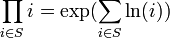
Okay, I’m pulling your leg a bit. There is no function defined in T-SQL that is called PRODUCT(). But everything is in place to let you build one without having to resort to CLR aggregate functions. All we need is to do is remember a bit of math. Remember that:
DECLARE @StartYear INT = 2005;
DECLARE @EndYear INT = 2010;

SELECT EXP(SUM(LOG(1+ (inflationRate/100.0))))
	AS ValueOfUSDollarAfterInflation
FROM (VALUES
	(2001, 2.85),
	(2002, 1.58),
	(2003, 2.28),
	(2004, 2.66),
	(2005, 3.39),
	(2006, 3.23),
	(2007, 2.85),
	(2008, 3.84),
	(2009, -0.36),
	(2010, 1.64),
	(2011, 0.99)
	) AS RATES([year], inflationRate)
WHERE [year] BETWEEN @StartYear + 1 AND @EndYear
/*
ValueOfADollarAfterInflation
----------------------------
1.11653740799858
*/
More About This Method
I don’t know the first person who came up with this trick (Most likely Napier). With a quick search, I understand that others have written about its implementation in SQL many times before. In fact, I wouldn’t be surprised if this tip comes up again this T-SQL Tuesday. But I post anyway because I like my examples and had fun writing it.
So I caught some sort of flu bug recently and that means no new blog post this week. Instead, I’m going to dig through the archives to bring something that you may have missed the first time around.
Today I’m sharing something I first posted two years ago: Something Pretty.
Something Pretty
A T-SQL script I came up with that displays the Mandelbrot set. (Tip: Hit Ctrl-T before executing)
SETNOCOUNTON;
--populate
;WITH Numbers ([row])AS(SELECTTOP100CAST(ROW_NUMBER()OVER(ORDERBY NEWID())ASFLOAT)[row]FROM sys.columns)SELECT A.rowAS x,
B.rowAS y,
0AS iter,
A.rowAS iterx,
B.rowAS itery,
'.'AS symbol
INTO #GRID
FROM Numbers A, Numbers B
WHERE B.[row]<=24
GO
-- scaleUPDATE #GRID
SET x = x *3.0/100.0-2,
y = y *2.0/24.0-1,
iterx = x *3.0/100.0-2,
itery = y *2.0/24.0-1
GO
--iterateUPDATE #GRID
SET iterx = iterx*iterx - itery*itery + x,
itery =2*iterx*itery + y,
iter = iter+1WHERE iterx*iterx+itery*itery <=2*2
GO 257UPDATE #GRID SET symbol =CHAR(64+(iter%26))WHERENOT iter =257
GO
--printWITH concatenated (y, c)AS(SELECT G2.y,
(SELECTSUBSTRING(G.symbol, 1, 1)AS[data()]FROM #GRID G WHERE G.y= G2.yFOR XML PATH('')) c
FROM(SELECTDISTINCT y FROM #GRID)AS G2
)SELECTREPLACE(c, ' ', '')FROM concatenated ORDERBY y
GO
DROPTABLE #GRID
SET NOCOUNT ON;

--populate
;WITH Numbers ([row]) AS
(
   SELECT TOP 100 CAST(ROW_NUMBER() OVER (ORDER BY NEWID()) AS FLOAT) [row]
   FROM sys.columns
)
SELECT A.row AS x,
   B.row AS y,
   0 AS iter,
   A.row AS iterx,
   B.row AS itery,
   '.' AS symbol
INTO #GRID
FROM Numbers A, Numbers B
WHERE B.[row] <= 24
GO

-- scale
UPDATE #GRID
SET x = x * 3.0 / 100.0 - 2,
   y = y * 2.0 / 24.0 - 1,
   iterx = x * 3.0 / 100.0 - 2,
   itery = y * 2.0 / 24.0 - 1
GO

--iterate
UPDATE #GRID
SET iterx = iterx*iterx - itery*itery + x,
    itery = 2*iterx*itery + y,
    iter = iter+1
WHERE iterx*iterx+itery*itery <= 2*2
GO 257

UPDATE #GRID SET symbol = CHAR(64+(iter%26)) WHERE NOT iter = 257
GO

--print
WITH concatenated (y, c) AS
(
   SELECT G2.y,
       (SELECT SUBSTRING(G.symbol, 1, 1) AS [data()] FROM #GRID G WHERE G.y = G2.y FOR XML PATH('')) c
   FROM (SELECT DISTINCT y FROM #GRID) AS G2
)
SELECT REPLACE(c, ' ', '') FROM concatenated ORDER BY y
GO

DROP TABLE #GRID