


Takeaway: Adding foreign keys require schema modification locks on every table involved. This can cause deadlocks on busy systems.
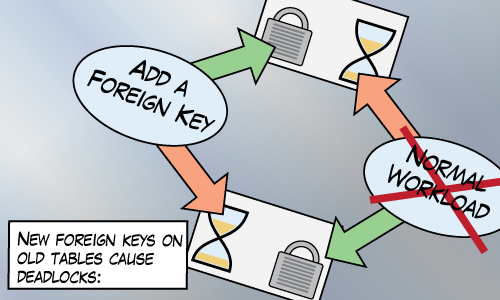
Schema modification locks (SCH-M) are taken by DDL (Data Definition Language) statements like CREATE/ALTER/DROP.
Schema stability locks (SCH-S) are taken by DML (Data Manipulation Language) statements like INSERT/UPDATE/DELETE.
Those two types of locks are incompatible. Meaning, I can’t get a SCH-S lock on some table if you’ve already got a SCH-M lock on it (and vice versa).
Paul Randal describes the SCH-M lock as a super-table-X lock. It makes sense to me, if I’m half way through querying a table, I don’t want its definition to change.
Such a pessimistic lock can be awkward for a busy system. The SCH-M can cause a lot of blocking. For example, creating (and dropping) foreign keys requires a SCH-M lock not only on the parent table, but also on the referenced table which leads to trouble.
Our Environment
Our environment is busy. We support thousands of databases that run 24-7 and we don’t really have time for any maintenance windows. So we really value changes that are as ONLINE as possible.
In the past few years, we’ve noticed occasional problems with the creation of foreign keys. These problems would take the form of deadlocks or excessive blocking, timeouts in the application, and website errors seen by end users.
As we grow in size, and make more changes to our databases, these problems became more frequent and more annoying. We see so much variety and volume of queries that it’s a bit like Murphy’s law. If some sort of race condition can cause trouble, then it will cause trouble. Maybe you can relate.
I explore two specific scenarios we’ve had trouble with. These scenarios seem safe but I’ll describe how they can go wrong, and what we do about them.
Creating a table with more than one foreign key
Creating a new table with more than one foreign key leads to trouble. There’s no concurrency issue with the new table because no one else knows it exists yet. It’s the other two SCH-M locks.
Trouble:
CREATE TABLE dbo.BrandNewTable ( Id BIGINT IDENTITY NOT NULL PRIMARY KEY, FirstId BIGINT NOT NULL CONSTRAINT FK_BrandNewTable1 FOREIGN KEY (FirstId) REFERENCES dbo.First(Id), SecondId BIGINT NOT NULL CONSTRAINT FK_BrandNewTable2 FOREIGN KEY (SecondId) REFERENCES dbo.Second(Id) ); |
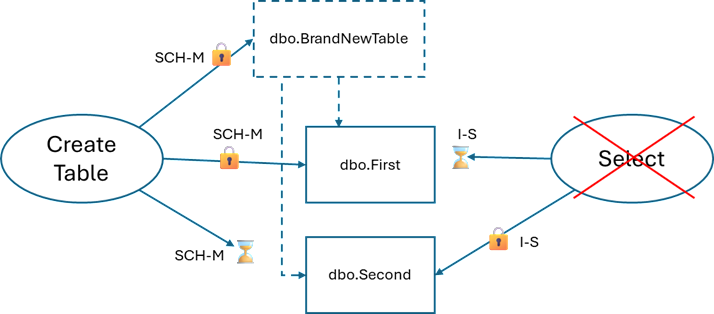
The SCH-M lock on BrandNewTable doesn’t even matter here. It’s the SCH-M locks on the other tables. Grabbing a SCH-M locks on dbo.First and then dbo.Second may deadlock with queries that want to use dbo.Second and then dbo.First.
I have this picture in my head when I think about this kind of deadlock:
Better:
This one’s easy to avoid, just add the foreign keys in separate statements (not in a transaction!):
CREATE TABLE dbo.BrandNewTable ( Id BIGINT IDENTITY NOT NULL PRIMARY KEY, FirstId BIGINT NOT NULL, SecondId BIGINT NOT NULL ); ALTER TABLE dbo.BrandNewTable ADD CONSTRAINT FK_BrandNewTable1 FOREIGN KEY (FirstId) REFERENCES dbo.First(Id); ALTER TABLE dbo.BrandNewTable ADD CONSTRAINT FK_BrandNewTable2 FOREIGN KEY (SecondId) REFERENCES dbo.Second(Id); |
Creating a foreign key between two existing tables
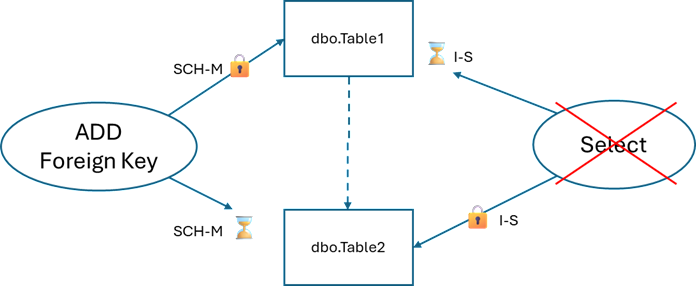
When creating a foreign key, SQL Server needs to take SCH-M locks on two tables inside a single transaction. If those tables are being queried, we can see contention.
Trouble
ALTER TABLE dbo.Table1 WITH NOCHECK ADD CONSTRAINT FK_Table1_Table2 FOREIGN KEY (Table2Id) REFERENCES dbo.Table2(Id); |
We get another deadlock similar to the first:
Maybe Better:
This one is harder to avoid but I’ve had some success with writing a script that retries deadlocks. I’m basically listening to the error message: “you have been chosen as the deadlock victim. Rerun your transaction”
SET DEADLOCK_PRIORITY LOW; DECLARE @MaxRetryCount INT = 20; DECLARE @RetryCount INT = 0; WHILE @RetryCount <= @MaxRetryCount BEGIN BEGIN TRY ALTER TABLE dbo.Table1 WITH NOCHECK ADD CONSTRAINT FK_Table1_Table2 FOREIGN KEY (Table2Id) REFERENCES dbo.Table2(Id); BREAK; END TRY BEGIN CATCH SET @RetryCount = @RetryCount + 1; WAITFOR DELAY '00:00:03'; END CATCH END; |
Advice
If you’re making changes to busy environments
- Don’t add more than one foreign key inside a
CREATE TABLEstatement. - Update: Kevin Feasel points out that ideally, and when possible, “apply foreign key constraints at table creation time.”
- If your deployment process is manual or resilient at all, consider taking one for the team.
SET DEADLOCK_PRIORITY LOWbefore executing DDL statements. This way you’re volunteering to be the deadlock victim and you can retry. - If your workload consists of long-running queries, then schema modifications will block any new query executions until the in-progress queries complete. But that’s a topic for another day.
- If you want to reproduce this yourself, I added code in the comments.

If you’re curious, the only AI I used for this post is Adobe Illustrator.
Comment by Michael J. Swart — May 20, 2026 @ 11:14 am
Here’s some code I used.
Set up the database
Repro
Call s_DoSomething 10000 times with 20 threads using SqlQueryStress.
Then in SSMS, execute one of the following a few times until you get a deadlock error:
or
Comment by Michael J. Swart — May 20, 2026 @ 11:20 am
[…] Michael J. Swart explains a challenge in adding a foreign key to an existing table: […]
Pingback by Adding Foreign Keys and Deadlocks – Curated SQL — May 21, 2026 @ 8:10 am
Nice write-up, Michael. I was just having some issues with SCH-M locks over the last couple of weeks and I revisited one of your older posts about them for some guidance. (I was dealing with a stored proc that disabled/enabled a trigger. I was able to avoid that via CONTEXT_INFO().)
And here we are again with another SCH-M lock issue to consider!
Hope you’re doing well.
Dave
Comment by Dave Mason — May 25, 2026 @ 1:26 pm
Should/could this considered a bug, in that SQL Server is using an overly-aggressive lock on the referenced table? While the Sch-M lock on the table have a Foreign Key added to it makes sense, is there anything that could happen to the referenced table, that would break the FK creation, that a Sch-S lock would not prevent? Is the actual work something like – place Sch-[M or S] lock on referenced table, check referenced column exists, check data type is compatible, [if using WITH CHECK get distinct values]. As you say, just using a Sch-S for that should prevent someone else, say dropping the referenced column, while the FK is being created because the other person would need to use a Sch-M lock which would be blocked by the FK-creation Sch-S lock.
Comment by DW — May 26, 2026 @ 4:01 pm
Hey Dave,
Good to hear from you. Yeah, these SCH-M issues are rare, but they can be hairy
Comment by Michael J Swart — May 26, 2026 @ 4:31 pm
Hey DW,
It could be considered a bug for sure. I couldn’t argue against that characterizations.
Like you, I often felt that a SCH-M was a bit over-aggressive for the referenced table and that a SCH-S lock would have been sufficient.
My guess is that either there’s some obscure issue that the aggressive locking prevents that I haven’t considered, or it’s a defect.
If we’re wishing for things that should be easier, I would
● Make it a meta operation to “demote” a rowversion column into a regular old “binary(8)” column.
● Add a trusted check constraint quickly when an index supports it
● Also, adding temporal tables quickly.
I bet I we all could think of a few more
Comment by Michael J Swart — May 26, 2026 @ 4:43 pm