


It’s hard to destroy data. Even when a column is dropped, the data is still physically there on the data page. We can use the undocumented/unsupported command DBCC PAGE to look at it.
Example
First, create a table based on English values from sys.messages:
use tempdb; go /* create table based on english values from sys.messages */ DROP TABLE IF EXISTS #MyMessages; CREATE TABLE #MyMessages ( message_id INT NOT NULL PRIMARY KEY, severity INT NOT NULL, text NVARCHAR(MAX) ); GO INSERT #MyMessages (message_id, severity, text) SELECT message_id, severity, text FROM sys.messages WHERE language_id = 1033; GO |
Then drop the column severity
/* drop column severity */ ALTER TABLE #MyMessages DROP COLUMN severity; GO |
The Task
Without restoring a backup, let’s try to answer the following question: “What was the severity of the message with message_id = 9015?”
We do that by
- Finding the physical page
- Looking at the memory dump with DBCC Page
- Finding the data and making sense of it
Finding the physical page
Start by finding the physical location of the row. It’s address is three numbers, FileId, PageId, SlotId.
SELECT sys.fn_PhysLocFormatter(%%physloc%%) FROM #MyMessages WHERE message_id = 9015 |
So as an example, the output will be like: (8:286:30). The first number is the FileId, the second is the PageId and the third is the SlotId. Remember those numbers.
Use DBCC PAGE to look at the page
Turn on trace flag 3604 to see results. DBCC PAGE takes parameters DatabaseName, FileId and PageId as an input. The fourth parameter is like an output type. Use 3.
DBCC TRACEON(3604) GO /* DBCC PAGE ('DATABASE_NAME', FileId, PageId, 3): */ DBCC PAGE('tempdb', 8, 286, 3) |
Then find slot 30. That will look something like this:
Slot 30 Offset 0x1df4 Length 103

Record Type = PRIMARY_RECORD        Record Attributes =  NULL_BITMAP VARIABLE_COLUMNS
Record Size = 103
Memory Dump @0x000000CA1CFF7DF4

0000000000000000:   30000c00 37230000 18000000 03000001 00670054  0...7#...........g.T
0000000000000014:   00680065 0020006c 006f0067 00200072 00650063  .h.e. .l.o.g. .r.e.c
0000000000000028:   006f0072 00640020 00610074 0020004c 0053004e  .o.r.d. .a.t. .L.S.N
000000000000003C:   00200025 0053005f 004c0053 004e0020 00690073  . .%.S._.L.S.N. .i.s
0000000000000050:   00200063 006f0072 00720075 00700074 00650064  . .c.o.r.r.u.p.t.e.d
0000000000000064:   002e00                                        ...

Slot 30 Column 1 Offset 0x4 Length 4 Length (physical) 4

message_id = 9015

Slot 30 Column 67108865 Offset 0x8 Length 0 Length (physical) 4

DROPPED = NULL

text = [BLOB Inline Data] Slot 30 Column 3 Offset 0x13 Length 84 Length (physical) 84

000000CA1CFEACC0:   54006800 65002000 6c006f00 67002000 72006500  T.h.e. .l.o.g. .r.e.
000000CA1CFEACD4:   63006f00 72006400 20006100 74002000 4c005300  c.o.r.d. .a.t. .L.S.
000000CA1CFEACE8:   4e002000 25005300 5f004c00 53004e00 20006900  N. .%.S._.L.S.N. .i.
000000CA1CFEACFC:   73002000 63006f00 72007200 75007000 74006500  s. .c.o.r.r.u.p.t.e.
000000CA1CFEAD10:   64002e00                                      d...

Slot 30 Offset 0x0 Length 0 Length (physical) 0

KeyHashValue = (da9b77820b53)
Find the data and make sense of the results
To retrieve our value, we look for the dropped column, it’s helpfully listed as DROPPED = NULL.
That NULL isn’t to helpful, but the extra info right before DROPPED = NULL Looks like: Slot 30 Column 67108865 Offset 0x8 Length 0 Length (physical) 4
We can use that information. In this example, the offset is 0x8 and the physical length is 4.
This means, at offset hex 0x8 which is 8, read 4 bytes. But where do we read that? At the memory dump for the row:
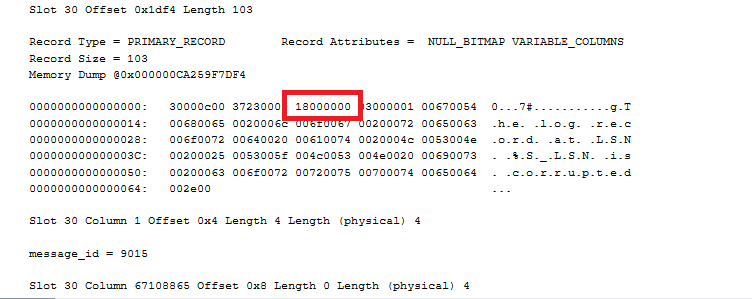
Each hex number is half a byte, so starting 16 hex digits over, look at the next 4 bytes (8 hex digits). That gives us 18000000. That’s a hex number whose bytes have been reversed.
So starting with: 18000000,
Split that into bytes: 18 00 00 00
Reverse it like Missy Elliot: 00 00 00 18.
Use a programming calculator to go from hex: 0x00000018
To decimal: 24
The severity of the message with message_id = 9015 was indeed 24.

Another variation is to delete the row of interest inside a transaction and roll it back.
The log record (accessible via sys.fn_dblog) will contain the deleted row image in e.g. RowLog Contents 0.
The byte offset and length needed can be obtained from sys.system_internals_partition_columns, which also indicates dropped columns.
Comment by Paul White — January 7, 2025 @ 5:14 am
[…] Michael J. Swart checks the typewriter ribbon: […]
Pingback by Reading Data from Deleted Columns – Curated SQL — January 7, 2025 @ 8:05 am
I’m too lazy to answer this myself, but I wonder how Accelerated Database Recovery would make this adventure fun, too. I don’t know how it handles schema changes like dropping a column – I would assume it builds a new copy of the table in a different place, but … okay, maybe I want to actually find this out, hahaha.
Comment by Brent Ozar — January 7, 2025 @ 8:46 am
If Accelerated Database Recovery (ADR) is in use, the main difference is versions go to the Persistent Version Store (PVS) rather than tempdb.
There’s no need to build a new copy of the table.
Speaking of versions:
Yet another variation, still deleting the row inside a transaction and rolling it back, is to look in the version store for the deleted row image.
The row image still contains the deleted column information, which can be extracted as I described before.
This only works for permanent tables.
If neither SI nor RCSI is enabled, temporarily creating a do-nothing trigger on the target table is enough to generate a version.
If PVS is in use, the row version will appear in sys.dm_tran_persistent_version_store and can be located from the known partition id (rowset_id).
If PVS is not in use, use sys.dm_tran_version_store instead.
If PVS is *not* in use, the version record can be printed to the console by enabling undocumented trace flag 3953 (with 3604 of course).
This saves a bit of effort because you no longer need to look in the transaction log or version store.
The output looks very similar to the DBCC PAGE result shown in the main post.
Comment by Paul White — January 10, 2025 @ 5:16 am