Michael J. Swart

March 26, 2018

T-SQL Options for Comparing “Distinctness”

Filed under: Miscelleaneous SQL,SQLServerPedia Syndication,Technical Articles — Michael J. Swart @ 8:40 am

I had the privilege of listening to Itzik Ben Gan talk about “distinctness” in a talk he gave at PASS Summit. Distinctness is a relationship or comparison between two variables, just like equals (=). But unlike equality, distinctness treats NULLs in a more intuitive way (NULL is not distinct from NULL).

There’s often confusion because equality in SQL is not like equality in mathematics. In particular equality in SQL doesn’t follow the reflexive property (∀A, A=A).

Clear right?

I explore different syntax options to test whether values are distinct or not. Each method has its pros and cons.

The Setup

Consider this table.

CREATE TABLE Tasks
(
    TaskId INT NOT NULL IDENTITY CONSTRAINT PK_TASKS PRIMARY KEY,
    AssignedTeamId INT NULL,
    AssignedSubTeamId INT NULL,
    TaskDetails NVARCHAR(2000) NOT NULL,
    INDEX IX_TASKS_ASSIGNEDTEAMID (AssignedTeamId)
);

When a task is unassigned, the AssignedTeamId and AssignedSubTeamId columns can both be null.
Our goal will be to select an arbitrary TaskId given parameters @TeamId, @SubTeamId. And when parameters @TeamId and @SubTeamId are both null, I want to return an unassigned task.

The Equality Join (doesn’t compare distinctness)

I just want to post this here as an example that doesn’t work.

DECLARE @TeamId bigint = NULL,
    @SubTeamId bigint = NULL;
 
-- this will never return any rows when the parameters are null:
SELECT TOP 1 TaskId
  FROM Tasks
 WHERE AssignedTeamId = @TeamId
   AND AssignedSubTeamId = @SubTeamId

PROS: The syntax looks nice and clean.
CONS: It doesn’t work for nulls.

The Expanded WHERE Clause

Well, let’s just write it all out then.

DECLARE @TeamId bigint = NULL,
    @SubTeamId bigint = NULL;
 
SELECT TOP 1 TaskId
  FROM Tasks
 WHERE ( (AssignedTeamId IS NULL AND @TeamId IS NULL) OR AssignedTeamId = @TeamId )
   AND ( (AssignedSubTeamId IS NULL AND @SubTeamId IS NULL) OR AssignedSubTeamId = @SubTeamId )

There’s no way that syntax is sarg-able. But it turns out that it is. SQL Server works hard and says “I see what you’re trying to do there, I’ll help you out”.
PROS: It works and it’s sarg-able.
CONS: That syntax is sooo awkward.

Using INTERSECT Syntax

This is a tip that I got straight from Itzik Ben Gan who says he got the idea from Paul White. The idea is that INTERSECT doesn’t use the idea of equality, but of distinctness for it’s comparison. We can use this to create slightly nicer syntax.

DECLARE @TeamId bigint = NULL,
    @SubTeamId bigint = NULL;
 
SELECT TOP 1 TaskId
FROM tasks
WHERE EXISTS (
    SELECT assignedTeamId, assignedSubTeamId
    INTERSECT
    SELECT @TeamId, @SubTeamId
)

The syntax is slightly less awkward, and it’s sarg-able. Or should be… But there’s a problem with this query (see if you can find it before reading further). Compare the two query plans. First the expanded where clause:

The Expanded where clause produces an efficient seek.


Here’s what the query with the INTERSECT syntax produces:

The INTERSECT syntax produces an inefficient scan

The secret to this mystery lies in that filter operator. There’s an implicit conversion there from int to bigint and that can cause a scan of the entire index. With the expanded syntax, SQL Server can handle the conversion gracefully. With the INTERSECT syntax it cannot. This was a really hard-earned lesson for us this week.

Change the parameters @TeamId and @SubTeamId to INT to match and the query becomes sarg-able again.

PROS: More elegant syntax and sarg-able (when you’re careful)
CONS: This syntax causes performance issues with mismatched types. Take extra-special care to make sure types match up.

IS NOT DISTINCT FROM

Check it:

DECLARE @TeamId bigint = NULL,
    @SubTeamId bigint = NULL;
 
SELECT TOP 1 TaskId
FROM tasks
WHERE assignedTeamId IS NOT DISTINCT FROM @TeamId
  AND assignedSubTeamId IS NOT DISTINCT FROM @SubTeamId

Talk about elegant! That’s what we wanted from the beginning. It’s part of ANSI’s SQL 1999 standard. Paul White tells us it’s implemented internally as part of the query processor, but it’s not part of T-SQL! There’s a connect item for it… err. Or whatever they’re calling it these days. Go read all the comments and then give it a vote. There are lots of examples of problems that this feature would solve.

PROS: Super-elegant!
CONS: Invalid syntax (vote to have it included).
March 15, 2018

“Failed to initialize deadlock control, Key cannot be null” When Viewing Deadlock Graphs

Filed under: SQLServerPedia Syndication — Michael J. Swart @ 10:02 am

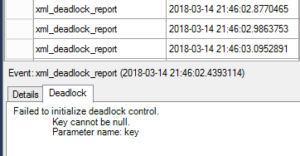
I recently got this error in Management Studio when trying to view a deadlock graph that was collected with an extended events session:

Failed to initialize deadlock control.
    Key cannot be null.
    Parameter name: key

I found this error in a session that included the xml_deadlock_report event. I chose to “View Target Data” and then clicked the deadlock tab:

So I couldn’t view the deadlock graph, but the xml for the deadlock was still accessible. I copy-pasted the deadlock graph information into an xdl file, I opened it in management studio and I still got the same error.

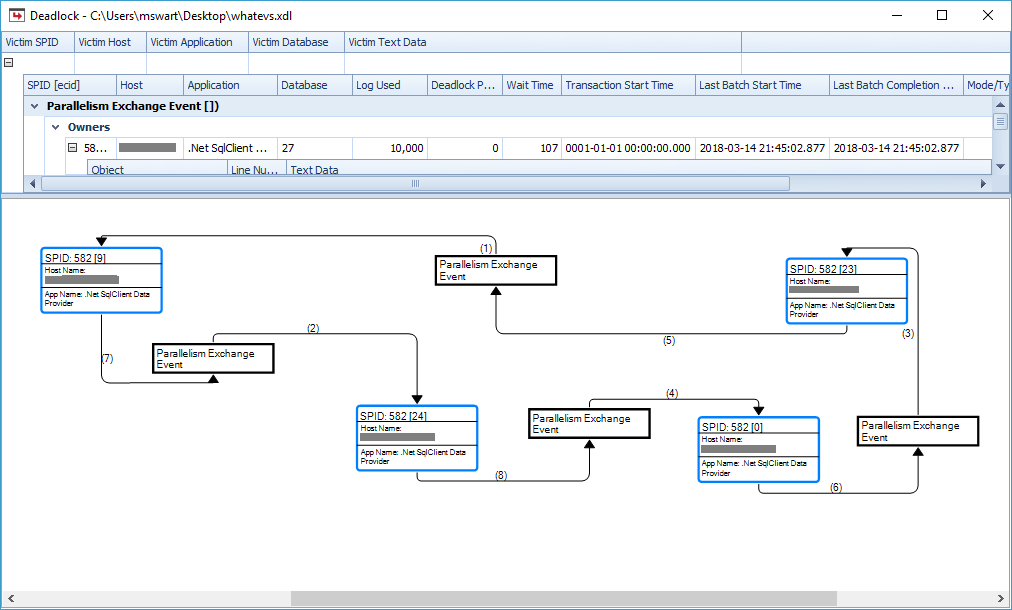
No luck in Management Studio, but SentryOne’s Plan Explorer had no trouble displaying the deadlock graph visually. In fact it kind of helped me figure out what’s going on:

I noticed a number of things:

  • The resource list is full of “exchangeEvent” elements (which has to do with parallelism) and not the usual key locks I’m used to seeing.
  • The “processes” are all the same process, just different threads (The spids on all processes are the same but the ecids are different)
  • Most importantly, there is no victim here! And our application that issued the query didn’t receive an error from the database.

My guess is that the deadlock monitor detects this kind of deadlock cycle, but knows how to resolve it without choosing a victim and then issues a deadlock report any way.

The reason that the management studio can’t display the deadlock is because it assumes that there is at least one victim in a deadlock graph.

The original deadlock graph starts like this:

<deadlock>
 <victim-list />
 <process-list>
  <process id="process3ad41344e8" taskpriority="0" logused="10000" ...

And when I edit it and pick an arbitrary victim like this:

<deadlock>
 <victim-list>
	<victimProcess id="process3ad41344e8" />
 </victim-list>
 <process-list>
  <process id="process3ad41344e8" taskpriority="0" logused="10000" ...

then Management Studio is happy again:

This Kind of Deadlock Is Ignorable

Take this with a grain of salt, but personally, I ignore these kinds of deadlock because there is no victim and my applications are unaffected.
I think there are two issues here.

  1. Management Studio can’t handle deadlock graphs with zero victims. But that’s just a UI problem.
  2. This “interquery parallelism” kind of deadlock is resolved internally somehow (yay!) but an xml_deadlock_report event is still raised (boo!)

Update Turns out this is a bit of a known issue. There’s a request you can vote on to add extra info to the xml_deadlock_report that would allow us to filter these non-deadlocks out: Add columns has_victims and is_intra_query_deadlock to the event xml_deadlock_report

March 12, 2018

My Trip to the West Coast

Filed under: SQLServerPedia Syndication — Michael J. Swart @ 11:22 am

I was at the MVP Global Summit last week in Redmond, Washington. I was excited to go because I hadn’t been to the summit since 2014. Since I was travelling to the west coast anyway, I applied to speak at SQL Saturday Victoria the weekend before and I got accepted. Then, I expanded my trip to include a visit to the D2L office near Vancouver making it a week and a half tour of the West coast.

The bonus for me is that I got to visit British Columbia. I’ve spent my whole life in Canada, but I’ve never been to British Columbia and I’m so glad I went. That is one good looking province.

West Coast D2L

I started my trip by visiting D2L first.

Everyone single person there was awesome. D2L has a great work culture and the Vancouver office was no different. They treated me like family.

On the first day, we did a Q&A on anything database related. There were some good questions and I get the feeling that some of the answers were surprising. For example, I don’t advocate for stored procedures over inline SQL.

At the end of the week, I got to practice my session that I prepared for SQL Saturday Victoria in front of my colleagues. Now that was interesting. I wrote the talk for a general audience. It’s always useful to imagine an audience member when writing a talk. I imagined someone who wanted to learn more about databases and chose to give up their Saturday to do it. This imaginary audience member chose to come to a talk called “100 Percent Online Migrations” and presumably were interested in schema migrations. So when I gave the talk to my D2L colleagues, it was interesting to be able to get into specifics because I know the business challenges we’re all dealing with. The Vancouver office gave awesome feedback and they didn’t heckle me too much.

Other sights included a pikachu car, a build-is-broken light (just like home!) and an impromptu tour of the best coffee roaster in Richmond, BC

Before I left for Victoria, I got to spend a little time in downtown Vancouver

Downtown Vancouver

Even though I didn’t have a lot of time in downtown Vancouver, I did get to snap a couple photos before the sun went down. Mostly in and around Gastown.

Gassy Jack, Steam Clock, Vancouver Street


Another thing I noticed is that no one seems to smoke tobacco any more.

Before I left, I did manage to find the alley that Bastian ran down when he was chased by bullies in the Neverending Story. But the alley hasn’t aged well. It didn’t look like luck-dragons frequented that place any more so I didn’t take a picture.

Then it was time to head to SQL Saturday Victoria

Ferry to Victoria

I spent Friday on busses and ferries. Long trips in Ontario are dull. If you’ve seen one corn field, you’ve seen them all. But in British Columbia, the passing scenery is beautiful. Here’s a timelapse video of part of the ferry ride to Swartz Bay (not Swart’s bay).

SQL Saturday Victoria

SQL Saturday in Victoria was great. I was relaxed, and the talk (I thought) went really really well.

Randolph tries not to heckle Michael


I wasn’t super-thrilled with the turn-out. There were about ten people there (five were fellow speakers). And I have an uncomfortably long streak of having someone fall asleep during my talks. I know I’m not the most dynamic speaker but it’s starting to get on my nerves. That streak remains unbroken thanks in part to Erland’s jetlag.

But it remained a special SQL Saturday for me. I discovered that the venue was Camosun College in Victoria. Not only is Camosun College a client of D2L, but they’ve got a beautiful campus. Fun fact, spring has already arrived on campus there:

Spring!

Thanks to Janice, Scott and everyone else who ran a very very successful event.

On Sunday, Randolph, Mike and I waited in line for breakfast and walked around Victoria until the evening when we took a boat to meet Angela in Seattle, then on to Bellevue just in time for the MVP Global Summit in Redmond!

The 2018 MVP Global Summit

It’s been a while since I attended the MVP Summit. And this one was a good one. Everyone behaved for the most part. In past years, I remember a lot of people looking gift horses in the mouth. The feedback from MVPs to Microsoft sometimes took the form of angry complaints. Even if it was about something they didn’t know existed until that day. There was much less of that this year.

Personally I got to give feedback about some SQL Server features, and I got to hear about new stuff coming up. I’m always very grateful for Microsoft for putting on this event. I returned home with a lot more blue stuff than I started with.

What does this photobooth do?

(Special thanks to Scott, Mike, Angela and Randolph for making this trip extra fun. You’re the best)

Powered by WordPress