


Last week I was asked to troubleshoot some deadlocks in production. I was surprised to find out that parameter sniffing was one of the causes. I describe the investigation below.
Parameter Sniffing
SQL Server does this neat trick when you give it a query with parameters. The query optimizer will take the parameter values into account when making cardinality estimates. It finds the best query plan it can for these values. This is called parameter sniffing.
But parameter sniffing combined with query plan caching means that SQL Server seems to only care about parameter values the first time it sees a query. So ideally the first parameter values should be typical parameter values.
When people talk about parameter sniffing problems, it’s usually because this assumption doesn’t hold. Either the query was compiled with atypical values, or maybe the data has an uneven distribution (meaning that “typical” parameter values don’t exist).
But remember that…

The Problem
The problem I saw in production involved some fairly typical looking tables. They looked something like this:
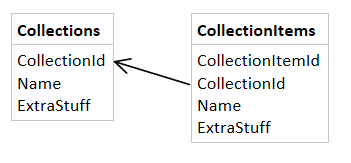
This is how they were defined.
create table dbo.Collections ( CollectionId bigint identity primary key, Name nvarchar(20) default ('--unnamed--') not null, Extrastuff char(100) not null default ('') ); create table dbo.CollectionItems ( CollectionItemId bigint identity primary key, CollectionId bigint not null references dbo.Collections(CollectionId), Name nvarchar(20) default ('--unnamed--') not null, ExtraStuff char(100) not null default ('') ); create index ix_CollectionItems on dbo.CollectionItems(CollectionId); |
The errors we were getting were deadlock errors and the deadlock graphs we collected were always the same. They looked something like this:

See that procedure called s_CopyCollection? It was defined like this:
create procedure dbo.s_CopyCollection @CollectionId bigint as set nocount on; declare @NewCollectionId bigint; if @CollectionId = 0 return; if not exists (select 1 from dbo.Collections where CollectionId = @CollectionId) return; set xact_abort on; begin tran; insert dbo.Collections (Name, Extrastuff) select Name, ExtraStuff from dbo.Collections where CollectionId = @CollectionId; set @NewCollectionId = SCOPE_IDENTITY(); insert dbo.CollectionItems (CollectionId, Name, ExtraStuff) select @NewCollectionId, Name, ExtraStuff from dbo.CollectionItems where CollectionId = @CollectionId; commit; |
It’s a pretty standard copy procedure right? Notice that this procedure exits early if @CollectionId = 0. That’s because 0 is used to indicate that the collection is in the “recycle bin”. And in practice, there can be many recycled collections.
Some Digging
I began by reproducing the problem on my local machine. I used this method to generate concurrent activity. But I couldn’t reproduce it! The procedure performed well and had no concurrency issues at all.
This meant more digging. I looked at the procedures behavior in production and saw that they were performing abysmally. So I grabbed the query plan from prod and here’s what that second insert statement looked like:

This statement inserts into CollectionItems but it was scanning Collections. That was a little confusing. I knew that the insert needed to check for the existence of a row Collections in order to enforce the foreign key, but I didn’t think it had to scan the whole table. Compare that to what I was seeing on my local database:

I looked at the compilation parameters (SQL Sentry Plan Explorer makes this easy) of the plan seen in production and saw that the plan was compiled with @CollectionId = 0. In this case, the assumption about parameter sniffing I mentioned earlier (that the compilation parameters should be typical parameters) did not hold.
This procedure was performing poorly in production (increasing the likelihood of overlapping executions times) but also, each one was taking shared locks on the whole Collections table right after having inserted into it. The whole procedure uses an explicit transaction and that’s a recipe for deadlocks.
Doing Something About It
Here are things I considered and some actions I took. My main goal was to avoid the bad plan shown above.
- Never call the procedure with
@CollectionId = 0. The early-exit in the procedure was not enough to avoid bad query plans. If the procedure never gets called with@CollectionId = 0, then SQL Server can never sniff the value0. - I began to consider query hints. Normally I avoid them because I don’t like telling SQL Server “I know better than you”. But in this case I did. So I began to consider hints like:
OPTIMIZE FOR (@CollectionId UNKNOWN). - I asked some experts. I know Paul White and Aaron Bertrand like to hang out at SQLPerformance.com. So I asked my question there. It’s a good site which is slightly better than dba.stackexchange when you want to ask about query plans.
- Aaron Bertrand recommended
OPTION (RECOMPILE). A fine option. I didn’t really mind the impact of the recompiles, but I like keeping query plans in cache when I can, just for reporting purposes (I can’t wait for the upcoming Query Store feature) - Paul White recommended a
LOOP JOINhint on the insert query. That makes theINSERTquery look like this:insert dbo.CollectionItems (CollectionId, Name, ExtraStuff) select @NewCollectionId, Name, ExtraStuff from dbo.CollectionItems where CollectionId = @CollectionId option (loop join);
That was something new for me. I thought
LOOP JOINhints were only join hints, not query hints. - Paul White also mentioned some other options, a
FAST 1hint or a plan guide and he also suggestedOPTION (RECOMPILE).
So I stopped calling the procedure with @CollectionId = 0 and I used a query hint to guarantee the better plan shown above. The performance improved and the procedure was no longer vulnerable to inconsistent performance due to parameter sniffing.
In general, there seem to be only two ways to avoid deadlocks. The first way minimizes the chance that two queries are executing at the same time. The second way carefully coordinates the locks that are taken and the order they’re taken in. Most deadlock solutions boil down to one of these methods. I was happy with this solution because it did both.
