I have trouble with procedures that use SELECT *. They are often not “Blue-Green safe“. In other words, if a procedure has a query that uses SELECT * then I can’t change the underlying tables can’t change without causing some tricky deployment issues. (The same is not true for ad hoc queries from the application).
I also have a lot of procedures to look at (about 5000) and I’d like to find the procedures that use SELECT *.
I want to maybe ignore SELECT * when selecting from a subquery with a well-defined column list.
I also want to maybe include related queries like OUTPUT inserted.*.
The Plan
So I’m going to make a schema-only copy of the database to work with.
I’m going to add a new dummy-column to every single table.
I’m going to use sys.dm_exec_describe_first_result_set_for_object to look for any of the new columns I created
Any of my new columns that show up, were selected with SELECT *.
The Script
use master;
DROPDATABASEIFEXISTS search_for_select_star;
DBCC CLONEDATABASE (the_name_of_the_database_you_want_to_analyze, search_for_select_star);
ALTERDATABASE search_for_select_star SET READ_WRITE;
GO
use search_for_select_star;
DECLARE @SQLNVARCHAR(MAX);
SELECT
@SQL= STRING_AGG(CAST('ALTER TABLE '+QUOTENAME(OBJECT_SCHEMA_NAME(object_id))+'.'+QUOTENAME(OBJECT_NAME(object_id))+' ADD NewDummyColumn BIT NULL'ASNVARCHAR(MAX)),
N';')FROM
sys.tables;
execsp_executesql @SQL;
SELECT
SCHEMA_NAME(p.schema_id)+'.'+ p.nameAS procedure_name,
r.column_ordinal,
r.nameFROM
sys.procedures p
CROSS APPLY
sys.dm_exec_describe_first_result_set_for_object(p.object_id, NULL) r
WHERE
r.name='NewDummyColumn'ORDERBY
p.schema_id, p.name;
use master;
DROPDATABASEIFEXISTS search_for_select_star;
use master;
DROP DATABASE IF EXISTS search_for_select_star;
DBCC CLONEDATABASE (the_name_of_the_database_you_want_to_analyze, search_for_select_star);
ALTER DATABASE search_for_select_star SET READ_WRITE;
GO

use search_for_select_star;

DECLARE @SQL NVARCHAR(MAX);
SELECT
	@SQL = STRING_AGG(
		CAST(
			'ALTER TABLE ' +
			QUOTENAME(OBJECT_SCHEMA_NAME(object_id)) +
			'.' +
			QUOTENAME(OBJECT_NAME(object_id)) +
			' ADD NewDummyColumn BIT NULL' AS NVARCHAR(MAX)),
		N';')
FROM
	sys.tables;

exec sp_executesql @SQL;

SELECT
	SCHEMA_NAME(p.schema_id) + '.' + p.name AS procedure_name,
	r.column_ordinal,
	r.name
FROM
	sys.procedures p
CROSS APPLY
	sys.dm_exec_describe_first_result_set_for_object(p.object_id, NULL) r
WHERE
	r.name = 'NewDummyColumn'
ORDER BY
	p.schema_id, p.name;

use master;
DROP DATABASE IF EXISTS search_for_select_star;
Update
Tom from StraightforwardSQL pointed out a nifty feature that Microsoft has already implemented.
Not sure here, but doesn't dm_sql_referenced_entities.is_select_all achieve the same thing?
selectdistinct SCHEMA_NAME(p.schema_id)+'.'+ p.nameAS procedure_name
from sys.procedures p
cross apply sys.dm_sql_referenced_entities(
object_schema_name(object_id)+'.'+object_name(object_id), default) re
where re.is_select_all=1
select distinct SCHEMA_NAME(p.schema_id) + '.' + p.name AS procedure_name
from sys.procedures p
cross apply sys.dm_sql_referenced_entities(
	object_schema_name(object_id) + '.' + object_name(object_id), default) re
where re.is_select_all = 1
Comparing the two, I noticed that my query – the one that uses dm_exec_describe_first_result_set_for_object – has some drawbacks. Maybe the SELECT * isn’t actually included in the first result set, but some subsequent result set. Or maybe the result set couldn’t be described for one of these various reasons
On the other hand, I noticed that dm_sql_referenced_entities has a couple drawbacks itself. It doesn’t seem to capture select statements that use `OUTPUT INSERTED.*` for example.
In practice though, I found the query that Tom suggested works a bit better. In the product I work most closely with, dm_sql_referenced_entities only missed 3 procedures that dm_exec_describe_first_result_set_for_object caught. But dm_exec_describe_first_result_set_for_object missed 49 procedures that dm_sql_referenced_entities caught!
If you update a column to the exact same value as it had before, there’s still work being done.
Quite obediently, SQL Server takes out its eraser, erases the old value, and writes the same value in its place even though nothing changed!
But it feels like a real change. It has consequences for locking and an impact to the transaction log just as if it were a real change.
So that leads to performance optimizations that look like this:
Original Update Statement:
UPDATE Users
SET    DisplayName = @NewDisplayName
WHERE  Id = @Id;
UPDATE Users
SET DisplayName = @NewDisplayName
WHERE Id = @Id;
Only Update When Necessary:
UPDATE Users
SET    DisplayName = @NewDisplayName
WHERE  Id = @Id
AND    DisplayName <> @NewDisplayName;
UPDATE Users
SET DisplayName = @NewDisplayName
WHERE Id = @Id
AND DisplayName <> @NewDisplayName;
But Take Care!
Be careful of this kind of optimization. For example, you have to double check that DisplayName is not a nullable column (do you know why?). There are other things to worry about too, mostly side effects:
Side Effects
This simple update statement can have loads of side effects that can be hard to see. And the trouble with any side effect, is that other people can place dependencies on them! It happens all the time. Here is a list of just some of the side effects I can think of, I’m sure it’s not exhaustive.
Triggers: Ugh, I dislike triggers at the best of times, so check out any triggers that might exist on the table. In the original UPDATE statement, the row always appears in the INSERTED and DELETED tables, but in the improved version, the row does not necessarily. You have to see if that matters.
RowCount: What if the original update statement was part of a batch that looked like this:
UPDATE Users
SET DisplayName = @NewDisplayName
WHERE Id = @Id;
IF(@@ROWCOUNT>0)RAISERROR('Could not find User to update', 16, 1);
UPDATE Users
SET    DisplayName = @NewDisplayName
WHERE  Id = @Id;

IF (@@ROWCOUNT > 0)
    RAISERROR ('Could not find User to update', 16, 1);
At least this side effect has the benefit of not being hidden. It’s located right beside the code that it depends on.
Rowversion: A rowversion value changes every time a row changes. Such a column would get updated in the original UPDATE statement, but not in the improved version. I can think of a number of reasonable of use cases that might depend on a rowversion column. ETLs for example that only care about changed data. So this might actually be an improvement for that ETL, but then again, maybe the number of “changed” rows was the important part and that number is now changing with the improvement. Speaking of ETLs:
Temporal Tables: Yep, the UPDATE statement is a “change” in the table that gets tracked in temporal history.
Change Data Capture, etc…: I haven’t bothered to set up Change Data Capture to check, but I assume that an UPDATE statement that updates a row to the same value is still considered a change. Right or wrong, the performance improvement changes that assumption.
People Depend On Side Effects
When I see people do this, I start to feel grouchy: Someone’s getting in the way of my performance improvement! But it happens. People depend on side effects like these all the time. I’m sure I do. XKCD pokes fun at this with Workflow where he notices that “Every change breaks someone’s workflow”. And now I’m imagining a case where some knucklehead is using the growth of the transaction log as a metric, like “Wow, business is really booming today, 5GB of transaction log growth and it’s not even noon!”
Although these are silly examples, there are of course more legit examples I could probably think of. And so in a well-functioning organization, we can’t unilaterally bust other peoples workflows (as much as we might like to).
Takeaway: For most use cases, using sp_releaseapplock is unnecessary. Especially when using @LockOwner = 'Transaction (which is the default).
The procedure sp_getapplock is a system stored procedure that can be helpful when developing SQL for concurrency. It takes a lock on an imaginary resource and it can be used to avoid race conditions.
But I don’t use sp_getapplock a lot. I almost always depend on SQL Server’s normal locking of resources (like tables, indexes, rows etc…). But I might consider it for complicated situations (like managing sort order in a hierarchy using a table with many different indexes).
But there’s a problem with this pattern, especially when using RCSI. After sp_releaseapplock is called, but before the COMMIT completes, another process running the same code can read the previous state. In the example above, both processes will think a time slot is available and will try to make the same reservation.
What I really want is to release the applock after the commit. But because I specified the lock owner is 'Transaction'. That gets done automatically when the transaction ends! So really what I want is this:
BEGINTRANexecsp_getapplock
@Resource = @LockResourceName,
@LockMode ='Exclusive',
@LockOwner ='Transaction';
/* read stuff (e.g. "is time slot available?") *//* change stuff (e.g. "make reservation") */COMMIT-- all locks are freed after this commit
BEGIN TRAN

exec sp_getapplock
    @Resource = @LockResourceName,
    @LockMode = 'Exclusive',
    @LockOwner = 'Transaction';

/* read stuff (e.g. "is time slot available?") */
/* change stuff (e.g. "make reservation") */

COMMIT -- all locks are freed after this commit
But that gives the total amount of waits for each wait type accumulated since the server was started. And that isn’t ideal when I’m troubleshooting trouble that started recently. No worries, Paul also has another fantastic post Capturing wait statistics for a period of time.
Taking that idea further, I can collect data all the time and look at it historically, or just for a baseline. Lot’s of monitoring tools do this already, but here’s what I’ve written:
Mostly I’m creating these scripts for me. I’ve created a version of these a few times now and some reason, I can’t find them each time I need them again!
This stuff can be super useful, especially, if you combine it with a visualization tool (like PowerBI or even Excel).
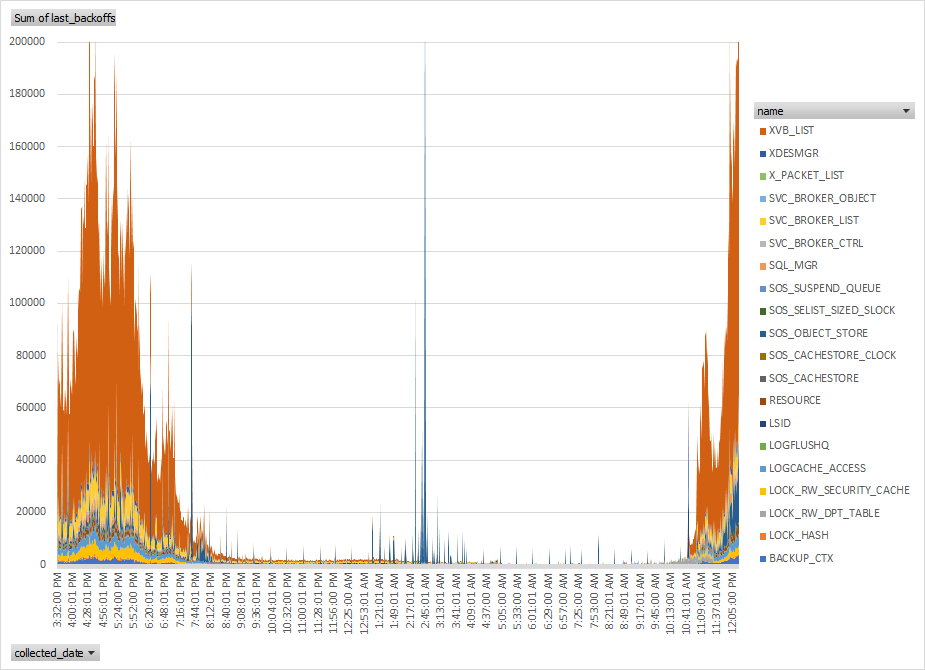
For example, here’s a chart I made when we were experiencing the XVB_LIST spinlock issues I wrote about not too long ago. Good visualizations can really tell powerful stories.
I’m talking here about spins and not waits of course, but the idea is the same and I’ve included the spinlock monitoring scripts in the same repo on github.
Scaling SQL Server High
The beginning of the school year is behind us and what a semester start! 2020 has been tough on many of us and I’m fortunate to work for a company whose services are in such high demand. In fact we’ve seen some scaling challenges like we’ve never seen before. I want to talk about some of them.
Detect Excessive Spinlock Contention on SQL Server
Context
As we prepared to face unprecedented demand this year, we began to think about whether bigger is better. Worried about CPU limits, we looked to what AWS had to offer in terms of their instance sizes.
We were already running our largest SQL Servers on r5 instances with 96 logical CPUs. But we decided to evaluate the pricy u instances which have 448 logical CPUs and a huge amount of memory.
Painful Symptoms
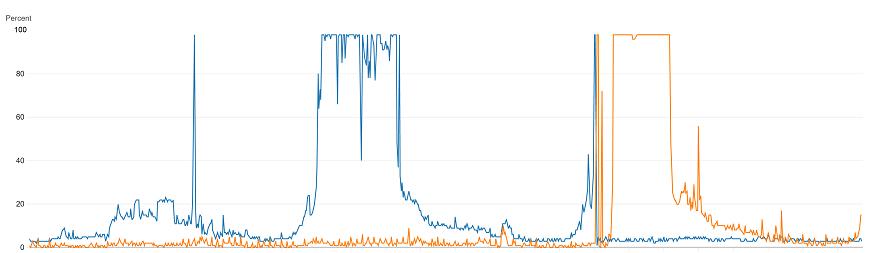
Well, bigger is not always better. We discovered that as we increased the load on the u-series servers, there would come a point where all processors would jump to 100% and stayed there. You could say it plateaued (based on the graph, would that be a plateau? A mesa? Or a butte?)
When that occurred, the number of batch requests that the server could handle dropped significantly. So we saw more CPU use, but less work was getting done.
The high demand kept the CPU at 100% with no relief until the demand decreased. When that happened, the database seemed to recover. Throughput was restored and the database’s metrics became healthy again. During this trouble we looked at everything including the number of spins reported in the sys.dm_os_spinlock_stats dmv.
The spins and backoffs reported seemed extremely high, especially for the category “XVB_LIST”, but we didn’t really have a baseline to tell whether those numbers were problematic. Even after capturing the numbers and visualizing them we saw larger than linear increases as demand increased, but were those increases excessive?
How To Tell For Sure
Chris Adkin has a post Diagnosing Spinlock Problems By Doing The Math. He explains why spinlocks are useful. It doesn’t seem like a while loop that chews up CPU could improve performance, but it actually does when it helps avoid context switches. He gives a formula to help find how much of the total CPU is spent spinning. That percentage can then help decide whether the spinning is excessive.
But I made a tiny tweak to his formula and I wrote a script to have SQL Server do the math:
You still have to give the number of CPUs on your server. If you don’t have those numbers handy, you can get them from SQL Server’s log. I include one of Glenn Berry’s diagnostic queries for that.
There’s an assumption in Chris’s calculation that one spin consumes one CPU clock cycle. A spin is really cheap (because it can use the test-and-set instruction), but it probably consumes more than one clock cycle. I assume four, but I have no idea what the actual value is.
EXEC sys.xp_readerrorlog 0, 1, N'detected', N'socket';
-- SQL Server detected 2 sockets with 24 cores per socket ...

declare @Sockets int = 2;
declare @PhysicalCoresPerSocket int = 24;
declare @TicksPerSpin int = 4;

declare @SpinlockSnapshot TABLE (
    SpinLockName VARCHAR(100),
    SpinTotal BIGINT
);

INSERT @SpinlockSnapshot ( SpinLockName, SpinTotal )
SELECT name, spins
FROM   sys.dm_os_spinlock_stats
WHERE  spins > 0;

DECLARE @Ticks bigint
SELECT @Ticks = cpu_ticks
FROM sys.dm_os_sys_info

WAITFOR DELAY '00:00:10'

DECLARE @TotalTicksInInterval BIGINT
DECLARE @CPU_GHz NUMERIC(20, 2);

SELECT @TotalTicksInInterval = (cpu_ticks - @Ticks) * @Sockets * @PhysicalCoresPerSocket,
       @CPU_GHz = ( cpu_ticks - @Ticks ) / 10000000000.0
FROM sys.dm_os_sys_info;

SELECT ISNULL(Snap.SpinLockName, 'Total') as [Spinlock Name],
       SUM(Stat.spins - Snap.SpinTotal) as [Spins In Interval],
       @TotalTicksInInterval as [Ticks In Interval],
       @CPU_Ghz as [Measured CPU GHz],
       100.0 * SUM(Stat.spins - Snap.SpinTotal) * @TicksPerSpin / @TotalTicksInInterval as [%]
FROM @SpinlockSnapshot Snap
JOIN sys.dm_os_spinlock_stats Stat
     ON Snap.SpinLockName = Stat.name
GROUP BY ROLLUP (Snap.SpinLockName)
HAVING SUM(Stat.spins - Snap.SpinTotal) > 0
ORDER BY [Spins In Interval] DESC;
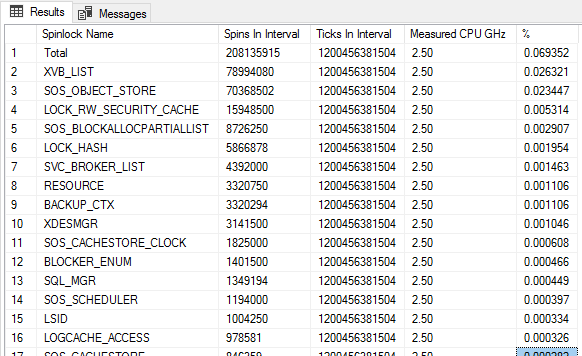
This is what I see on a very healthy server (r5.24xlarge). The server was using 14% cpu. And .03% of that is spent spinning (or somewhere in that ballpark).
More Troubleshooting Steps
So what’s going on? What is that XVB_LIST category? Microsoft says “internal use only” But I can guess. Paul Randal talks about the related latch class Versioning Transaction List. It’s an instance-wide list that is used in the implementation of features like Read Committed Snapshot Isolation (RCSI) which we do use.
Microsoft also has a whitepaper on troubleshooting this stuff Diagnose and resolve spinlock contention on SQL Server. They actually give a technique to collect call stacks during spinlock contention in order to try and maybe glean some information about what else is going on. We did that, but we didn’t learn too much. We learned that we use RCSI with lots of concurrent queries. Something we really can’t give up on.
So Then What?
What We Did
Well, we moved away from the u instance with its hundreds of CPUs and we went back to our r5 instance with only (only!) 96 logical CPUs. We’re dealing with the limits imposed by that hardware and accepting that we can’t scale higher using that box. We’re continuing to do our darnedest to move data and activity out of SQL Server and into other solutions like DynamoDb. We’re also trying to partition our databases into different deployments which spreads the load out, but introduces a lot of other challenges.
Basically, we gave up trying to scale higher. If we did want to pursue this further (which we don’t), we’d probably contact Microsoft support to try and address this spinlock contention. We know that these conditions are sufficient (if not necessary) to see the contention we saw:
SQL Server 2016 SP2
U-series instance from Amazon
Highly concurrent and frequent queries (>200K batch requests per second with a good mix of writes and reads on the same tables)
RCSI enabled.
Thank you Erin Stellato
We reached out to Erin Stellato to help us through this issue. We did this sometime around the “Painful Symptoms” section above. We had a stressful time troubleshooting all this stuff and I really appreciate Erin guiding us through it. We learned so much.
Scaling SQL Server High
The beginning of the school year is behind us and what a semester start! 2020 has been tough on many of us and I’m fortunate to work for a company whose services are in such high demand. In fact we’ve seen some scaling challenges like we’ve never seen before. I want to talk about some of them.
At D2L, we’re the perfect candidate customer for In Memory OLTP features, but we’ve held off adopting those features for years. Our servers handle tons of super quick but super frequent queries and so we find ourselves trying to address the same scaling challenges we read about in Microsoft’s customer case studies.
But there’s only one In Memory feature in particular that I care about. It’s the Memory Optimized Table Types. Specifically, I’ve always wanted to use that feature to avoid tempdb object allocation contention. Recently I finally got my chance with a lot of success. So even though I could say I’m happy with In Memory features, I think it’s more accurate to say that I feel relieved at having finally squashed my tempdb issues.
The Trouble With Tempdb
We use table valued parameters with our procedures a lot (like thousands a second). We’re lucky that the table variables are not created on each execution, they’re cached. We rely heavily on the reduced overhead that this gives us. It’s for that reason we much prefer table variables over temp tables.
But when we crank up the demand, we can still run into catastrophic trouble. When tempdb contention hits us, throughput doesn’t just plateau, it drops hard. This kind of contention we see is like a kind of traffic jam where anyone who needs to use tempdb (i.e. everyone) has to wait for it. These tempdb traffic jams are rough. We even created a lighter version of sp_whoisactive that avoids tempdb issues for times like those.
I won’t go on too long about our troubles (I’ve written about tempdb issues a few times already: 1, 2, 3, 4, 5, 6, 7). The usual advice is to increase the number of tempdb data files. We were using 48 data files and really looking hard for other options.
SQL Server 2019 has some promising options. In TEMPDB – Files and Trace Flags and Updates, Oh My! Pam Lahoud points out how SQL Server can use all the PFS pages in the tempdb data files, not just the first available one. But we couldn’t move to 2019 that quickly. So we looked at Memory Optimized Table Types to help us.
Memory Optimized Table Types Can Help
Improving temp table and table variable performance using memory optimization tells us how. Our main goal is to avoid tempdb contention and memory optimized table variables don’t use tempdb at all. As long as we can be sure that the number of rows stored in these table variables is small, it’s all pros and no cons.
But it wasn’t easy for us to implement. In 2017, I wrote about Postponing Our Use Of In Memory OLTP. There were just some challenges that we couldn’t overcome. We’re not alone in struggling with the limitations of In Memory features. But our challenges weren’t the usual limitations that folks talk about and so they’re worth exploring.
The Challenge of Sardines and Whales
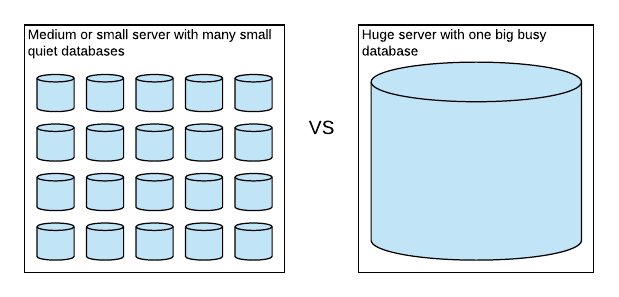
We have one product that we deploy to many clients. Each client gets their own database. The big ones (whales) have their own servers but the small ones (sardines) get grouped together.
So the overhead of enabling In Memory on all the sardines was going to cause issues. The In Memory OLTP filegroup requires up to 4GB of disk space which isn’t easy to handle with hundreds of sardines. So we’re left with this dilemma. We’d like to use In Memory on the biggest whales, but not on the sardines. We tackled that in two ways
Decide that the choice to add the In Memory filegroup is configuration, not product. This still required some changes though. Our backup and restore processes needed to at least handle the new filegroups, but they couldn’t expect it.
Add an exception to our processes that allow schema drift in the definition table types. Our plan was to manually alter the table types to be memory optimized, but only on the largest whales. Introducing schema drift is not ideal, but we made this choice deliberately.
This whole challenge could have been avoided if memory optimized table types didn’t require an In Memory OLTP file group. I get the sense that the memory optimized table types don’t actually use that folder because I noticed something interesting. SQL Server 2019 introduces memory optimized tempdb metadata tables without a memory optimized filegroup! How did they pull that off? I’m a bit jealous. I asked Pam Lahoud and it turns out that the In Memory filegroups are still required for memory optimized table types and will continue to be. It turns out that Microsoft can make certain assumptions about the tempdb metadata tables that they can’t with regular table types. 😟
Some Implementation Surprises
As we implemented our plan, we also encountered some interesting things during testing that might be useful for you if you’re considering In Memory features.
The default directory for storing database files should point to a folder that exists on the database server and on any secondary nodes in the same availability group. So if the default location is E:\SQLData then make sure there’s an E drive on every node. SQL Server will need to create an xtp folder in there.
When adding the In Memory OLTP file group, the folder that contains it should also exist on all secondary nodes.
In SQL Server 2014, I noticed that the addition of the memory optimized file group required up to 4 Gb of space. In SQL Server 2016, I see that that still happens, but the space isn’t taken until the first memory optimized table type I create. That’s also when the xtp folder gets created.
Adjusting the table types to be memory optimized was a challenge because we wanted the process to be online. I wrote about how we pulled that off earlier this week in How to Alter User Defined Table Types (Mostly) Online
Success!
Things worked out really really well for us. Our main goal was to avoid tempdb contention and we succeeded there. But there’s an additional performance boost. When you insert into a regular table variable, that data gets written to tempdb’s transaction log. But that’s not the case for memory optimized tables. So even though I really just care about avoiding contention, the boost in performance is significant and measurable and really nice.
In testing we were finally able to push a 96 CPU machine up to 100% CPU on every core and only then did throughput plateau. No tempdb contention in sight.
In production we also saw the same behavior and we were able to sustain over 200K batch requests per second. No tempdb contention in sight.
Those numbers are nice, tempdb contention has been such a thorn in my side for so long, it’s such a relief to squash that issue once and for all. I now get to focus on the next bottleneck and can leave tempdb contention in the past.
Last year, Aaron Bertrand tackled the question, How To Alter User Defined Table Types. Aaron points out that “There is no ALTER TYPE, and you can’t drop and re-create a type that is in use”. Aaron’s suggestion was to create a new type and then update all procedure to use the new type.
I think I’ve got a bit of improvement based on sp_rename and sp_refreshmodule. Something that works well with
imperfectly understood schemas, like schemas that may have suffered from a little bit of schema drift.
Example
Say I have… I don’t know, let’s pick an example out of thin air. Say I have a simple table type containing one BIGINT column that I want to make memory optimized:
What I’ve Got
CREATE TYPE dbo.BigIntSetASTABLE(ValueBIGINTNOTNULLINDEX IX_BigIntSet );
CREATE TYPE dbo.BigIntSet
  AS TABLE (
    Value BIGINT NOT NULL INDEX IX_BigIntSet );
What I Want
CREATE TYPE dbo.BigIntSetASTABLE(ValueBIGINTNOTNULLINDEX IX_BigIntSet )WITH(MEMORY_OPTIMIZED=ON);
CREATE TYPE dbo.BigIntSet
  AS TABLE (
    Value BIGINT NOT NULL INDEX IX_BigIntSet )
  WITH (MEMORY_OPTIMIZED=ON);
I can’t directly ALTER this table type, but I can do this three-card monte trick using sp_rename to put the BigIntSet in its place.
The Migration Script
IFNOTEXISTS(SELECT*FROM sys.table_typesWHERE name ='BigIntSet'AND is_memory_optimized =1)BEGINCREATE TYPE dbo.BigIntSet_MOASTABLE(ValuebigintNOTNULLINDEX IX_BigIntSet )WITH(MEMORY_OPTIMIZED=ON);
-- the switcheroo!EXECsp_rename'dbo.BigIntSet', 'zz_BigIntSet';
EXECsp_rename'dbo.BigIntSet_MO', 'BigIntSet';
--refresh modulesDECLARE @Refreshmodulescripts TABLE(script nvarchar(max));
INSERT @Refreshmodulescripts (script)SELECT'EXEC sp_refreshsqlmodule '''+QUOTENAME(referencing_schema_name)+'.'+QUOTENAME(referencing_entity_name)+''';'FROM sys.dm_sql_referencing_entities('dbo.BigIntSet', 'TYPE');
DECLARE @SQLNVARCHAR(MAX)= N'';
SELECT @SQL= @SQL+ script FROM @Refreshmodulescripts;
EXECsp_executesql @SQL;
END
IF NOT EXISTS (
  SELECT *
  FROM sys.table_types
  WHERE name = 'BigIntSet'
  AND is_memory_optimized = 1
)
BEGIN

  CREATE TYPE dbo.BigIntSet_MO
    AS TABLE (
      Value bigint NOT NULL
      INDEX IX_BigIntSet )
    WITH (MEMORY_OPTIMIZED=ON);

  -- the switcheroo!
  EXEC sp_rename 'dbo.BigIntSet', 'zz_BigIntSet';
  EXEC sp_rename 'dbo.BigIntSet_MO', 'BigIntSet';

  --refresh modules
  DECLARE @Refreshmodulescripts TABLE (script nvarchar(max));

  INSERT @Refreshmodulescripts (script)
  SELECT 'EXEC sp_refreshsqlmodule ''' + QUOTENAME(referencing_schema_name) + '.' + QUOTENAME(referencing_entity_name) + ''';'
  FROM sys.dm_sql_referencing_entities('dbo.BigIntSet', 'TYPE');

  DECLARE @SQL NVARCHAR(MAX) = N'';
  SELECT @SQL = @SQL + script FROM @Refreshmodulescripts;

  EXEC sp_executesql @SQL;

END
But Is This Online?
Mostly. All queries that are in progress (whether ad-hoc or via procedures), continue to execute with no issues. However, there may be an issue with other queries that begin their execution during this migration.
If someone sends a query that uses the table type in the split second between the two sp_rename statements, then the query may fail.
If someone executes a procedure in the time between the first sp_rename and when sp_executesql gets around to refreshing that procedure, then the procedure may fail.
In practice, even on a busy server, I saw no such errors the few times I’ve tried this method, but of course, that’s no guarantee. In my case, even when refreshing close to 300 modules, this script takes about one second with no issues.
I actually tried adding a transaction around this whole migration script, and I did in fact see issues on a busy server. The schema modification lock that needs to be taken and held on all 300 objects was too much. It caused excessive blocking and I had to abandon that approach. In practice, I avoided trouble by ditching the explicit transaction.
Solving real-world problems is different than answering interview questions or twitter polls. The biggest difference is that real problems aren’t always fair. There’s not always a right answer.
Answer this multiple choice question:
Which of the following SQL statements is used to modify existing data in a table?
A) SELECT
B) INSERT
C) DELETE
Give it some thought. Which option would you pick? The correct answer is UPDATE but it wasn’t one of the options listed and that’s not fair. But neither is real life. Many real problems don’t have an easy answer and some real problems are impossible to solve. That can be discouraging.
Real Problems Allow For Creativity
But if your problems are unfair, then maybe you’re allowed to cheat too.
“None of the above” is always an option. Understand the goal so that you can stretch or ignore requirements.
Example – Changing an INT to a BIGINT
I have a table that logs enrollments into courses. It’s append only and looks something like this:
CREATETABLE dbo.LOG_ENROLL(
LogId INTIDENTITYNOTNULL, -- This identity column is running out of space
UserId INTNOTNULL,
CourseId INTNOTNULL,
RoleId INTNULL,
EnrollmentType INTNOTNULL,
LogDate DATETIMENOTNULLDEFAULTGETUTCDATE(),
INDEX IX_LOG_ENROLL_CourseId CLUSTERED( CourseId, UserId ),
CONSTRAINT PK_LOG_ENROLL PRIMARYKEYNONCLUSTERED( LogId ),
INDEX IX_LOG_ENROLL_UserId NONCLUSTERED( UserId, CourseId ),
INDEX IX_LOG_ENROLL_LogDate NONCLUSTERED( LogDate, LogId ));
CREATE TABLE dbo.LOG_ENROLL (
    LogId INT IDENTITY NOT NULL,  -- This identity column is running out of space
    UserId INT NOT NULL,
    CourseId INT NOT NULL,
    RoleId INT NULL,
    EnrollmentType INT NOT NULL,
    LogDate DATETIME NOT NULL DEFAULT GETUTCDATE(),

    INDEX      IX_LOG_ENROLL_CourseId    CLUSTERED    ( CourseId, UserId ),
    CONSTRAINT PK_LOG_ENROLL PRIMARY KEY NONCLUSTERED ( LogId ),
    INDEX      IX_LOG_ENROLL_UserId      NONCLUSTERED ( UserId, CourseId ),
    INDEX      IX_LOG_ENROLL_LogDate     NONCLUSTERED ( LogDate, LogId )
);
The table has over 2 billion rows and it looks like it’s going to run out of space soon because the LogId column is defined as an INT. I need to change this table so that it’s a BIGINT. But changing an INT to a BIGINT is known as a “size of data” operation. This means SQL Server has to process every row to expand the LogId column from 4 to 8 bytes. But it gets trickier than that.
The biggest challenge is that the table has to remain “online” (available for queries and inserts).
Compression?
Gianluca Sartori (spaghettidba) had the idea of enlarging the columns with no downtime using compression. It’s promising, but I discovered that for this to work, all indexes need to be compressed not just the ones that contain the changed column. Also, any indexes which use the column need to be disabled for this to work.
Cheating
I gave up on solving this problem in general and constrained my focus to the specific problem I was facing. There’s always some context that lets us bend the rules. In my case, here’s what I did.
Ahead of time:
I removed extra rows. I discovered that many of the rows were extraneous and could be removed. After thinning out the table, the number of rows went from 2 billion down to 300 million.
I compressed two of the indexes online (IX_LOG_ENROLL_UserId and IX_LOG_ENROLL_CourseId) because I still want to use the compression trick.
But I’m not ready yet. I still can’t modify the column because the other two indexes depend on the LogId column. If I tried, I get this error message:
Msg 5074, Level 16, State 1, Line 22
The index ‘IX_LOG_ENROLL_LogDate’ is dependent on column ‘LogId’.
Msg 5074, Level 16, State 1, Line 22
The object ‘PK_LOG_ENROLL’ is dependent on column ‘LogId’.
Msg 4922, Level 16, State 9, Line 22
ALTER TABLE ALTER COLUMN LogId failed because one or more objects access this column.
So I temporarily drop those indexes!
Drop the constraint PK_LOG_ENROLL and the index IX_LOG_ENROLL_LogDate
Do the switch! ALTER TABLE LOG_ENROLL ALTER COLUMN LogId BIGINT NOT NULL; This step takes no time!
Recreate the indexes online that were dropped.
Hang on, that last step is a size of data operation. Anyone who needs those indexes won’t be able to use them while they’re being built.
Exactly, and this is where I cheat. It turns out those indexes were used for infrequent reports and I was able to co-ordinate my index rebuild around the reporting schedule.
You can’t always make an operation online, but with effort and creativity, you can get close enough. I have found that every real problem allows for a great degree of creativity when you’re allowed to bend the rules or question requirements.
After identifying a database you’re curious about, you may want to drill down further. I wrote about this problem earlier in Tackle WRITELOG Waits Using the Transaction Log and Extended Events. The query I wrote for that post combines results of an extended events session with the transaction log in order to identify which procedures are doing the most writing.
But it’s a tricky kind of script. It takes a while to run on busy systems. There’s a faster way to drill into writes if you switch your focus from which queries are writing so much to which tables are being written to so much. Both methods of drilling down can be helpful, but the table approach is faster and doesn’t require an extended event session and it might be enough to point you in the right direction.
Use This Query
use[specify your databasename here]-- get the latest lsn for current DBdeclare @xact_seqno binary(10);
declare @xact_seqno_string_begin varchar(50);
exec sp_replincrementlsn @xact_seqno OUTPUT;
set @xact_seqno_string_begin ='0x'+CONVERT(varchar(50), @xact_seqno, 2);
set @xact_seqno_string_begin =stuff(@xact_seqno_string_begin, 11, 0, ':')set @xact_seqno_string_begin =stuff(@xact_seqno_string_begin, 20, 0, ':');
-- wait a few secondswaitfor delay '00:00:10'-- get the latest lsn for current DBdeclare @xact_seqno_string_end varchar(50);
exec sp_replincrementlsn @xact_seqno OUTPUT;
set @xact_seqno_string_end ='0x'+CONVERT(varchar(50), @xact_seqno, 2);
set @xact_seqno_string_end =stuff(@xact_seqno_string_end, 11, 0, ':')set @xact_seqno_string_end =stuff(@xact_seqno_string_end, 20, 0, ':');
WITH[Log]AS(SELECT Category,
SUM([Log Record Length])as[Log Bytes]FROM fn_dblog(@xact_seqno_string_begin, @xact_seqno_string_end)CROSS APPLY (SELECT ISNULL(AllocUnitName, Operation))AS C(Category)GROUPBY Category
)SELECT Category,
[Log Bytes],
100.0*[Log Bytes]/SUM([Log Bytes])OVER()AS[%]FROM[Log]ORDERBY[Log Bytes]DESC;
use [specify your databasename here]

-- get the latest lsn for current DB
declare @xact_seqno binary(10);
declare @xact_seqno_string_begin varchar(50);
exec sp_replincrementlsn @xact_seqno OUTPUT;
set @xact_seqno_string_begin = '0x' + CONVERT(varchar(50), @xact_seqno, 2);
set @xact_seqno_string_begin = stuff(@xact_seqno_string_begin, 11, 0, ':')
set @xact_seqno_string_begin = stuff(@xact_seqno_string_begin, 20, 0, ':');

-- wait a few seconds
waitfor delay '00:00:10'

-- get the latest lsn for current DB
declare @xact_seqno_string_end varchar(50);
exec sp_replincrementlsn @xact_seqno OUTPUT;
set @xact_seqno_string_end = '0x' + CONVERT(varchar(50), @xact_seqno, 2);
set @xact_seqno_string_end = stuff(@xact_seqno_string_end, 11, 0, ':')
set @xact_seqno_string_end = stuff(@xact_seqno_string_end, 20, 0, ':');

WITH [Log] AS
(
  SELECT Category,
         SUM([Log Record Length]) as [Log Bytes]
  FROM   fn_dblog(@xact_seqno_string_begin, @xact_seqno_string_end)
  CROSS  APPLY (SELECT ISNULL(AllocUnitName, Operation)) AS C(Category)
  GROUP  BY Category
)
SELECT   Category,
         [Log Bytes],
         100.0 * [Log Bytes] / SUM([Log Bytes]) OVER () AS [%]
FROM     [Log]
ORDER BY [Log Bytes] DESC;
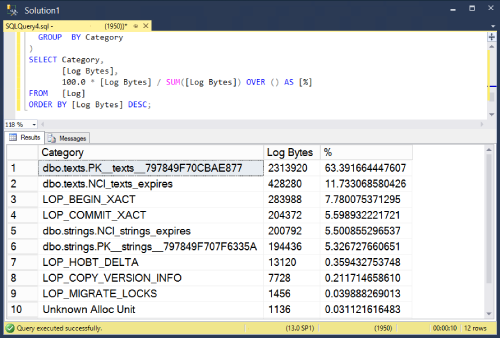
Results look something like this (Your mileage may vary).
Notes
Notice that some space in the transaction log is not actually about writing to tables. I’ve grouped them into their own categories and kept them in the results. For example LOP_BEGIN_XACT records information about the beginning of transactions.
I’m using sp_replincrementlsn to find the current last lsn. I could have used log_min_lsn from sys.dm_db_log_stats but that dmv is only available in 2016 SP2 and later.
This method is a little more direct measurement of transaction log activity than a similar query that uses sys.dm_db_index_operational_stats
Taking a small break from my blogging sabbatical to post one script that I’ve found myself writing from scratch too often.
My hope is that the next time I need this, I’ll look it up here.
The User Settable Counter
Use this to monitor something that’s not already exposed as a performance counter. Like the progress of a custom task or whatever. If you can write a quick query, you can expose it to a counter that can be plotted by Performance Monitor.
Here’s the script (adjust SomeMeasurement and SomeTable to whatever makes sense and adjust the delay interval if 1 second is too short:
declare @deltaMeasurement int = 0;
declare @totalMeasurement int = 0;

while (1=1)
begin

  select @deltaMeasurement = SomeMeasurement - @totalMeasurement
  from SomeTable;

  set @totalMeasurement += @deltaMeasurement;

  exec sp_user_counter1 @deltaMeasurement;
  waitfor delay '00:00:01'
end
Monitoring
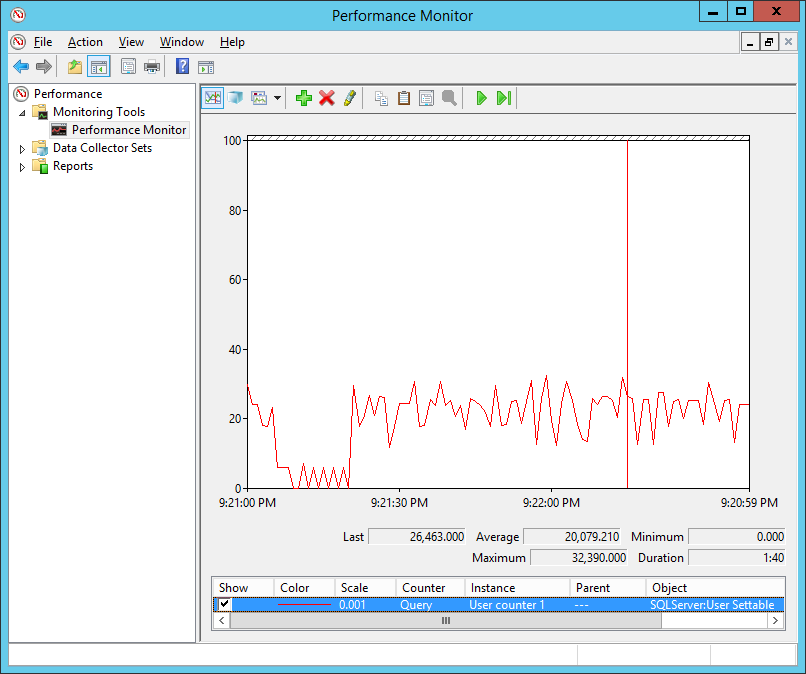
Now you can monitor “User Counter 1” in the object “SQLServer:User Settable” which will look like this:
Don’t forget to stop the running query when you’re done.